Subset of graph is tree-which has no-loop but in graph loop is possible.
3 ways to represent Greaph
- Objects and pointers
- Matrix
- Adjacency List
Familiarise with each one of it and know the trade-offs
Subset of graph is tree-which has no-loop but in graph loop is possible.
3 ways to represent Greaph
Familiarise with each one of it and know the trade-offs
It’s a recursive(/Iterative) DS
Index
Topics Covered-
Trees are non-linear data structures. They are often used to represent hierarchical data. For a real-world example, a hierarchical company structure uses a tree to organize.
Tree have 1:N parent-child relation, if N is 2 then we call it Binary Tree
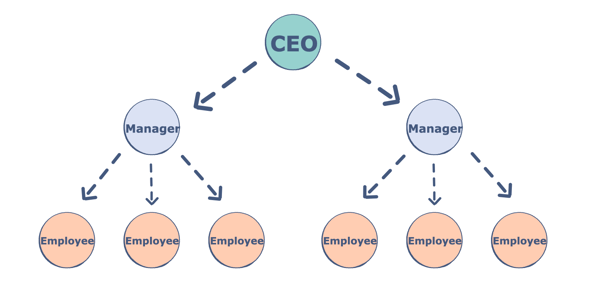
Components of a Tree
Trees are a collection of nodes (vertices), and they are linked with edges (pointers), representing the hierarchical connections between the nodes. A node contains data of any type, but all the nodes must be of the same data type. Trees are similar to graphs, but a cycle cannot exist in a tree. What are the different components of a tree?
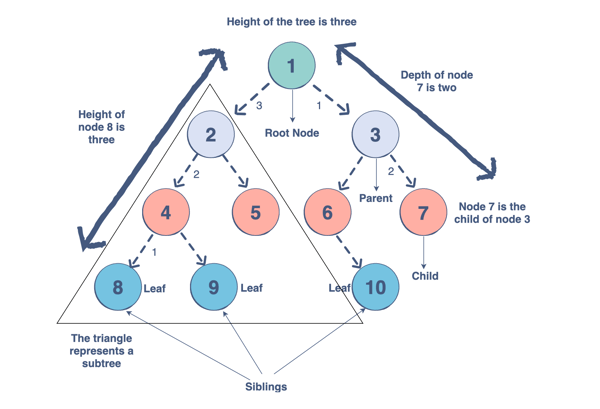
Why do we use trees?
The hierarchical structure gives a tree unique properties for storing, manipulating, and accessing data.We can use a tree for the following:
How to make a tree/?
To build a tree in Java we start with the root node.
Node<String> root = new Node<>("root");
Once we have our root, we can add our first child node using addChild, which adds a child node and assigns it to a parent node. We refer to this process as insertion (adding nodes) and deletion (removing nodes)
Node<String> node1 = root.addChild(new Node<String>("node 1"));
Types of Trees
There are many types of trees that we can use to organize data differently within a hierarchical structure.The tree we use depends on the problem we are trying to solve. Let’s take a look at the trees we can use in Java. We will be covering:
There are 3 main types of Binary tree based on thier structureL
1.Complete Binary Tree
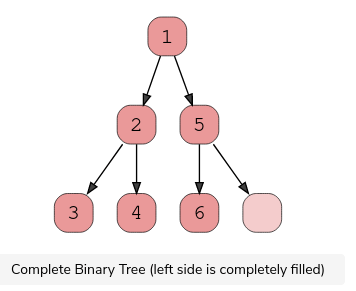
A complete binary tree exists when every level, excluding the last, is filled and all nodes at the last level are as far left as they can be. Here is a visual representation of a complete binary tree.
2.Full Binary Tree
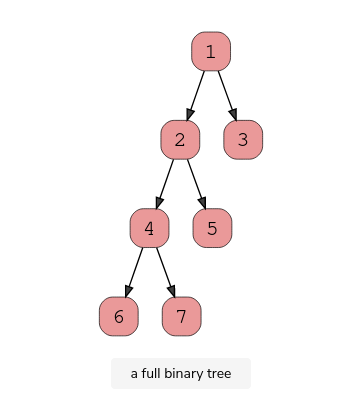
A full binary tree (sometimes called proper binary tree) exits when every node, excluding the leaves, has two children. Every level must be filled, and the nodes are as far left as possible. Look at this diagram to understand how a full binary tree looks.
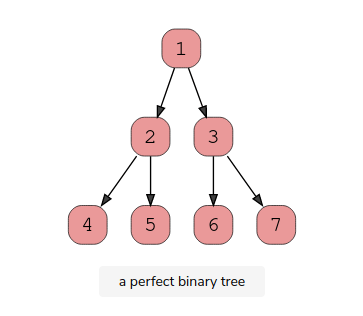
3.Perfect Binary Tree
A perfect binary tree should be both full and complete. All interior nodes should have two children, and all leaves must have the same depth. Look at this diagram to understand how a perfect binary tree looks.
A perfect binary tree should be both full and complete. All interior nodes should have two children, and all leaves must have the same depth. Look at this diagram to understand how a perfect binary tree looks.
Binary Search Trees
A Binary Search Tree is a binary tree in which every node has a key and an associated value. This allows for quick lookup and edits (additions or removals), hence the name “search”.
It’s important to note that every Binary Search Tree is a binary tree, but not every binary tree is a Binary Search Tree.
What makes them different? In a Binary Search Tree, the left subtree of a subtree must contain nodes with fewer(smaller) keys than a node’s key, while the right subtree will contain nodes with keys greater than that node’s key. Take a look at this visual to understand this condition.
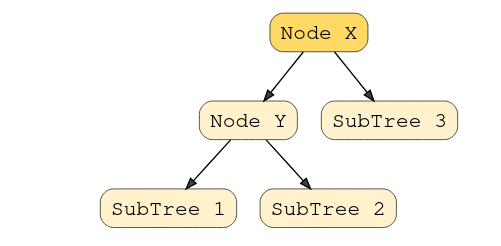
In this example, the node Y is a parent node with two child nodes. All nodes in subtree 1 must have a value less than node Y, and subtree 2 must have a greater value than node Y.
Red Black Tree (Used in HashMap Java-8)
Intro to Tree Traversal and Searching
To use trees, we can traverse them by visiting/checking every node of a tree. If a tree is “traversed”, this means every node has been visited. There are four ways to traverse a tree. These four processes fall into one of two categories: breadth-first traversal or depth-first traversal.
Note : the traversal technique – in-order, pre-order and post-order only applies to binary tree where as DFS (iteratively using stack)can also be used for general graph for traversal.
Depth First Search/Traversal
Overview: We follow a path from the starting node to the ending node and then start another path until all nodes are visited. This is commonly implemented using stacks, and it requires less memory than BFS. It is best for topographical sorting, such as graph backtracking or cycle detection.
The steps for the DFS algorithm are as follows:
visited before proceeding, or you will be stuck in an infinite loop.BFS traversal -Level Order Traversal
Overview: We proceed level-by-level to visit all nodes at one level before going to the next. The BFS algorithm is commonly implemented using queues, and it requires more memory than the DFS algorithm. It is best for finding the shortest path between two nodes.
The steps for the BFS algorithm are as follows:
visited before proceeding, or you will be stuck in an infinite loop.Application/Uses of Tree traversal – BFS traversal Application
 Techglot