Index – Following topics are covered:-
- Introduction
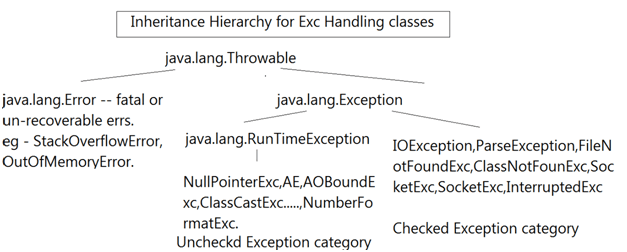
- Exception Class Hierarchy
- Exception class methods
- Common Exception,Root cause
- Creating Custom Exception
- Legal syntax
- A Vs B
- Throw vs throws
- final vs Finally vs finalise
- Best Practices (ref SCJP)
Intro
Why Required?
- Separation between Business. Logic (try block) & err handling logic(catch)
- To recover from run time exceptions(to continue with execution flow)
Exception Handling flow and Hierarchy
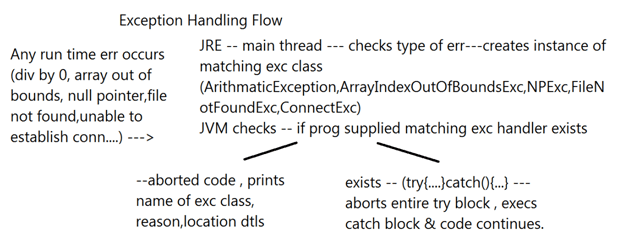
Hierarchy:
Exception Class Methods
1. public void printStackTrace() — Displays name of exception class, reason, location dtls.
java.lang.ArithmeticException: / by zero
at DemoClass.calc(DemoClass.java:15)
at DemoClass.almostThere(DemoClass.java:9)
at DemoClass.main(DemoClass.java:5)
2. public String getMessage() — rets error mesg of exception
e.g. / by zero
3. public String toString() — rets Name of exc class & reason.
e.g. java.lang.ArithmeticException: / by zero
Following are Exceptions, root cause,origin time
| Exception | Caused by | Discription | Thrown By(Type) |
|---|---|---|---|
| NullPointerException | String s = null; s.length(); | Thrown when attempting to access an object with a reference variable whose current value is null. | By the JVM |
| ArithmeticException | int a = 3; int b=0; int q = a/b; | ||
| ArrayIndexOutOfBoundsException | int[] a = new int[10]; a[10]; | Thrown when attempting to access an array with an invalid index value (either negative or beyond the length of the array). | By the JVM |
| ClassCastException | Object x = new Integer(1); String s = (String) x; | Thrown when attempting to cast a reference variable to a type that fails the IS-A test. | By the JVM |
| StringIndexOutOfBoundsException | String s = “Hello”; s.charAt(5); | ||
| IllegalArgumentException (subclass of java.lang.RunTimeException/unchecked) | Mysqroot(-5){ Throw new IAE(“msg”);} | Thrown when a method receives an argument formatted differently than the method expects. | Programmatically |
| IllegalStateException | Thrown when the state of the environment doesn’t match the operation being attempted, e.g., using a Scanner that’s been closed. | Programmatically | |
| NumberFormatException | Thrown when a method that converts aString to a number receives a String that itcannot convert. | Programmatically | |
| StackOverflowError | Typically thrown when a method recurses too deeply. (Each invocation is added to the stack.) | By the JVM | |
| NoClassDefFoundError | Thrown when the JVM can’t find a class it needs, because of a command-line error, a classpath issue, or a missing .class file | By the JVM |
Where Exceptions Come From? Broad Categories Of Exception:-
JVM exceptions
Those exceptions or errors that are either exclusively or most logically thrown by the JVM.
Programmatic exceptions
Those exceptions that are thrown explicitly by application and/or API programmers.
Creating Custom(User defined/Application) Exceptions
Here are the steps that create a custom exception:
- Create a new class whose name should end with an Exception, like the ClassNameException. This is a convention to differentiate an exception class from regular ones.
- Make the class extends one of the exceptions that are subtypes of the java.lang.Exception class. Generally, a custom exception class always extends directly from the Exception class.
- Create a constructor with a String parameter, which is the detail message of the exception. In this constructor, simply call the super constructor and pass the message, Best practice(Separation of Concern):Instead of passing ‘string as a parameter’ to super(), we can separate out error-codes and error-messages in separate enum .
Code Example: (ref.ACTS)
1. Create a package public class which extends Throwable (not recommended but legal)/Exception(recommended)/Error(not recommended but legal)/RuntimeExc (not recommended but legal)
public MyClassException extends Exception{ }
2.CustExc(String msg) : overload the constr : to invoke the super-class constr. of the form
public MyClassException extends Exception{
String msg,code;
MyClassException  (String msg,String code){
this.code=code;this.msg=msg;
Super(String msg); }
//getters
 }
OR
CustExc(String msg,Throwable rootCause)
<Invoked>
public Exception(String message,Throwable cause) by super(msg,cause)
Create a centralized Enum to be Used in place of redundant error messages messages in Exception classes :
public enum ErrorCodes{
String code,msg;
INVALID_ARGUMENT("ER401","Invalid argument passed");
ErrorCodes(String code,String msg){
this.code=code;
this.msg=msg;
}
//getters
}
Note:For details on working of Enun see post:”Anatomy of Enum”
Brief Conclusion:
Display of Custom Error Messages:
- Error and exception messages that are expected to be displayed, in case of exception, are passed at time of throwing custom exception and in built-in case in-built messages are there.
- Error Messages passed from throw clause can be retried in catch block either by calling method getMessage() of exception class or by calling getter method of Enum, which in turn in set in constructor of Custom Exception class.
Legal syntax
- try {…} catch (exc1 e){}
- try {…} catch (exc1 e){} catch (exc2 e) {} ….
- try {…} catch (exc1 e){} catch (exc2 e) {}catch(Exception e){catch-all}
3.5 3. try {…} catch (exc1 e){} catch (exc2 | exc3 e) {}catch(Exception e){catch-all}
Throw vs Throws
| throws | throw |
|---|---|
| keyoword in java , for exception handling | keyoword in java , for exception handling |
| can appear only in meth declaration. | can only appear as java statement |
| mandatory for un-handled checked excs | Typically used for raising custom exceptions |
| Meaning — Current method IS NOT handling the | Syntax — |
| exception BUT its caller should handle. | throw Throwable instance; |
| throws’ keyword allows delegation of exc handling | Legal — throw new NullPointerException(“msg”); |
| throw new Emp(…..); —Illegal | |
| to the caller. | Legal — throw new SocketException(“msg”,e); |
| Legal –throw new InvalidInputException(“invalid email”); |
Final VS Finally
finally — keyword in exc handling
finally — block — finally block ALWAYS survives(except System.exit(0))
i.e in the presence or absence of excs.
5.1 try{…} catch (Exception e){….} finally {….}
5.2 try{…} catch (NullPointerException e){….} finally {….}
5.3 try {…} finally {….}
Best Practices: extracts from Books
Effective Java: Bloach
Use checked exceptions for recoverable conditions and runtime exceptions for programming errors:-
Description-
Some Rules from SCJP:-
- It is illegal to use a try clause without either a catch clause or a finally clause. A try clause by itself will result in a compiler error. Any catch clauses must immediately follow the try block. Any finally clause must immediately follow the last catch clause (or it must immediately follow the try block if there is no catch). It is legal to omit either the catch clause or the finally clause, but not both
- Exception, Error, RuntimeException, and Throwable types can all be thrown using the throw keyword, and can all be caught (although you rarely will catch anything other than Exception subtypes).
- You can keep throwing an exception down through the methods on the stack. But what about when you get to the main() method at the bottom? You can throw the exception out of main() as well. This results in the Java Virtual Machine (JVM) halting, and the stack trace will be printed to the output.
- When an object of a subtype of Exception is thrown, it must be handled or declared. These objects are called checked exceptions, and include all exceptions except those that are subtypes of RuntimeException, which are unchecked exceptions.
Java Exception Handling Best Practices
- Clean up resources in a finally block or use a try-with-resources statement
- Throw a specific exception
- Do not catch the Exception class rather catch specific sub-classes
- Never catch a Throwable class
- Always correctly wrap the exceptions in custom exceptions so that the stack trace is not lost
- Catch the most specific exception first
- Don’t ignore exceptions rather log the exceptions
- Never throw any exception from the finally block
- Don’t use the printStackTrace() statement or similar methods
- Use the finally blocks instead of catch blocks if you are not going to handle the exception
- Validate user input to catch adverse conditions very early in the request processing
- Throw exceptions with descriptive messages
.

 Techglot