Tip – Skim through topic and recall the concept
Section 1 : Internal Working of java
- JDK Vs JRE Vs JVM
- Garbage Collection(Todo)
- collection strategies – mark n sweep
- memory Section for cleanup strategy – permgen vs metaspace
Section 2 :Object Oriented Programming concepts
- OOPs Concepts
- P.I.E.A
- Abstract class & Interface
- Working of Abstraction & Interface : syntax and creation
- Where to use which entity?
- Difference between Abstraction & Interface
- Composition Vs Aggregation Vs Association
Section 3 :Collection Framework
- Fail-fast & Fail-safe
- ArrayList vs CopyOnWriteArrayList
- HashMap vs ConcurrentHashMap
- Map
- Internal Implementation
- ConcurrentHashmap vs Syncronized Hashmap
- Why use TreeMap ?
Section 4 : Exception Handling
- final vs Finally vs finalize
- Restriction related to exception while overriding methods
- ClassNotFoundException vs NoClassDefinationException
- ConcurrentModificationException
- what if catch and finally both have return statement?
- Types of Exceptions
- Checked unchecked exception rules during overriding
- Compile-time vs Runtime exception
Section 5 : Threads
- Immutable Object
- why String is immutable
- Immutability of Custom Object(string,List<String>)
- Why wait/notify/notifyAll is inObject class not in Thread class
- Static Synchronised block vs static synchronised method (both are available at class level)
- How threads communicate within each other ?
- Diff bw :
- Volatie and synchronise -can they be used interchanably -No
- Atomic variable vs synchronise – can they be used interchangeably – complementary – efficient
- Re-entrant lock
- CountDownLatch vs Barrier
- Wait, synchronized,
- Thread-pool (Executor service)and thread local (data specific to each thread)
- TBD: optimise synchronised mehtod – 2 method 1 threds gets acces – hold the object? – other thread waiting how to overcome
Section 6 : Java Special purpose classes
- Cloneable : Clone Working
- Why clone is not part of Cloneable class but of Object class
- Can we use clone method without cloneable interface
- deep copy and shallow copy
- Externisliable vs serialzable (serailID use)
- Reflection
- Comparable & Comparator
- SingBuffer vs StringBuilder
- Class Working
- Boxing and auto-boxing
- Wrapper class use (similar to Adaptor pattern)
- Objects accessing
- In super class, 2 methods and in-base class 5 methods, how to access base from super
- Equals and Hash-code contract
Section 7 : One liners
Section 1 : Internal Working of java
1.JDK Vs JRE VS JVM
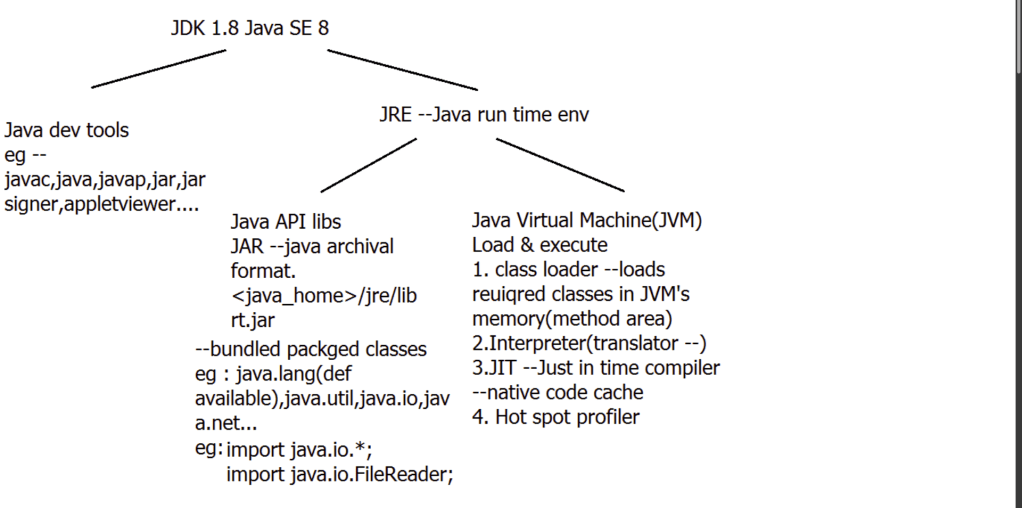
What is JRE?
Together,
- the JVM
- Java API Classes(like util, math, lang, awt,swing etc)
- Runtime libraries
form a “platform”/JRE for which all Java programs are compiled.
If you want to run any java program, you need to have JRE installed in the system
– JDK –
JDK contains tools needed to develop the Java programs.
The tools include :
- compiler (javac.exe),
- Java application launcher (java.exe),
- Appletviewer, etc.
Compiler converts java code into byte code. Java application launcher opens a JRE, loads the class, and invokes its main method.
You need JDK, if at all you want to write your own programs, and to compile them. For running java programs, JRE is sufficient.
If u just want to run applets (ex: Online games or puzzles), JRE needs to be installed on the machine.
– JVM –
- When we compile a Java file, generates a ‘.class’ file.
- ‘.class’ file consists of Java byte codes which are understandable by JVM.
- JVM interprets the byte code into the machine code depending upon the underlying operating system and hardware combination.
JVM is responsible for all the things like :
- garbage collection,
- array bounds checking, etc
JVM is platform dependent.
The JVM is called “virtual” because it provides a machine interface that does not depend on the underlying OS and machine hardware architecture. This independence is a cornerstone of the write-once run-anywhere value of Java programs.
There are different JVM implementations. These may differ in things like performance, reliability, speed, etc. These implementations will differ in those areas where Java specification doesn’t mention how to implement the features, like how the garbage collection process works is JVM dependent, Java spec doesn’t define any specific way to do this.
Note- for In-depth detail on:
- JVM
- Garbage collection (types)
- Java Memory Management
refer – Core java tutorial : JVM
Section 2 :Object Oriented Programming concepts
Principles around creation and organisation of data.
Following are major concepts of OOPs [P.I.E.A]:
- Polymorphism
- Inheritance
- Encapsulation
- Abstraction
Polymorphism & Inheritance
refer tutorial section : Core Java tutorial : Inheritence & Polymorpihsm
Encapsulation
Encapsulation refers to bundling of data,this bundling is provided by class which encapsulates or bundles the fields and methods that manipulate those fields data.
One Point of bundling data is to hide implementation.
Hiding implementation is done by making fields private and there is one more way to hide implementation that is the use of Interface
And By Using Interface the Operations on object are purely based on interface contract.
And this Interface thing provides encapsulation or data hiding in the sense that there is no particular way tied to implement internally(in server side code) the helper methods .
Abstract & Interface
About Abstract Class:
- What is Abstract class?
- Definition – A class which contains 0 or more abstract methods is known as abstract class. If it contains at least one abstract method, it must be declared abstract.
- Can Abstract class have constructor? If Yes then Why is it so?
- Yes, Abstract class have the constructor, Since Abstract class can have non-abstract instances and method to initialise them(using constructor chaining ) we need to have constructor though it directly cannot be instantiated.
- Why cannot we create an instance of Abstract class? Once a class is abstract it indicates that it may contain incomplete methods hence you cannot create an object of the abstract class.
public abstract class AbstractClassDemo {
	abstract void demo();
	private int val;
	AbstractClassDemo(int a) {
		this.val = a;
	}
	int demo1() {
		return val;
	};
}
AbstractClassDemo is an abstract class having a non-abstact instance member val,In order to initialise it we need the constructor.
public class ApplicationDemo extends AbstractClassDemo {
	ApplicationDemo(int a) {
		super(a);
	}
	public static void main(String[] args) {
		ApplicationDemo a = new ApplicationDemo(99);
		System.out.println(a.demo1());
	}
	@Override
	void demo() {
		// TODO Auto-generated method stub
	}
}
Interface vs Abstract class When to use an abstract class and when to use an interface in Java?
Summary Table:
| Parameter | Abstract | Interface |
|---|---|---|
| Accessibility control | It can be used, if we want to declare non-public members | all methods must be public. |
| Modifiable | better choice : If we want to add new methods in the future. | if we add new methods to an interface, then all of the classes that already implemented that interface will have to be changed to implement the new methods. |
| Versioning | If we want to create multiple versions of our component- create an abstract class. By updating the base class, all inheriting classes are automatically updated with the change | Cannot be changed once created[owing to fact that interface only provides signature and all implementing class must implement it]. If a new version of an interface is required, we must create a whole new interface. |
| Common functionality | If we want to provide common-implemented functionality among all implementations of our component, use an abstract class. – [can also be provided by any super class not necessarily abstract] | interfaces contain no implementation for any members. exception in java-8 default for backward comparability. Backward comp-ability – if new method added – already implementing class don’t have to override additional methods. |
| Use-case | Abstract classes should be used primarily for objects that are closely related. Todo: why? | If the functionality we are creating will be useful across a wide range of disparate objects, use an interface. interfaces are best suited for providing a common functionality to unrelated classes. |
| Inheritance | Diamond problem so multiple inheritance not allowed.Abstract class can extends one other class and can implement one or more interface. | Interfaces are also good when we want to have something similar to multiple inheritances since we can implement multiple interfaces.Interface can extends to one or more interfaces only |
| Scale | If we are designing large functional units, use an abstract class. Todo: why? | If we are designing small, concise bits of functionality, use interfaces |
| Level of Implementation | Abstract class is a class that is only partially implemented by the programmer. | Interface provides pure abstraction no implementation |
| Instantiation | cannot be instantiated | cannot be instantiated |
| Constructor | can have constructors | can’t have constructors. |
| Types of methods | can have abstract and non-abstract methods | can have only abstract methods. Since Java 8, it can have default and static methods also. (why?) |
| Performance | Abstract class is faster than interface | Interface is somewhat slower as it takes some time to find implemented method in class |
Onion peeling Strategy-
Outer Layer (Basic Overview)–> Middle layer(Primary differences)–> inner layer(Detailed comparision) –> Core (Example /inbuilt library)
Overview –
- Both abstract classes and interfaces are tools in Java for achieving abstraction and defining contracts.
- Both allow you to declare methods without providing implementations.
Middle layer(Primary differences)
- Access modifiers (from table above)
- multiple inheritance
- Allowed method – abstract vs concrete methods (mention things before java-8 – on prompt bring java-8 addition and reason for addition)
Inner detailed comparison – detailed discussion
Core comparison
- Highlight scenarios where you might prefer one over the other based on specific requirements, such as when designing APIs or creating reusable components.
Composition Vs Aggregation Vs Association
The concepts of Association, Aggregation, and Composition describe different types of relationships between classes. These relationships define how objects are connected and how their lifecycles are managed.
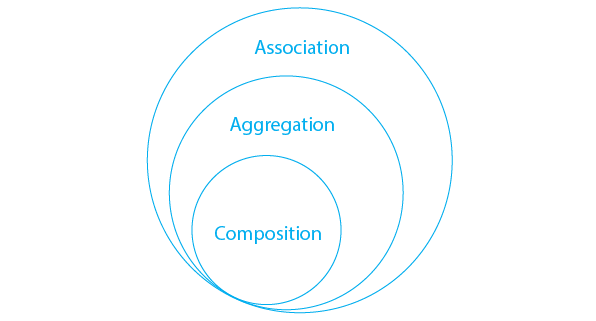
Summary Table :
| Relationship | UML Symbol | Lifecycle Dependency | Example | Comment |
|---|---|---|---|---|
| Association | -- | Independent | Customer — Payment | A customer can exist even if no payment is made. A payment is linked to a customer but does not “own” it. |
| Aggregation | ◇-- | Part can live longer | PaymentGateway ◇– Merchant | Stripe or Razorpay is not “owned” by a merchant. Merchants just use them. |
| Composition | ◆-- | Part dies with whole | Payment ◆– AuditTrail Or Human ◆– Heart | Audit trail has no meaning without actual Payment transaction. |
Association
- A general relationship between two classes.
- Objects can be independent of each other.
- Can be one-to-one, one-to-many, etc.
- Example :
- A
Paymentis associated with aCustomer. They exist independently.
- A
class Customer {
    private String customerId;
    private String name;
    // constructors, getters, setters
}

class Payment {
    private String paymentId;
    private Customer customer; // Association
    public Payment(String paymentId, Customer customer) {
        this.paymentId = paymentId;
        this.customer = customer;
    }
}
Aggregation (HAS-A, weak ownership)
- A special type of association.
- Represents a whole-part relationship, but the part can exist independently of the whole.
- Often called a “HAS-A” relationship.
- Example :
- A
Merchanthas multiplePaymentGateways, but the gateways (like Razorpay, Stripe) exist independently
- A
class PaymentGateway {
    private String name;
    // constructors, getters, setters
}

class Merchant {
    private String merchantId;
    private List<PaymentGateway> gateways; // Aggregation

    public Merchant(String merchantId) {
        this.merchantId = merchantId;
        this.gateways = new ArrayList<>();
    }

    public void addGateway(PaymentGateway gateway) {
        gateways.add(gateway);
    }
}
Composition (HAS-A, strong ownership)
- A stronger form of aggregation.
- If the whole is destroyed, the parts are also destroyed.
- The part cannot exist independently.
- Example :
- Departments can exist outside of the university. If the university is destroyed, departments may still exist.
class AuditTrail {
}

class Payment {
    private final AuditTrail adtTrail = new AuditTrail();
}
Section 3 : Collection Framework
Fail-fast and fail-safe
Fail Fast And Fail Safe Iterators in Java
Iterators in java are used to iterate over the Collection objects.Fail-Fast iterators immediately throw ConcurrentModificationException if there is structural modification of the collection. Structural modification means adding, removing any element from collection while a thread is iterating over that collection. Iterator on ArrayList, HashMap classes are some examples of fail-fast Iterator.
Fail-Safe iterators don’t throw any exceptions if a collection is structurally modified while iterating over it. This is because, they operate on the clone of the collection, not on the original collection and that’s why they are called fail-safe iterators. Iterator on CopyOnWriteArrayList, ConcurrentHashMap classes are examples of fail-safe Iterator.
Note- Normal iteration over Data-structure S like – Hash-map/Array-list are fail-fast. there is nothing new about iterator except it traverse over Data-structure
Concurrent Modification: Concurrent Modification in programming means to modify an object concurrently when another task is already running over it. For example, in Java to modify a collection when another thread is iterating over it.
Map
HashMap is one of the most used collection. It doesn’t extend from Collection i/f. BUT collection view of a map can be obtained using keySet,values or entrySet()
Map.Entry interface – static nested interface : This interface represents a map entry (key-value pair).
HashMap in Java stores both key & value object ref – in bucket, As an object of Entry class which implements the nested interface Map.Entry.
How Hash-map internally works? & Internal Implementation
Note: Bucket = i in arr[] : Bucket term used is actually an index of array, that array is called table in HashMap implementation. Thus table[0] is referred as bucket0, table[1] as bucket1 and so on.
Hash-map works on the principal of hashing.
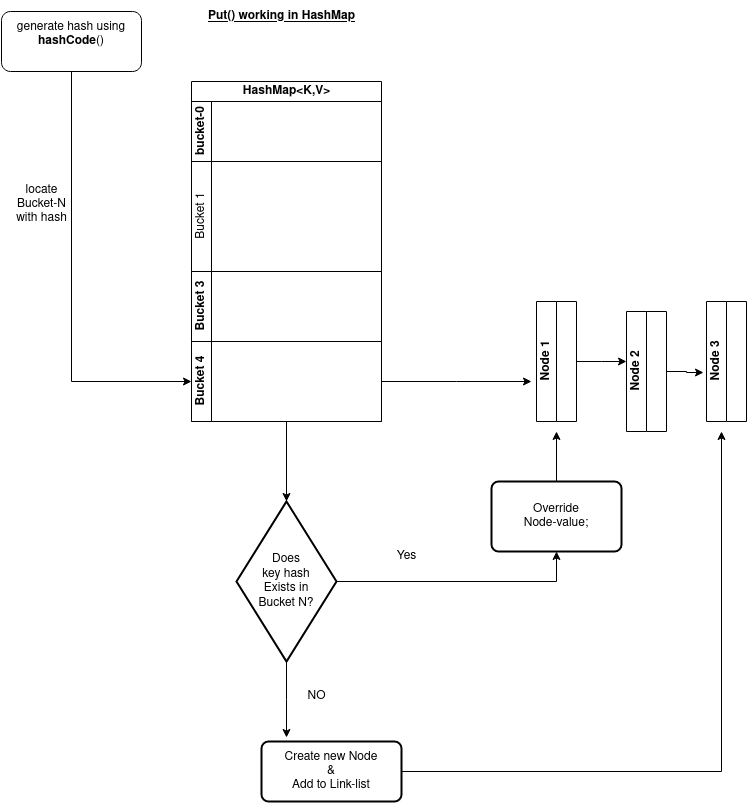
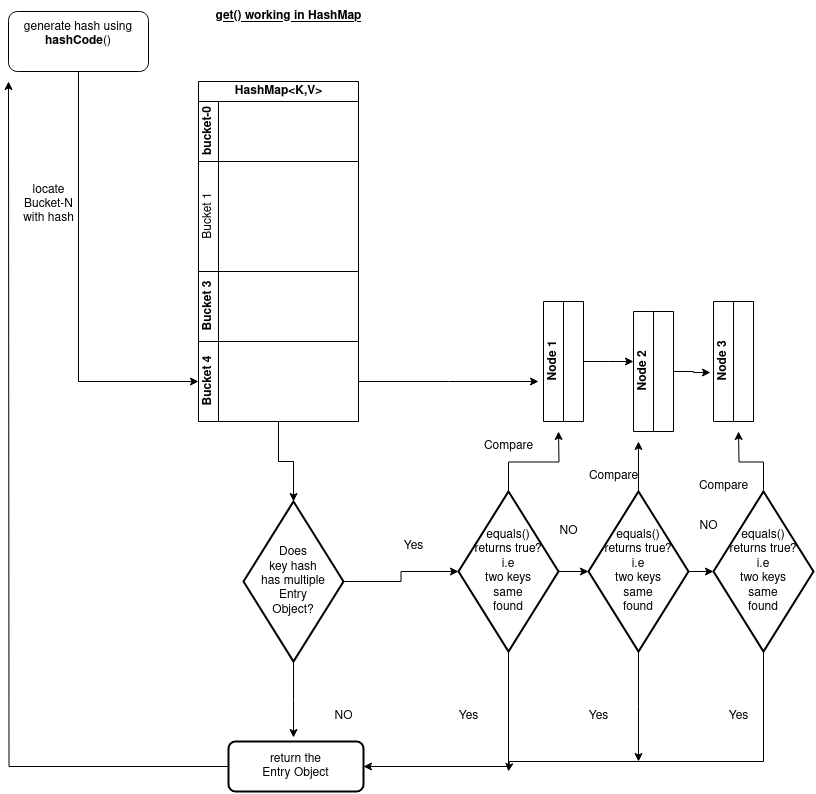
- hashCode() working in case of get(k)& put(k,v) operation:
- When put() method is used to store (Key, Value) pair, HashMap implementation calls hashcode() on Key object to calculate a hash that is used to find a bucket where Entry object will be stored.
- When get() method is used to retrieve value, again key object is used to calculate a hash which is used then to find a bucket where that particular key is stored.
- equals() Working :
- equals() method is used to compare objects for equality & see if the key is equal to any of the already inserted keys (Recall that there may be more than one entry in the same bucket).
- In case of HashMap, key object is used for comparison, also using equals() method Map knows how to handle hashing collision (hashing collision means more than one key having the same hash value, thus assigned to the same bucket. In that case objects are stored in a linked list (grow-able –singly linked)
HashMap provides put(key, value) for storing and get(key) method for retrieving Values from HashMap.
Hash-Collision Summary Table:
| Scenario | Behavior | Explanation |
|---|---|---|
| Two different keys, same hash index | LinkedList formed | Keys not equal, both stored in chain |
| Same key inserted again | Value overridden | equals() returns true — replaces |
| Same bucket has > 8 entries | Treeification starts (if capacity ≥ 64) | LinkedList → Tree for faster lookup |
In a nutshell for hash-collision – there are 2 scenarios in case of put() :
Using hashCode() method, hash value will be calculated. Using that hash it will be ascertained, in which bucket particular entry will be stored. equals() method is used to find if such a key already exists in that bucket,
- if equals() on key returns false, then a new node is created with the map entry and stored within the same bucket. A linked-list is used to store those nodes.
- If equals() method on key returns true, which means that the key already exists in the bucket. In that case, the new value will overwrite the old value for the matched key.
How get() methods works internally in case of hash-collsion:
As we already know how Entry objects are stored in a bucket and what happens in the case of Hash Collision it is easy to understand what happens when key object is passed in the get method of the Hash-map to retrieve a value.
Using the key again hash value will be calculated to determine the bucket where that Entry object is stored, in case there are more than one Entry object with in the same bucket stored as a linked-list equals() method will be used to find out the correct key. As soon as the matching key is found get() method will return the value object stored in the Entry object.
In case of null Key
As we know that HashMap also allows null, though there can only be one null key in HashMap. While storing the Entry object HashMap implementation checks if the key is null, in case key is null, it always map to bucket 0 as hash is not calculated for null keys.
Hash Map updates in Java 8
Though HashMap implementation provides constant time performance O(1) for get() and put() method but that is in the ideal case when the Hash function distributes the objects evenly among the buckets.
But the performance may worsen in the case hashCode() used is not proper and there are lots of hash collisions. As we know now that in case of hash collision entry objects are stored as a node in a linked-list and equals() method is used to compare keys. That comparison to find the correct key with in a linked-list is a linear operation so in a worst case scenario the complexity becomes O(n).
To address this issue in Java 8 hash elements use balanced trees(red-black) instead of linked lists after a certain threshold is reached. Which means HashMap starts with storing Entry objects in linked list but after the number of items in a hash becomes larger than a certain threshold, the hash will change from using a linked list to a balanced tree, this will improve the worst case performance from O(n) to O(log n).
Difference between ConcurrentHashMap and Synchronized HashMap:
| ConcurrentHashMap | Synchronized HashMap |
|---|---|
| It is a class that implements the ConcurrentMap and serializable interface. | We can synchronize the HashMap by using the synchronizedMap() method of java.util.Collections class. |
| It locks some portion of the map. | It locks the whole map. |
| ConcurrentHashMap allows performing concurrent read and write operation. Hence, performance is relatively better than the Synchronized Map. | In Synchronized HashMap, multiple threads can not access the map concurrently. Hence, the performance is relatively less than the ConcurrentHashMap. |
| ConcurrentHashMap doesn’t allow inserting null (internally uses HAshTable) as a key or value. | Synchronized HashMap allows inserting null as a key. |
| ConccurentHashMap doesn’t throw ConcurrentModificationException. | Synchronized HashMap throw ConcurrentModificationException. |
Why use TreeMap ?
Section 4 : Exception Handling
What Is the Difference Between Final, Finally, and Finalize in Java?
1. final: Is used to apply restrictions on the class, method, and variable. The final class can’t be inherited — neither method can it be overridden nor variable be changed.

When to use final keyword?
Any field that you never expect to be changed (be that a primitive value, or a reference to an object, whether or not that particular object is itself immutable or not), should generally be declared final. Another way of looking at things is: If your object is accessed by multiple threads, and you don’t declare its fields final, then you must provide thread-safety by some other means.
- volatile
- synchronised
- explicit lock
- atomic behaviour
above means are provided for scenarios in which you expect the value of variable/object to change but you want to provide thread safety.
2. finally: this keyword is used with the try-catch block to provide statements that will always get executed even if some exception arises. Usually, finally is used to close resources.
In the presence or absence of excs , finally block ALWAYS survives(except System.exit(0))
Syntax:
//1
try{...} catch (Exception e){....} finally {....}
//2
try{...} catch (NullPointerException e){....} finally {....}
//3
try {...} finally {....}
//valid multi catch
3. finalize: is used to perform clean up processing just before the object is garbage collected.
Can You Throw any Exception Inside a Lambda Expression’s Body?
- Can Only throw unchecked exceptions, When using a standard functional interface already provided by Java, standard functional interfaces do not have a “throws” clause in its method signatures:
- However, if you are using a custom functional interface, throwing checked exceptions is possible.
//Standard Functional Interface
List<Integer> integers = Arrays.asList(3, 9, 7, 0, 10, 20);
integers.forEach(i -> {
if (i == 0) {
 throw new IllegalArgumentException("Zero not allowed");
 }
    System.out.println(Math.PI / i);
});

//Custom Functional Interface
@FunctionalInterface
public static interface CheckedFunction<T> {
  void apply(T t) throws Exception;
}
public void processTasks(
List<Task> taks, CheckedFunction<Task> checkedFunction) {
   for (Task task : taks) {
      try {
 checkedFunction.apply(task);
  } catch (Exception e) {
// ...
 }
 }
}
processTasks(taskList, t -> {
 // ...
throw new Exception("Something happened");
});
What Are the Rules We Need to Follow When Overriding a Method That Throws an Exception?
- When the
parentclass method doesn’t throw any exceptions, thechildclass method can’t throw any checked exceptions, but it may throw any unchecked. Here’s an example code to demonstrate this:
Code -Example :
// Valid: unchecked-exception
class Parent {
 void doSomething() {
   // ...
}}
class Child extends Parent {
void doSomething() throws IllegalArgumentException {
 // ...
 }}
//Invalid:-Checked exception
class Parent {
void doSomething() {
  // ...
  }}
class Child extends Parent {
 void doSomething() throws IOException {
 // Compilation error
 }}
- When the
parentclass method throws one or more checked exceptions, thechildclass method can throw any unchecked exception, including all, none, or a subset of the declared checked exceptions and an even a greater number of these as long as they have the same scope or narrower. Here’s an example code that successfully follows the previous rule
class Parent {
   void doSomething() throws FileNotFoundException {
 // ...
}}
class Child extends Parent {
 void doSomething() throws IOException {
     // Compilation error
 }}
ClassNotFoundexception vs Noclassdefinationfounderror
Both occur at run time but in different scenarios and different triggers:
| ClassNotFoundException | NoClassDefFoundError |
|---|---|
| It is an exception. It is of type java.lang.Exception. | It is an error. It is of type java.lang.Error. |
| It occurs when an application tries to load a class at runtime which is not updated in the classpath. | It occurs when java runtime system doesn’t find a class definition, which is present at compile time, but missing at run time. |
| It is thrown by the application itself. It is thrown by the methods like Class.forName(), loadClass() and findSystemClass(). | It is thrown by the Java Runtime System. |
| It occurs when classpath is not updated with required JAR files. | It occurs when required class definition is missing at runtime. |
| Checked Exception (must be handled) | Error (unchecked, serious problem) |
ClassNotFoundException –
For example, you may have come across this exception when you try to connect to MySQL or Oracle databases and you have not updated the classpath with required JAR files. Most of the time, this exception occurs when you try to run an application without updating the classpath with required JAR files
public class MainClass
{
    public static void main(String[] args)
    {
        try
        {
//OracleDriver not exists in classpath
            Class.forName("oracle.jdbc.driver.OracleDriver");
        }catch (ClassNotFoundException e)
        {
            e.printStackTrace();
        }
    }
}
NoClassDefinationFoundError –
Code-Example :
When you compile the above program, two .class files will be generated. One is A.class and another one is B.class. If you remove the A.class file and run the B.class file, Java Runtime System will throw NoClassDefFoundError.
Class was present at compile time but after build it got removed from target folder
class A
{
  // some code
}

public class B
{
    public static void main(String[] args)
    {
        A a = new A();
    }
}
Concurrent ModificationException
The ConcurrentModificationException occurs when an object is tried to be modified concurrently when it is not permissible. This exception usually comes when one is working with Java Collection classes.
For Example – It is not permissible for a thread to modify a Collection when some other thread is iterating over it. This is because the result of the iteration becomes undefined with it. Some implementation of the Iterator class throws this exception, including all those general-purpose implementations of Iterator which are provided by the JRE. Iterators which do this are called fail-fast as they throw the exception quickly as soon as they encounter such situation rather than facing undetermined behavior of the collection any time in the future.
Note: It is not mandatory that this exception will be thrown only when some other thread tries to modify a Collection object. It can also happen if a single thread has some methods called which are trying to violate the contract of the object. This may happen when a thread is trying to modify the Collection object while it is being iterated by some fail-fast iterator, the iterator will throw the exception.
if while iterating over the collection, we directly try to modify that collection, then the given fail-fast iterator will throw this ConcurrentModificationException.
mport java.awt.List;
import java.util.*;

public class Concurrentmodificationexception {

    public static void main(String[] args) {
        ArrayList<Integer> list = new ArrayList<>();

        list.add(1);
        list.add(2);
        list.add(3);
        list.add(4);
        list.add(5);

        Iterator<Integer> it = list.iterator();
        while (it.hasNext()) {
Integer value = it.next();
            System.out.println("List Value:" + value);
            if (value.equals(3))
                list.remove(value);  //error
//safe : it.remove(); - list will have now 4 elements
        }

    }

}
How to avoid ConcurrentModificationException in a single-threaded environment?
By using iterator’s remove() function, you can remove an object from an underlying collection object.
REf- https://www.javatpoint.com/concurrentmodificationexception-in-java
What if catch and finally both has return statement?
- In a try-catch-finally block that has
returnstatements, only the value from thefinallyblock will be returned. - When returning reference types, be aware of any updates being done on them in the
finallyblock that could end up in unwanted results.
Compile-time vs Runtime exception
| Feature | Compile-Time Exception | Runtime Exception |
|---|---|---|
| Occurrence | Detected during the compilation of the program. | Occur during the execution of the program. |
| Timing | Occur before the program is executed. | Occur while the program is running. |
| Cause | Due to syntactical or structural issues in the code. | Due to unexpected conditions during program execution. |
| Example | Typographical errors, incorrect syntax, type mismatches. | ArrayIndexOutOfBoundsException, NullPointerException. |
| Detection | Detected by the compiler. | Detected by the JVM (Java Virtual Machine) at runtime. |
| Handling | Must be fixed by modifying the source code and recompiling. | Can be handled using try-catch blocks or other mechanisms. |
| Impact on Program | Prevents the program from being compiled successfully. | May cause the program to terminate prematurely. |
//example 1
public class CompileTimeErrorExample {
    public static void main(String[] args) {
        int x = "Hello"; // This line will cause a compile-time error
        System.out.println(x);
    }
}
//example 2
public class RuntimeErrorExample {
    public static void main(String[] args) {
        int[] array = new int[3];
        System.out.println(array[4]); // This line will cause a runtime error
    }
}
Checked vs unchecked exception
| Feature | Checked Exception | Unchecked Exception |
|---|---|---|
| Definition | Subclasses of java.lang.Exception excluding RuntimeException and its subclasses. | Subclasses of RuntimeException and Error. |
| Mandatory Handling | Must be handled or declared in the method signature. | Not required to be handled explicitly. |
| Compile-Time Behavior | Compiler checks for handling or declaration. | Compiler does not enforce handling or declaration. |
| Examples | IOException, SQLException, ClassNotFoundException. | NullPointerException, ArrayIndexOutOfBoundsException. |
| Purpose | Intended to handle expected exceptional conditions that a program can reasonably recover from. | Typically indicates programming errors or conditions beyond the control of the programmer. |
| Checked by Compiler | Yes | No |
| Need Try-Catch or Throws | Must be caught or declared in the method signature. | Optional, can be caught but not required. |
| Forced Exception Handling | Yes | No |
//Example1

public class CheckedExceptionExample {
    public static void main(String[] args) {
        try {
            FileReader file = new FileReader("file.txt");
            // File processing code
        } catch (IOException e) {
            // Handle the exception
            e.printStackTrace();
        }
    }
}
//example2:
public class UncheckedExceptionExample {
    public static void main(String[] args) {
        String str = null;
        System.out.println(str.length()); // This line will throw NullPointerException
    }
}
Checked vs Compile-time exception
Note: Eclipse IDE, as well as many other Integrated Development Environments (IDEs), often perform static code analysis in real-time, providing feedback on potential issues before compilation. This is different from compile-time exceptions, which occur during the actual compilation process.
| Feature | Compile-Time Exception | Checked Exception |
|---|---|---|
| Definition | Any exception that occurs during compilation due to syntactical or structural issues in the code. | Subclasses of java.lang.Exception excluding RuntimeException and its subclasses. |
| Mandatory Handling | Not required to be handled explicitly; resolved by fixing the issues identified by the compiler. | Must be handled or declared in the method signature. |
| Example | Syntax errors, type mismatches, unresolved symbols. | IOException, SQLException, ClassNotFoundException. |
| Example Code Snippet | java public class CompileTimeExceptionExample { public static void main(String[] args) { int x = "Hello"; // This line will cause a compile-time error System.out.println(x); } } | java import java.io.FileReader; import java.io.IOException; public class CheckedExceptionExample { public static void main(String[] args) { try { FileReader file = new FileReader("file.txt"); // File processing code } catch (IOException e) { e.printStackTrace(); } } } |
unchecked vs runtime exception
| Feature | Unchecked Exception | Runtime Exception |
|---|---|---|
| Definition | Subclasses of Error. | Subclasses of RuntimeException and Error. |
| Mandatory Handling | Not required to be handled explicitly. | Not required to be handled explicitly. |
| Example Code Snippet | public class StackOverflowErrorExample { public static void recursiveMethod(int n) { if (n == 0) { return; // Base case to prevent infinite recursion } recursiveMethod(n); // Recursive call without a decrementing argument } public static void main(String[] args) { recursiveMethod(100000); // Large number of recursive calls } }//Note:The default stack size can vary depending on your operating system and JVM configuration. You can sometimes adjust it using flags like -Xss when starting the JVM process. | String str = "abc"; int num = Integer.parseInt(str); // Throws NumberFormatException |
| In-built classes: | Subclasses of Error:StackOverflowError OutOfMemoryError VirtualMachineError InternalError | Subclasses of RuntimeException: NullPointerExceptionArrayIndexOutOfBoundsException ClassCastException IllegalArgumentException NumberFormatException UnsupportedOperationException ConcurrentModificationException IllegalStateException NoSuchElementException SecurityException NegativeArraySizeException IndexOutOfBoundsException ArithmeticException (e.g., division by zero) AssertionError UnsupportedOperationException |
Section 5 : Threads
Topics
- Immutability
- How to create immutable object? – 5Steps
- Thread-local
- Executor-service
- Size of Thread-pool
What is Immutability/Immutable Object?
Definition- An Immutable Object means that the state of the Object cannot change after its creation. Changing an object means to use its methods to change one of its fields or the fields are public (and not final ), so that you can be updated from outside without accessing them via methods.
Example Of Immutable class:
- String
- Primary Wrapper class
String – The String is immutable means that you cannot change the object itself, but you can change the reference to the object.while the String object is immutable, its reference variable is not.
Advantages of immutability
- Thread safety : Immutability of strings has positive significance in multithreaded applications because it provides automatic thread safety. Instances of immutable types are inherently thread-safe , because no thread can modify it.
- Security reasons- String is widely used as parameter for many java classes, e.g. network connection, opening files, etc. Were String not immutable , a connection or file would be changed and lead to serious security threat.
- ClassLoader:– A ClassLoader in Java uses a String object as an argument. Consider, if the String object is modifiable, the value might be changed and the class that is supposed to be loaded might be different.To avoid this kind of misinterpretation, String is immutable
- Heap Space – The immutability of String helps to minimize the usage in the heap memory. When we try to declare a new String object, the JVM checks whether the value already exists in the String pool or not. If it exists, the same value is assigned to the new object. This feature allows Java to use the heap space efficiently. (verify this using commoands!)
Drawback
- They require more resources than other object types. Because each time it modified, it creates a new one.
Solution – you should use the Java StringBuilder class, which allows you to modify the text without making new String class instances. Java StringBuilder is a Mutable type, that means when you alter it , it still holding same data
Why String class is Final in Java?
The reason behind the String class being final is because no one can override the methods of the String class. So that it can provide the same features to the new String objects as well as to the old ones.
Why Primitive Wrapper Classes are Immutable in Java? -Same reason as the advantage if immutability on object
How to create immutable class in java?
5 steps –
- The class must be declared as final so that child classes can’t be created.
- Data members in the class must be declared private so that direct access is not allowed.
- Data members in the class must be declared as final so that we can’t change the value of it after object creation.
- A parameterized constructor should initialize all the fields performing a deep copy so that data members can’t be modified with an object reference.
- You need to take special care while working with mutable object. You need to do deep copy in case of imutable objects.
- Deep Copy of objects should be performed in the getter methods to return a copy rather than returning the actual object reference)
- If you return clone of object from getter method, it won’t return original object, so your original object will remain intact.
Example
Immutability implementation With bugs
public final class Country{

 private final String countryName;
 private final ArrayList listOfStates;

 public Country(String countryName,ArrayList listOfStates) {
 super();
 this.countryName = countryName;
 this.listOfStates=listOfStates;

 }

 public String getCountryName() {
 return countryName;
 }

 public ArrayList getListOfStates() {
 return listOfStates;
 }

 public static void main(String args[])
 {
 ArrayList listOfStates=new ArrayList();
 listOfStates.add("Madhya Pradesh");
 listOfStates.add("Maharastra");
 listOfStates.add("Gujrat");

 Country country=new Country("India",listOfStates);
 System.out.println("Country : "+country.getCountryName());
 System.out.println("List of states : "+country.getListOfStates());
 // It will be added to the list because we did not use clone in getListOfStates
 country.getListOfStates().add("Kerala");
 // It will be added to the list because we did not use deep copy in constructor
 listOfStates.add("Rajasthan");
 System.out.println("Updated List of states : "+country.getListOfStates());

 }
}
Above class is not immutable. There are two reasons for it :
- We did not use clone in getListOfStates() method, so we are able to add “Kerala” to the listOfStates.
- We did not do deep copy for listOfStates , so we are able to add “Rajasthan” to the list.
Lets use clone in getListOfStates() method and see the difference, just change getListOfStates() to below code:
public ArrayList getListOfStates() {
  return  (ArrayList) listOfStates.clone();
 }
 //in case of mutable map
//in getter-create temp map and assign valuer iof instance member and return temp
Outpu-
Country : India
List of states : [Madhya Pradesh, Maharastra, Gujrat]
Updated List of states : [Madhya Pradesh, Maharastra, Gujrat, Rajasthan]
If you notice, “Kerala” is not added to the list because we are returning clone of listOfStates in getListOfStates() method, so adding “Kerala” to country.getListOfStates() won’t affect original list.
We are one step closed to immutable class now.
Lets change constructor to make deep copy of listOfStates object
public Country(String countryName, ArrayList listOfStates) {
  super();
  this.countryName = countryName;
  ArrayList tempList = new ArrayList();

  for (int i = 0; i < listOfStates.size(); i++) {
   tempList.add(listOfStates.get(i));
  }
  this.listOfStates = tempList;
 }
- Concurrent vs parallelism
- Number of threads required
- Why wait/notify/notifyall() is in the Object Clas not Thread
Thread scope :
- synchronised block- static vs non-static
- synchronised method – static vs non-static
- block vs method
| Attribute | Static synchronised block | Non-Static synchronised block | Static synchronised method | Non-static synchronised method |
|---|---|---|---|---|
| Concurrency | can only be executed by one thread at a time. | |||
| Memory allocation | memory is allocated only once at the time of class loading.while execution of a static method the whole class is blocked. So other static synchronized methods are also blocked. | memory is allocated multiple time whenever method is called. | ||
| Monitor scope[meaning of monitor] | the monitor belongs to the class | the monitor belongs to the instance. | ||
Thread Future use .. apart from type .. where to use where not to use.
CV- rEQUES -aSYNC Queue .. if inflows if heavy and queue is full how to deal with it?
ThreadLocal
The TheadLocal construct allows us to store data that will be accessible only by a specific thread.
Let’s say that we want to have an Integer value that will be bundled with the specific thread:
ThreadLocal<Integer> threadLocalValue = new ThreadLocal<>();
Next, when we want to use this value from a thread we only need to call a get() or set() method. Simply put, we can think that ThreadLocal stores data inside of a map – with the thread as the key.
Due to that fact, when we call a get() method on the threadLocalValue, we will get an Integer value for the requesting thread:
threadLocalValue.set(1);
Integer result = threadLocalValue.get();
We can construct an instance of the ThreadLocal by using the withInitial() static method and passing a supplier to it:
ThreadLocal<Integer> threadLocal = ThreadLocal.withInitial(() -> 1);
To remove the value from the ThreadLocal, we can call the remove() method:
threadLocal.remove();
ThreadLocals and Thread Pools
ThreadLocal provides an easy-to-use API to confine some values to each thread. This is a reasonable way of achieving thread-safety in Java. However, we should be extra careful when we’re using ThreadLocals and thread pools together.
In order to better understand the possible caveat, let’s consider the following scenario:
- First, the application borrows a thread from the pool.
- Then it stores some thread-confined values into the current thread’s ThreadLocal.
- Once the current execution finishes, the application returns the borrowed thread to the pool.
- After a while, the application borrows the same thread to process another request.
- Since the application didn’t perform the necessary cleanups last time, it may re-use the same ThreadLocal data for the new request.
This may cause surprising consequences in highly concurrent applications.
One way to solve this problem is to manually remove each ThreadLocal once we’re done using it. Because this approach needs rigorous code reviews, it can be error-prone.
Extending the ThreadPoolExecutor
As it turns out, it’s possible to extend the ThreadPoolExecutor class and provide a custom hook implementation for beforeExecute() and afterExecute() methods. The thread pool will call the beforeExecute() method before running anything using the borrowed thread. On the other hand, it will call the afterExecute() method after executing our logic.
https://www.baeldung.com/java-threadlocal
Ideal thread pool size-
Tuning Thread Pool
https://www.geeksforgeeks.org/thread-pools-java/
The optimum size of the thread pool depends on the number of processors available and the nature of the tasks.
On a N processor system for a queue of only computation type processes, a maximum thread pool size of N or N+1 will achieve the maximum efficiency.
But tasks may wait for I/O and in such a case we take into account the ratio of waiting time(W) and service time(S) for a request; resulting in a maximum pool size of N*(1+ W/S) for maximum efficiency.
Youtube-
Programming– Concurrency vs parallelism
- Parallel = Two queues and two coffee machines.
- Concurrent = Two queues and one coffee machine.
| S.NO | Concurrency | Parallelism |
|---|---|---|
| 1. | Concurrency is the task of running and managing the multiple computations at the same time. | While parallelism is the task of running multiple computations simultaneously. |
| 2. | Concurrency is achieved through the interleaving operation of processes on the central processing unit(CPU) or in other words by the context switching. | While it is achieved by through multiple central processing units(CPUs). |
| 3. | Concurrency can be done by using a single processing unit. | While this can’t be done by using a single processing unit. it needs multiple processing units. |
| 4. | Concurrency increases the amount of work finished at a time. | While it improves the throughput and computational speed of the system. |
| 5. | Concurrency deals lot of things simultaneously. | While it do lot of things simultaneously. |
| 6. | Concurrency is the non-deterministic control flow approach. | While it is deterministic control flow approach. |
| 7. | In concurrency debugging is very hard. | While in this debugging is also hard but simple than concurrency. |
Computing – parallel vs Distributed
Parallel Computing:
In parallel computing multiple processors performs multiple tasks assigned to them simultaneously. Memory in parallel systems can either be shared or distributed. Parallel computing provides concurrency and saves time and money.

Distributed Computing:
In distributed computing we have multiple autonomous computers which seems to the user as single system. In distributed systems there is no shared memory and computers communicate with each other through message passing. In distributed computing a single task is divided among different computers.
Section 6 : Java Special purpose classes
Topics
- Cloning
- ShallowCopy & DeepCopy
- Serialization & Externalization
- Comparable & Comparator
- StringBuffer & StringBuilder
- Hash-code and equals contract
How cloning works?
Definition- cloning is about creating the copy of original object. I
By default, java cloning is ‘field by field copy’ i.e. as the Object class does not have idea about the structure of class on which clone() method will be invoked
So, JVM when called for cloning, do following things:
- If the class has only primitive data type members then a completely new copy of the object will be created and the reference to the new object copy will be returned.
- If the class contains members of any class type then only the object references to those members are copied and hence the member references in both the-original-object as well as the cloned-object refer to the same object.
Apart from above default behaviour, you can always override this behavior and specify your own. This is done using overriding clone() method. Let’s see how it is done.
Java Cloneable interface and clone() method
If a class needs to support cloning it has to do following things:
- You must implement
Cloneableinterface. - You must override
clone()method from Object class. [Its weird.clone()method should have been inCloneableinterface.]
Java docs about clone() method are given below (formatted and extract).
//mention the three axioms of clone.
/*Java clone() method
Creates and returns a copy of this object. The precise meaning of "copy" may depend on the class of the object.
The general intent is that, for any object x, the expression:
1) x.clone() != x will be true .
2) x.clone().getClass() == x.getClass() will be true, but these are not absolute requirements.
3) x.clone().equals(x) will be true, this is not an absolute requirement.
*/

protected native Object clone() throws CloneNotSupportedException;
- First statement guarantees that cloned object will have separate memory address assignment
- Second statement suggest that original and cloned objects should have same class type, but it is not mandatory.
- Third statement suggest that original and cloned objects should have be equal using equals() method, but it is not mandatory
Let’s understand Java clone with example. Our first class is Employee class with 3 attributes – id, name and department.
TestCloning.java
public class TestCloning
{

    public static void main(String[] args) throws CloneNotSupportedException
    {
        Department dept = new Department(1, "Human Resource");
        Employee original = new Employee(1, "Admin", dept);

        //Lets create a clone of original object
        Employee cloned = (Employee) original.clone();

        //Let verify using employee id, if cloning actually workded
        System.out.println(cloned.getEmpoyeeId());

        //Verify JDK's rules

        //Must be true and objects must have different memory addresses
        System.out.println(original != cloned);

        //As we are returning same class; so it should be true
        System.out.println(original.getClass() == cloned.getClass());

        //Default equals method checks for references so it should be false. If we want to make it true,
        //then we need to override equals method in Employee class.
        System.out.println(original.equals(cloned));
    }
}

//Output:
 //1
//true
//true
//false
Employee.java
public class Employee implements Cloneable{

    private int empoyeeId;
    private String employeeName;
    private Department department;

    public Employee(int id, String name, Department dept)
    {
        this.empoyeeId = id;
        this.employeeName = name;
        this.department = dept;
    }
    @Override
    protected Object clone() throws CloneNotSupportedException {
        return super.clone();
    }

    //Getters and Setters
}
Department.java
public class Department
{
    private int id;
    private String name;

    public Department(int id, String name)
    {
        this.id = id;
        this.name = name;
    }

    //Getters and Setters
}
Great, we successfully cloned the Employee object. But, remember we have two references to the same object and now both will change the state of the object in different parts of the application. Want to see how? Let’s see.
Original and cloned - both changes
public class TestCloning {

    public static void main(String[] args) throws CloneNotSupportedException {
        Department hr = new Department(1, "Human Resource");
        Employee original = new Employee(1, "Admin", hr);
        Employee cloned = (Employee) original.clone();

        //Let change the department name in cloned object and we will verify in original object
        cloned.getDepartment().setName("Finance");

        System.out.println(original.getDepartment().getName());
        System.out.println(cloned.getDepartment().getName());
    }
}

//Output:
//Finance
//Finance
Oops, cloned object changes are visible in original also. This way cloned objects can make havoc in the system if allowed to do so. Anybody can come and clone your application objects and do whatever he likes. Can we prevent this??
Answer is yes, we can. We can prevent this by creating Java deep copy and use copy constructors. We will learn about them later in this post. Let’s first see what is deep cloning and shallow cloning in Java.
Java Shallow Copy
Shallow clone is “default implementation” in Java. In overridden clone method, if you are not cloning all the object types (not primitives), then you are making a shallow copy.
All above examples are of shallow copy only, because we have not cloned the Department object on Employee class’s clone method. Now, I will move on to next section where we will see the deep cloning.
Java Deep Copy
In the deep copy, we create a clone which is independent of original object and making changes in the cloned object should not affect original object.
Let see how deep copy is created in Java.(additional copying is needed part from overriding clonew() if class has refernce to other Object)
//Deep clone
//Modified clone() method in Employee class
@Override
protected Object clone() throws CloneNotSupportedException {
    Employee cloned = (Employee)super.clone();
    cloned.setDepartment((Department)cloned.getDepartment().clone());
    return cloned;
}
I modified the Employee classes clone() method and added following clone method in Department class.
//Department.java
//Defined clone method in Department class.
@Override
protected Object clone() throws CloneNotSupportedException {
    return super.clone();
}
Now testing our cloning code gives desired result and name of the department will not be modified.
public class TestCloning
{
    public static void main(String[] args) throws CloneNotSupportedException
    {
        Department hr = new Department(1, "Human Resource");

        Employee original = new Employee(1, "Admin", hr);
        Employee cloned = (Employee) original.clone();

        //Let change the department name in cloned object and we will verify in original object
        cloned.getDepartment().setName("Finance");

        System.out.println(original.getDepartment().getName());
        System.out.println(cloned.getDepartment().getName());
    }
}

//Output:

//Human Resource
//Finance
So deep cloning requires satisfaction of following rules –
- All the member classes in original class should support cloning and in clone method of original class in context should call
super.clone()on all member classes. - If any member class does not support cloning then in clone method, one must create a new instance of that member class and copy all its attributes one by one to new member class object. This new member class object will be set in cloned object.
Java Copy Constructors -way to clone without using Cloneable Interface and clone() method
Copy constructors are special constructors in a class which takes argument for its own class type. So, when you pass an instance of class to copy constructor, then constructor will return a new instance of class with values copied from argument instance. It helps you to clone object without Cloneable interface.
reference- https://howtodoinjava.com/java/cloning/a-guide-to-object-cloning-in-java/
For Array Cloning refer section Data-Structure: Array – https://techglot.tech.blog/category/interview-2/data-structure-interview/array-data-structure/
Differences between Externalizable vs Serializable
| SERIALIZABLE | EXTERNALIZABLE |
| Serializable is a marker interface i.e. does not contain any method. | Externalizable interface contains two methods writeExternal() and readExternal() which implementing classes MUST override. |
| Serializable interface pass the responsibility of serialization to JVM and it’s default algorithm. | Externalizable provides control of serialization logic to programmer – to write custom logic. |
| Mostly, default serialization is easy to implement, but has higher performance cost. | Serialization done using Externalizable, add more responsibility to programmer but often result in better performance. |
| It’s hard to analyze and modify class structure because any change may break the serialization. | It’s more easy to analyze and modify class structure because of complete control over serialization logic. |
| Default serialization does not call any class constructor. | A public no-arg constructor is required while using Externalizable interface. |
- Comparable vs Comparator
https://www.geeksforgeeks.org/comparable-vs-comparator-in-java/
| Comparable | Comparator |
|---|---|
| Comparable provides compareTo() method to sort elements in Java. | Comparator provides compare() method to sort elements in Java. |
| Comparable interface is present in java.lang package. | Comparator interface is present in java.util package. |
| The logic of sorting must be in the same class whose object you are going to sort. | The logic of sorting should be in separate class to write different sorting based on different attributes of objects. |
| The class whose objects you want to sort must implement comparable interface. | Class, whose objects you want to sort, do not need to implement a comparator interface. |
| It provides single sorting sequences. [since the compareTo(T obj) method is in same class] | It provides multiple sorting sequences.[since the compare(T obj,T obj1) method can be used with multiple class to provide multiple sorting sequence] |
| This method can sort the data according to the natural sorting order. | This method sorts the data according to the customised sorting order. |
| It affects the original class. i.e., actual class is altered. | It doesn’t affect the original class, i.e., actual class is not altered. |
| Implemented frequently in the API by: Calendar, Wrapper classes, Date, and String. | It is implemented to sort instances of third-party classes. |
NullPointerException – if the specified object is nullClassCastException – if the specified object’s type prevents it from being compared to this object. | |
| We can sort the list elements of Comparable type by Collections.sort(List) method. | We can sort the list elements of Comparator type by Collections.sort(List, Comparator) method. |
Comparable Example:
/**
 * @author arsenal Application Runner class
 */
public class ComparingObjectsDemo {
	public static void main(String[] args) {
		List<Integer> numbsers = Arrays.asList(32, 12, 4, 5, 232, 5, 6, 786, 43, 34);
		// In-built Objects already implements Comparable so are sorted as per NO
		numbsers.forEach(x -> System.out.println(x));//inorder but not sorted
		Collections.sort(numbsers);
		numbsers.forEach(x -> System.out.println(x));

		// Cusomte Object need to implement comparable
		List<Employee> emps = new LinkedList<>();
		emps.add(new Employee(Date.valueOf("2005-10-10"), "Sevanand", 11));
		emps.add(new Employee(Date.valueOf("2006-10-10"), "Nand", 12));
		emps.add(new Employee(Date.valueOf("2002-10-10"), "Anand", 13));
		emps.add(new Employee(Date.valueOf("2010-10-10"), "Xevanand", 14));
		// emps.forEach(x->System.out.println(x)); //Print In-order of insertion not
		// sorted
		Collections.sort(emps);// sorted by natural Order //For custom objects need to implement Comparable
		// emps.forEach(x -> System.out.println(x));

	}

}

/**
 * @author arsenal
 * Custom Object to be sorted must implement Comparable
 */
class Employee implements Comparable<Employee> {
	private Date dob;
	private String name;
	private int empID;

	public Employee(Date dob, String name, int empID) {
		super();
		this.dob = dob;
		this.name = name;
		this.empID = empID;
	}

	public Date getDob() {
		return dob;
	}

	public String getName() {
		return name;
	}
	public int getEmpID() {
		return empID;
	}
	@Override
	public int compareTo(Employee o) {
		return this.empID - o.empID;//can be sorted based on only one parameter since Comparable part of Object itself
		// return this.name.compareTo(o.name);
		// return this.dob.compareTo(o.dob);
	}
	@Override
	public String toString() {
		return "Employee [dob=" + dob + ", name=" + name + ", empID=" + empID + "]";
	}
}
Comparator Example
// A class 'Movie' To be sorted
class Movie {
    private double rating;
    private String name;
    private int year;


    // Constructor
    public Movie(String nm, double rt, int yr)
    {
        this.name = nm;
        this.rating = rt;
        this.year = yr;
    }

    // Getter methods for accessing private data
    public double getRating() { return rating; }
    public String getName()   {  return name; }
    public int getYear()      {  return year;  }
}
// Class to compare Movies by name
class NameCompare implements Comparator<Movie>
{
    public int compare(Movie m1, Movie m2)
    {
        return m1.getName().compareTo(m2.getName());
    }
}
// Class to compare Movies by ratings
class RatingCompare implements Comparator<Movie>
{
    public int compare(Movie m1, Movie m2)
    {
        if (m1.getRating() < m2.getRating()) return -1;
        if (m1.getRating() > m2.getRating()) return 1;
        else return 0;
    }
}
// Driver class
class Main
{
    public static void main(String[] args)
    {
        ArrayList<Movie> list = new ArrayList<Movie>();
        list.add(new Movie("Force Awakens", 8.3, 2015));
        list.add(new Movie("Star Wars", 8.7, 1977));
        list.add(new Movie("Empire Strikes Back", 8.8, 1980));
        list.add(new Movie("Return of the Jedi", 8.4, 1983));
        // Sort by rating : (1) Create an object of ratingCompare
        //                  (2) Call Collections.sort
        //                  (3) Print Sorted list
        System.out.println("Sorted by rating");
        RatingCompare ratingCompare = new RatingCompare();
        Collections.sort(list, ratingCompare);
        for (Movie movie: list)
            System.out.println(movie.getRating() + " " +
                               movie.getName() + " " +
                               movie.getYear());


        // Call overloaded sort method with RatingCompare
        // (Same three steps as above)
        System.out.println("\nSorted by name");
        NameCompare nameCompare = new NameCompare();
        Collections.sort(list, nameCompare);
        for (Movie movie: list)
            System.out.println(movie.getName() + " " +
                               movie.getRating() + " " +
                               movie.getYear());

        // Uses Comparable to sort by year
        System.out.println("\nSorted by year");
        Collections.sort(list);
        for (Movie movie: list)
            System.out.println(movie.getYear() + " " +
                               movie.getRating() + " " +
                               movie.getName()+" ");
    }
}
Comparator’s abstract, default and static methods:
| Method | Signature | Description | Example Usage |
|---|---|---|---|
compare(T o1, T o2) | int compare(T o1, T o2) | Compares two objects for order. Returns a negative integer, zero, or a positive integer as the first argument is less than, equal to, or greater than the second. | java Comparator<Person> ageComparator = (p1, p2) -> p1.getAge() - p2.getAge(); int comparison = ageComparator.compare(person1, person2); |
reversed() | Comparator<T> reversed() | Returns a comparator that imposes the reverse ordering of the original comparator. | java Comparator<Person> ageComparator = Comparator.comparing(Person::getAge); Comparator<Person> reversedAgeComparator = ageComparator.reversed(); int comparison = reversedAgeComparator.compare(person1, person2); |
thenComparing(Comparator<? super T> other) | default Comparator<T> thenComparing(Comparator<? super T> other) | Returns a composed comparator that performs a subsequent comparison if this comparator considers two elements equal. | java Comparator<Person> nameComparator = Comparator.comparing(Person::getName); Comparator<Person> ageThenNameComparator = ageComparator.thenComparing(nameComparator); int comparison = ageThenNameComparator.compare(person1, person2); |
nullsFirst() | default Comparator<T> nullsFirst() | Returns a comparator that considers null values as less than non-null values. | java Comparator<String> nullsFirstComparator = Comparator.nullsFirst(Comparator.naturalOrder()); int comparison = nullsFirstComparator.compare("apple", null); |
nullsLast() | default Comparator<T> nullsLast() | Returns a comparator that considers null values as greater than non-null values. | java Comparator<String> nullsLastComparator = Comparator.nullsLast(Comparator.naturalOrder()); int comparison = nullsLastComparator.compare(null, "banana"); |
naturalOrder() | static <T extends Comparable<? super T>> Comparator<T> naturalOrder() | Returns a comparator that compares Comparable objects in natural order. | java Comparator<String> naturalOrderComparator = Comparator.naturalOrder(); int comparison = naturalOrderComparator.compare("apple", "banana"); |
reverseOrder() | static <T> Comparator<T> reverseOrder() | Returns a comparator that reverses the order of the natural ordering of Comparable objects. | java Comparator<String> reverseOrderComparator = Comparator.reverseOrder(); int comparison = reverseOrderComparator.compare("banana", "apple"); |
String Buffer(thread safe) vs String Builder (not safe but better performance)
| No. | String-buffer | StringBuilder |
|---|---|---|
| 1) | StringBuffer is synchronized i.e. thread safe. It means two threads can’t call the methods of StringBuffer simultaneously. | StringBuilder is non-synchronized i.e. not thread safe. It means two threads can call the methods of StringBuilder simultaneously. |
| 2) | StringBuffer is less efficient than StringBuilder. | StringBuilder is more efficient than StringBuffer. |
| 3) | StringBuffer was introduced in Java 1.0 | StringBuilder was introduced in Java 1.5 |
Hash-code and Equals Contract
In Java, the hashCode and equals methods are part of the Object class, and they play a crucial role in hash-based collections like HashMap, HashSet, etc.
hashCodeMethod:- According to the contract, if two objects are equal (according to the
equalsmethod), they must have the same hash code. However, the reverse is not necessarily true: two objects with the same hash code are not required to be equal. - It is important to override the
hashCodemethod when you override theequalsmethod to maintain this contract.
- According to the contract, if two objects are equal (according to the
equalsMethod:- According to the contract, the
equalsmethod must be reflexive, symmetric, transitive, and consistent.- Reflexive:
x.equals(x)must return true. - Symmetric: If
x.equals(y)returns true, theny.equals(x)must also return true. - Transitive: If
x.equals(y)returns true andy.equals(z)returns true, thenx.equals(z)must also return true. - Consistent: Repeated calls to
equalsshould consistently return true or false, assuming the objects being compared have not been modified.
- Reflexive:
- It is essential to override the
equalsmethod when you want to define custom equality for your objects.
- According to the contract, the
//Format - synatx
@Override
public int hashCode() {
    // Calculate and return the hash code for the object
}

//equals
@Override
public boolean equals(Object obj) {
    // Compare this object with another object for equality
}
Additional Information
- Why 2 object equality should result in hashcode equality?
- If Hashcode is not equal for equal object then hash based DS will not work efficiently
- Since it uses has-code as key to bucket- since hash-code are not same then same content will point to 2 different buckets
- If Hashcode is not equal for equal object then hash based DS will not work efficiently
- Why 2 Object with same hashcode are not required to be equal
- in-efficient implementation of hash-code result in hash-collision and unequal object points to same bucket
//object not same but hashcode same - faulty implemention of haschcode
import java.util.Objects;

class CustomObject {
    private String data;

    public CustomObject(String data) {
        this.data = data;
    }

    @Override
    public int hashCode() {
        // Generate the same hash code for all objects
        return 42;
    }

    @Override
    public boolean equals(Object obj) {
        if (this == obj) return true;
        if (obj == null || getClass() != obj.getClass()) return false;
        CustomObject that = (CustomObject) obj;
        return Objects.equals(data, that.data);
    }
}

public class SameHashCodeDifferentEquals {
    public static void main(String[] args) {
        // Creating two different objects with the same hash code
        CustomObject obj1 = new CustomObject("Object 1");
        CustomObject obj2 = new CustomObject("Object 2");

        // Printing hash codes
        System.out.println("Hash code for obj1: " + obj1.hashCode());
        System.out.println("Hash code for obj2: " + obj2.hashCode());

        // Checking equality
        System.out.println("Are obj1 and obj2 equal? " + obj1.equals(obj2));
    }
}

 Techglot