Collection
Index
- Introduction
- List
- Array-list vs Linked-list
- Map
Collection vs Coll framework vs java.util.Collections
- Collection — Super i/f for List & Set
- Collection framework — ready made implementation of std algo.
- Collections — concrete utility class for manipulating Collection (api — sort, shuffle, copy , applying thrd safety…)
Collection hierarchy
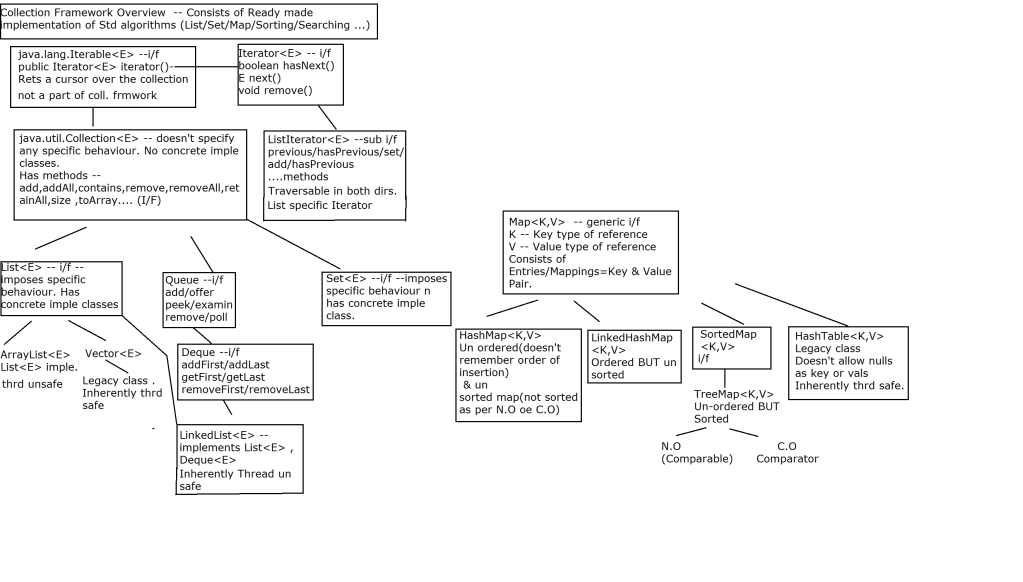
Collections class API
- public static void shuffle(List list, Random rnd)
- Desc — shuffles ref of ANY type as per the random number supplied.
- ? — wild card — ANY unknown type — can be replaced by any ref type. — un bounded wild card.
- java.util.Random — random number generator.
- eg : Collections.shuffle(accts,new Random());
List<E> features
- List represents ordered collection — order is significant
- Allows null references
- Allows duplicates
- Supports index based operation
ArrayList API
- java.util.ArrayList — E — type of ref.
- ArrayList — constructor
- API-
- ArrayList() — default constructor. — creates EMPTY array list object , with init capacity=10,size=0;
- eg —ArrayList l1=new ArrayList();
- ArrayList(int capacity) — — creates EMPTY array list object , with init capacity=capacity,size=0;
- eg —ArrayList l1=new ArrayList<>(100);
- ArrayList() — default constructor. — creates EMPTY array list object , with init capacity=10,size=0;
- add methods
- boolean add(E e) — append (at the end)
- void add(int index,E e) — insert (at specific position)
- void addAll(Collection e) — bulk append operation
- eg : l1 — AL
- l1.addAll(…..);
- AL,LL,Vector — legal
- HS,TS,LHS –legal
- HM,LHM,TM –illegal –javac error
- Retrieve elem from list
- E get(int index)
- index ranges from —0 —(size-1)
- java.lang.IndexOutOfBoundsException
- E get(int index)
- display list contents using — toString
Attaching Iterator to List
Collection interface method — implemented by ArrayList
Iterator iterator()
—places iterator BEFORE 1st element ref.
Iterator i/f methods
- boolean hasNext() — rets true if there exists next element, false otherwise.
- E next() — returns the element next to iterator position
- void remove() — removes last returned element from iterator.
Regarding exceptions with Iterator/List
- java.util.NoSuchElementException — thrown whenever trying to access the elem beyond the size of list.
- java.lang.IllegalStateException — thrown whenever trying to remove elem before calling next().
- java.util.ConcurrentModificationException– thrown typically — when trying to use same iterator/list iterator –after structurally modifying list(eg add/remove methods of list)
- Exception while accessing element by index.
- java.lang.IndexOutOfBounds — thrown typically — while trying to access elem beyond size(0—size-1)
- Attaching for-each = attaching implicit iterator.
- Attaching ListIterator —scrollable iterator or to beign iteration from a specific element — List ONLY or list specific iterator.
- ListIterator listItearator() –places LI before 1st element
- ListIterator listItearator(int index) –places LI before specified index.
- search for a particular element in list
boolean contains(Object o) - searching for 1st occurrence
use — indexOf
int indexOf(Object o)
rets index of 1st occurrence of specified elem. Rets -1 if elem not found.
searching for last occurrence
use — lastIndexOf
int lastIndexOf(Object o)
rets index of last occurrence of specified elem. Rets -1 if elem not found.- E set(int index,E e)
- Replaces old elem at spepcified index by new elem.
- Returns old elem
- remove methods
- E remove(int index) —removes elem at specified index & returns removed elem.
- boolean remove(Object o) — removes element specified by argument , rets true — if elem is removed or false if elem cant be removed.
NOTE :
For searching or removing in List Implementation classes — All search methods (contains,indexOf,lastIndexOf,remove(Object o)) — based upon equals method(of type of List eg –Account/Customer/Emp….)
For correct working
- Identify prim key & create overloaded constr using PK.
- Using PK , override equals for content equality.
Sorting —
- For sorting elements as per Natural(implicit i.e criteria defined within UDT(User-Defined-Type) class definition) ordering or
- Custom(explicit i.e criteria defined outside UDT , in a separate class or anonymus iner class)
Difference between ArrayList and LinkedList in Java
ArrayList and LinkedList both implements List interface and their methods and results are almost identical. However there are few differences between them which make one better over another depending on the requirement.
- Search: ArrayList search operation is pretty fast compared to the LinkedList search operation. get(int index) in ArrayList gives the performance of O(1) while LinkedList performance is O(n).
- Reason: ArrayList maintains index based system for its elements as it uses array data structure implicitly which makes it faster for searching an element in the list. On the other side LinkedList implements doubly linked list which requires the traversal through all the elements for searching an element.
- Deletion: LinkedList remove operation gives O(1) performance while ArrayList gives variable performance: O(n) in worst case (while removing last element) and O(1) in best case (While removing 1st element).
- Conclusion: LinkedList element deletion is faster compared to ArrayList.
- Reason: LinkedLists each element maintains two pointers (addresses) which points to the both neighbor elements in the list. Hence removal only requires change in the pointer location in the two neighbor nodes (elements) of the node which is going to be removed. While In ArrayList all the elements need to be shifted to fill out the space created by removed element.
- Inserts Performance: LinkedList add method gives O(1) performance while ArrayList gives O(n) in worst case. Reason is same as explained for remove.
- Memory Overhead: ArrayList maintains indexes and element data while LinkedList maintains element data and two pointers for neighbor nodes hence the memory consumption is high in LinkedList comparatively.
There are few similarities between these classes which are as follows:
- Both ArrayList and LinkedList are implementation of List interface.
- They both maintain the elements insertion order which means while displaying ArrayList and LinkedList elements the result set would be having the same order in which the elements got inserted into the List.
- Both these classes are non-synchronized and can be made synchronized explicitly by using Collections.synchronizedList method.
- The iterator and listIterator returned by these classes are fail-fast (if list is structurally modified at any time after the iterator is created, in any way except through the iterators own remove or add methods, the iterator will throw a ConcurrentModificationException).
When to use LinkedList and when to use ArrayList?
- As explained above the insert and remove operations give good performance (O(1)) in LinkedList compared to ArrayList(O(n)). Hence if there is a requirement of frequent addition and deletion in application then LinkedList is a best choice.
- Search (get(index) method) operations are fast in Arraylist (O(1)) but not in LinkedList (O(n)) so If there are less add and remove operations and more search operations requirement, ArrayList would be your best bet.

HashSet
HashSet hs=new HashSet<>();
hs.add(new Emp(1,"aa",1000);
hs.add(new Emp(2,"ab",2000);
l2=new ArrayList<>(hs);
Vector
Vector v1=new Vector<>();
v1.add(new Mgr(….));
v1.add(new Mgr(….));
l2=new ArrayList(v1);
Map API

 Techglot
One thought on “Java Tutorial”