16. Account mgmt and Billing support
Index
- Organisation
- SCP
- AWS Control Tower
- Pricing model for AWS services(ec2,RDS,S3 etc)
- TCO Calculator and Simple Monthly calculator/Pricing calculator( estimating t he usage)
- Billing Dashboard,Tags,Cost and Usage Report,Cost explorer (Tracking)
- Billing Alarms and Budget (For monitoring)
AWS Organisation
- Global service
- Allows to manage multiple AWS accounts
- The main account is the master account
- Cost Benefits:
- Consolidated Billing across all accounts – single payment method
- Pricing benefits from aggregated usage (volume discount for EC2, S3…)
- Pooling of Reserved EC2 instances for optimal savings
- API is available to automate AWS account creation
- Restrict account privileges using Service Control Policies (SCP)
Multiple Account Strategies
Create accounts per department, per cost center, per dev / test / prod, based on regulatory restrictions (using SCP), for better resource isolation (ex: VPC), to have separate per-account service limits, isolated account for logging
Multi Account vs One Account Multi VPC
• Use tagging standards for billing purposes
• Enable CloudTrail on all accounts, send logs to central S3 account
• Send CloudWatch Logs to central logging account
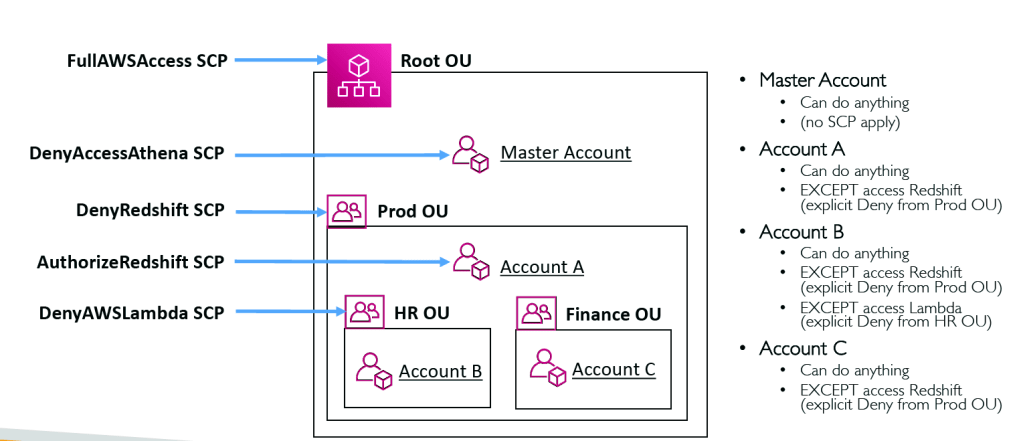
Service Control Policies (SCP)
- Whitelist or blacklist IAM actions
- Applied at the OU or Account level
- Does not apply to the Master Account
- SCP is applied to all the Users and Roles of the Account, including Root user
- The SCP does not affect service-linked roles
- Service-linked roles enable other AWS services to integrate with AWS Organizations and can’t be restricted by SCPs.
- SCP must have an explicit Allow (does not allow anything by default)
- Use cases:
- Restrict access to certain services (for example: can’t use EMR)
- Enforce PCI compliance by explicitly disabling services
SCP Hierarchy
AWS Control Tower
Easy way to set up and govern a secure and compliant multi-account AWS environment based on best practices
• Benefits:
- Automate the set up of your environment in a few clicks
- Automate ongoing policy management using guardrails
- Detect policy violations and remediate them
- Monitor compliance through an interactive dashboard
- AWS Control Tower runs on top of AWS Organizations:
- It automatically sets up AWS Organizations to organize accounts and implement SCPs (Service Control Policies)
Pricing Models in AWS
• AWS has 4 pricing models:
• Pay as you go: pay for what you use, remain agile, responsive, meet scale
demands
• Save when you reserve: minimize risks, predictably manage budgets, comply
with long-terms requirements
• Reservations are available for EC2 Reserved Instances, DynamoDB Reserved
Capacity, ElastiCache Reserved Nodes, RDS Reserved Instance, Redshift Reserved
Nodes
• Pay less by using more: volume-based discounts
• Pay less as AWS grows
Free services & free tier in AWS
• IAM
• VPC
• Consolidated Billing
• Elastic Beanstalk
• CloudFormation
• Auto Scaling Groups
• Free Tier: https://aws.amazon.com/free/
• EC2 t2.micro instance for a year
• S3, EBS, ELB, AWS Data transfer
⚠You do pay for the resources created
Compute Pricing – EC2
- Only charged for what you use
- Number of instances
- Instance configuration:
- Physical capacity
- Region
- OS and software
- Instance type
- Instance size
- ELB running time and amount of data processed
- Detailed monitoring
- On-demand instances:
- Minimum of 60s
- Pay per second (Linux) or per hour (Windows)
- Reserved instances:
- Up to 75% discount compared to On-demand on hourly rate
- 1- or 3-years commitment
- All upfront, partial upfront, no upfront
- Spot instances:
- Up to 90% discount compared to On-demand on hourly rate
- Bid for unused capacity
- Dedicated Host:
- On-demand
- Reservation for 1 year or 3 years commitment
- Savings plans as an alternative to save on sustained usage
Compute Pricing – Lambda & ECS
- Lambda:
- Pay per call
- Pay per duration
- ECS:
- EC2 Launch Type Model: No additional fees, you pay for AWS resources stored and created in your application
- Fargate:
- Fargate Launch Type Model: Pay for vCPU and memory
- resources allocated to your applications in your containers
Storage Pricing – S3
• Storage class:
- S3 Standard,
- S3 Infrequent Access,
- S3 One-Zone IA,
- S3 Intelligent Tiering,
- S3 Glacier and
- S3 Glacier Deep Archive
Pricing based on –
• Number and size of objects: Price can be tiered (based on volume)
• Number and type of requests
• Data transfer OUT of the S3 region
• S3 Transfer Acceleration
• Lifecycle transitions
• Similar service: EFS (pay per use, has infrequent access & lifecycle rules)
Storage Pricing – EBS
- Volume type (based on performance)
- Storage volume in GB per month provisionned
- IOPS:
- General Purpose SSD: Included
- Provisioned IOPS SSD: Provisionned amount in IOPS
- Magnetic: Number of requests
- Snapshots:
- Added data cost per GB per month
- Data transfer:
- Outbound data transfer are tiered for volume discounts Inbound is free
Database Pricing – RDS
- Per hour billing
- Database characteristics:
- Engine
- Size
- Memory class
- Purchase type:
- On-demand
- Reserved instances (1 or 3 years) with required up-front
- Backup Storage: There is no additional charge for backup storage up to
- 100% of your total database storage for a region
- Additional storage (per GB per month)
- Number of input and output requests per month
- Deployment type (storage and I/O are variable):
- Single AZ
- Multiple AZs
- Data transfer:
- Outbound data transfer are tiered for volume discounts
- Inbound is free
Content Delivery – CloudFront
• Pricing is different across different geographic regions
• Aggregated for each edge location, then applied to your bill
• Data Transfer Out (volume discount)
• Number of HTTP/HTTPS requests
Question on this topic – Options of CLoudFront Pricing-
- Discounting
- free tier
- on-demand
- BUT no option for 1 year contract
Networking Costs in AWS per GB – Simplified
- Use Private IP instead of Public IP for good savings and better network performance
- • Use same AZ for maximum savings (at the cost of high availability
Savings Plan
- Commit a certain $ amount per hour for 1 or 3 years
- Easiest way to setup long-term commitments on AWS
- EC2 Savings Plan
- • Up to 72% discount compared to On-Demand
- • Commit to usage of individual instance families in a region (e.g. C5 or M5)
- • Regardless of AZ, size (m5.xl to m5.4xl), OS (Linux/Windows) or tenancy
- • All upfront, partial upfront, no upfront
- • Compute Savings Plan
- • Up to 66% discount compared to On-Demand
- • Regardless of Family, Region, size, OS, tenancy, compute options
- • Compute Options: EC2, Fargate, Lambda
- • Setup from the AWS Cost Explorer console
- • Estimate pricing at https://aws.amazon.com/savingsplans/
AWS Compute Optimizer
- Reduce costs and improve performance by recommending optimal AWS resources for your workloads
- Helps you choose optimal configurations and rightsize your workloads (over/under provisioned)
- Uses Machine Learning to analyze your resources’ configurations and their utilization CloudWatch metrics
- Supported resources
- EC2 instances
- EC2 Auto Scaling Groups
- EBS volumes
- Lambda functions
- Lower your costs by up to 25%
- Recommendations can be exported to S3
Billing and Costing Tools
- Estimating costs in the cloud:
- TCO Calculator
- Simple Monthly Calculator / Pricing Calculator
- Tracking costs in the cloud:
- Billing Dashboard
- Cost Allocation Tags
- Cost and Usage Reports
- Cost Explorer
- Monitoring against costs plans:
- Billing Alarms
- Budgets
AWS Total Cost of Ownership (TCO) Calculators
• AWS helps you reduce Total Cost of Ownership (TCO) by reducing the
need to invest in large capital expenditures and providing a pay-as-you go
model
• The TCO calculators allow you to estimate the cost savings when using
AWS and provide a detailed set of reports that can be used in executive presentations.
• Compare the cost of your applications in an on-premises or traditional
hosting environment to AWS: Server, Storage, Network, IT Labor
• https://awstcocalculator.com/
Simple Monthly Calculator / Pricing Calculator
• Note: deprecated service (June 30th 2020)
• Replaced by AWS Pricing Calculator https://calculator.aws/
• Estimate the cost for your architecture solution. (Not a comparison to on-premise solution)
Cost Allocation Tags
- Use cost allocation tags to track your AWS costs on a detailed level
- AWS generated tags
- Automatically applied to the resource you create
- Starts with Prefix aws: (e.g. aws: createdBy)
- User-defined tags
- Defined by the user
- Starts with Prefix user:
Tagging and Resource Groups
- Tags are used for organizing resources:
- EC2: instances, images, load balancers, security groups…
- RDS, VPC resources, Route 53, IAM users, etc…
- Resources created by CloudFormation are all tagged the same way
- Free naming, common tags are: Name, Environment, Team …
- Tags can be used to create Resource Groups
- Create, maintain, and view a collection of resources that share common tags
- Manage these tags using the Tag Editor
Cost and Usage Reports
• Dive deeper into your AWS costs and usage
• The AWS Cost & Usage Report contains the most comprehensive set
of AWS cost and usage data available, including additional metadata
about AWS services, pricing, and reservations (e.g., Amazon EC2
Reserved Instances (RIs)).
• The AWS Cost & Usage Report lists AWS usage for each service
category used by an account and its IAM users in hourly or daily line
items, as well as any tags that you have activated for cost allocation
purposes.
• Can be integrated with Athena, Redshift or QuickSight
Cost Explorer
• Visualize, understand, and manage your AWS costs and usage over time
• Create custom reports that analyze cost and usage data.
• Analyze your data at a high level: total costs and usage across all accounts
• Or Monthly, hourly, resource level granularity
• Choose an optimal Savings Plan (to lower prices on your bill)
• Forecast usage up to 12 months based on previous usage
Cost Explorer – Savings Plan Alternative to Reserved Instances
Savings plan lets you set the hourly cost limit
Billing Alarms in CloudWatch
• Billing data metric is stored in CloudWatch us-east-1
• Billing data are for overall worldwide AWS costs
• It’s for actual cost, not for projected costs
• Intended a simple alarm (not as powerful as AWS Budgets)
AWS Budgets
• Create budget and send alarms when costs exceeds the budget
• 3 types of budgets: Usage, Cost, Reservation
• For Reserved Instances (RI)
• Track utilization
• Supports EC2, ElastiCache, RDS, Redshift
• Up to 5 SNS notifications per budget
• Can filter by: Service, Linked Account, Tag, Purchase Option, Instance
Type, Region, Availability Zone, API Operation, etc…
• Same options as AWS Cost Explorer!
• 2 budgets are free, then $0.02/day/budget
Trusted Advisor
No need to install anything – high level AWS account assessment
• Analyze your AWS accounts and provides recommendation
- Core Checks and recommendations – all customers
- • Can enable weekly email notification from the console
- • Full Trusted Advisor – Available for Business & Enterprise support plans
- • Ability to set CloudWatch alarms when reaching limits
- • Programmatic Access using AWS Support API
AWS Compute Optimizer v Trusted ADVISOR
A.C. Optimiser only checks for resource configuration for compute services (EC2, Lambda etc) for recommendation using ML where as Trusted Advisory Analyse Account and provides recommendation
Trusted Advisor Checks Examples
- Cost Optimization:
- low utilization EC2 instances, idle load balancers, under-utilized EBS volumes…
- Reserved instances & savings plans optimizations,
- Performance:
- High utilization EC2 instances, CloudFront CDN optimizations
- EC2 to EBS throughput optimizations, Alias records recommendations
- Security:
- MFA enabled on Root Account, IAM key rotation, exposed Access Keys
- S3 Bucket Permissions for public access, security groups with unrestricted ports
- Fault Tolerance:
- EBS snapshots age, Availability Zone Balance
- ASG Multi-AZ, RDS Multi-AZ, ELB configuration…
- Service Limits
AWS Support Plans Pricing
- Basic
- Developer
- Business
- Enterprise
Basic Support: free
AWS Basic Support Plan
• Customer Service & Communities – 24×7 access to customer service,
documentation, whitepapers, and support forums.
• AWS Trusted Advisor – Access to the 7 core Trusted Advisor checks and
guidance to provision your resources following best practices to
increase performance and improve security.
• AWS Personal Health Dashboard – A personalized view of the health of
AWS services, and alerts when your resources are impacted
AWS Developer Support Plan
• All Basic Support Plan +
• Business hours email access to Cloud Support Associates
• Unlimited cases / 1 primary contact
• Case severity / response times:
• General guidance: < 24 business hours
• System impaired: < 12 business hours
AWS Business Support Plan (24/7)
• Intended to be used if you have production workloads
• Trusted Advisor – Full set of checks + API access
• 24×7 phone, email, and chat access to Cloud Support Engineers
• Unlimited cases / unlimited contacts
• Access to Infrastructure Event Management for additional fee.
• Case severity / response times:
• General guidance: < 24 business hours
• System impaired: < 12 business hours
• Production system impaired: < 4 hours
• Production system down: < 1 hour
AWS Enterprise Support Plan (24/7)
• Intended to be used if you have mission critical workloads
• All of Business Support Plan +
• Access to a Technical Account Manager (TAM)
• Concierge Support Team (for billing and account best practices)
• Infrastructure Event Management, Well-Architected & Operations Reviews
• Case severity / response times:
• …
• Production system impaired: < 4 hours
• Production system down: < 1 hour
• Business-critical system down: < 15 minutes
Summary
- AWS Cost and Usage Report provides the most detailed level information
- Cost Explorer – AWS Cost Explorer has an easy-to-use interface that lets you visualize, understand, and manage your AWS costs and usage over time and historical data is available for the last 12 months and provide forecasting for the next 12 months
- TCO – cost estimate for on-prem to cloud migration

 Techglot