2.IAM – Identity and Access management
Memory map/index – basics and definition , relation , security , security tools
Note: In AWS Account and USER have different meaning and relevance. account is AWS account can have multiple account , root being the default user. other users can be created.
Users and Group Relation-

IAM: Permissions
- Users or Groups can be assigned JSON documents called policies
- These policies define the permissions of the users
- In AWS you apply the least privilege principle: don’t give more permissions than a user needs.
Acronym for Policy : EAR (Effect Action Resources)
{
"Version": "2012-10-17",
"Statement": [
{
"Effect": "Allow",
"Action": "ec2:Describe*",
"Resource": "*"
},
{
"Effect": "Allow",
"Action": "elasticloadbalancing:Describe*",
"Resource": "*"
},
{
"Effect": "Allow",
"Action": [
"cloudwatch:ListMetrics",
"cloudwatch:GetMetricStatistics",
"cloudwatch:Describe*"
],
"Resource": "*"
}
]
}
IAM Policies inheritance

IAM Policies Structure
- Consists of
- Version: policy language version, always include “2012-10-17”
- Id: an identifier for the policy (optional)
- Statement: one or more individual statements (required
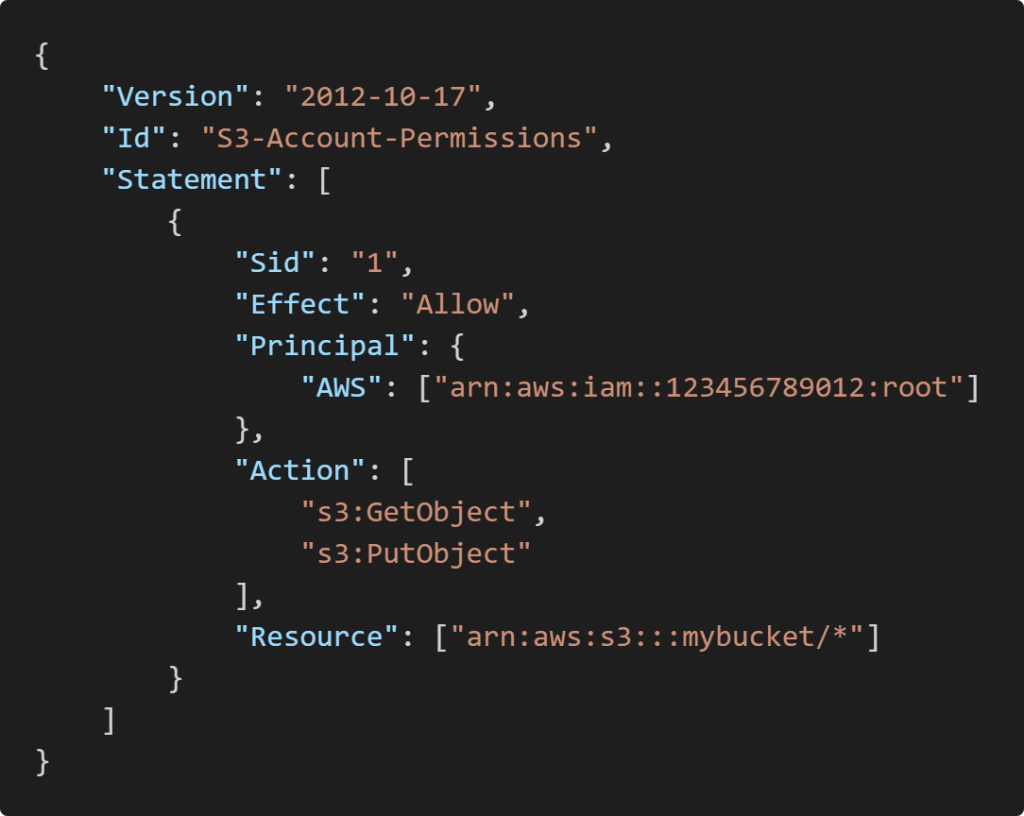
Statements consists of (PEAR)
- Sid: an identifier for the statement (optional)
- Effect: whether the statement allows or denies access(Allow, Deny)
- Principal: account/user/role to which this policy applied to
- Action: list of actions this policy allows or denies
- Resource: list of resources to which the actions applied to
- Condition: conditions for when this policy is in effect(optional)
IAM – Password Policy
Strong passwords = higher security for your account, In AWS, you can setup a password policy:
- Set a minimum password length
- Require specific character types:
- including uppercase letters
- lowercase letters
- numbers
- non-alphanumeric characters
- Allow all IAM users to change their own passwords
- Require users to change their password after some time (password expiration)
- Prevent password re-use
Multi Factor Authentication – MFA
You want to protect your Root Accounts and IAM users
MFA = password you know + security device you own
Main benefit of MFA:
if a password is stolen or hacked, the account is not compromised
How can users access AWS ?
To access AWS, you have three options:
- AWS Management Console (protected by password + MFA)
- AWS Command Line Interface (CLI): protected by access keys
- AWS Software Developer Kit (SDK) – for code: protected by access keys
- Access Keys are generated through the AWS Console
- Users manage their own access keys
- Access Keys are secret, just like a password. Don’t share them
- Access Key ID ~= username
- Secret Access Key ~= password
IAM Roles for Services
Some AWS service will need to perform actions on your behalf. To do so, we will assign permissions to AWS services with IAM Roles Common roles:
- EC2 Instance Roles
- Lambda Function Roles
- Roles for CloudFormation
IAM Security Tools
IAM Credentials Report (account-level) – a report that lists all your account’s users and the status of their various credentials
IAM Access Advisor (user-level) –
Access advisor shows the service permissions granted to a user and when those
services were last accessed,You can use this information to revise your policies.
Question Related to IAM
- Programmatic ques[Curiosity]- how to determine if an account is root[Default] account or an user account.
- Roles are assigned to caller-service or services called?
- Question came up because
- By assigning roles like EC2 Instance Roles how you suppose to access other services so either name is inappropriate not justifying the functionality Or,
- Question came up because
- Way-1 : Download IAM Credentials Report (account-level)- it has users and their credentials use details

 Techglot