Java-17 features

Index

  1. NullPointerException message enhancement
  2. Null allowed in switch
  3. Switch expression enhancement
    • switch can come with arrow sign -> which returns a value and
    • use of keyword yield to return default value in default section
    • multiple cases can be separated by comma
  4. Sealed classes
    • Only permitted class can inherit
  5. Record class
    • reduced boilerplate,
    • immutable and final class – they are not extensible.  
    • No setters
    • temporarily hold immutable data i.e traditional POJO

Spring-boot

Index

  1. Versions
  2. Interview Questions

Versions

VersionRelease DateMajor FeaturesComment
3.2.3February 22, 2024Upgraded dependencies (Spring Framework 6.1.4, Spring Data JPA 3.1.3, Spring Security 6.2.2, etc.) https://www.codejava.net/spring-boot-tutorials
3.1.3September 20, 2023Enhanced developer experience, improved reactive support, and updated dependencies https://spring.io/blog/2022/05/24/preparing-for-spring-boot-3-0
3.0.xMay 2020 – December 2022Introduced reactive programming, improved build system, and various dependency updates throughout the series (refer to official documentation for details)
2.xMarch 2018 – May 2020Introduced Spring Boot actuator, developer tools, and auto-configuration (refer to official documentation for specific features within each version)2.7.7 used in project (switch)
1.xApril 2014 – February 2018Initial versions focusing on simplifying Spring application development1.5.22.RELEASE used in project (consumers)

Springboot versions and corresponding spring version support:

Spring Boot VersionSupported Spring Framework Versions
1.x4.x
2.0.x – 2.3.x5.x
2.4.x5.x, 6.x
3.0.x – 3.2.x6.x


Interview Questions

  • Why springboot over spring?
    1. Convention-over-Configuration:
      • Spring Boot: Spring Boot follows convention-over-configuration principles, reducing the need for explicit configuration. Annotations like @Service are automatically recognized and configured based on conventions.
      • Spring (Traditional): In traditional Spring applications, while you can use annotations, you might need more explicit configuration, especially in XML-based configurations.
    2. Auto-Configuration:
      • Spring Boot: Spring Boot provides auto-configuration, which means that common configurations are automatically applied based on the project’s dependencies. For example, if you have @Service annotated classes, Spring Boot will automatically configure them as Spring beans.
      • Spring (Traditional): In traditional Spring, you might need to configure components more explicitly, specifying details in XML files or Java-based configuration classes.
    3. Reduced Boilerplate Code:
      • Spring Boot: Spring Boot’s defaults and starters significantly reduce boilerplate code. You can focus more on writing business logic and less on configuration.
      • Spring (Traditional): Without the conventions and defaults of Spring Boot, you might find yourself writing more configuration code to set up beans and application context.
    4. Simplified Dependency Management:
      • Spring Boot: The use of starters simplifies dependency management. With the appropriate starter, you get a predefined set of dependencies, including those for services, making it easy to include and manage dependencies.
      • Spring (Traditional): While you can manage dependencies in traditional Spring, Spring Boot provides a more streamlined way to do so with starters.
    5. Out-of-the-Box Features:
      • Spring Boot: Spring Boot provides out-of-the-box features, such as embedded servers, metrics, and health checks. These features are often automatically configured, making it easier to develop production-ready applications.
      • Spring (Traditional): While you can manually configure these features in traditional Spring, Spring Boot simplifies the process and encourages best practices.
    6. Faster Project Bootstrap:
      • Spring Boot: With its starters and defaults, Spring Boot allows for faster project bootstrapping. You can create a fully functional application with minimal setup.
      • Spring (Traditional): Setting up a traditional Spring application might involve more manual configuration and a longer setup time.
  1. Annotations in springboot
    • @SpringbootApplication
      1. @EnableAutoconfiguration
      2. @ComponentScan
      3. @SpringBootConfiguration specialised form of @Configuration

Micro-services – DP

INdex

Design patterns

  1. Decentralized Data Management:
    • Implementation:
      1. Each microservice manages its own data and database independently.
      2. Avoids a shared database to prevent tight coupling between services.
    • Java Libraries:
      1. No specific library is tied to this pattern, as it’s more of an architectural principle.
      2. The choice of databases is left to individual microservices. For example, microservices might use Spring Data JPA for database interactions.
  2. Event-Driven Architecture:
    • Implementation:
      1. Microservices communicate asynchronously through events.
      2. Events represent state changes and are used for inter-service communication.
    • Java Libraries:
      1. Apache Kafka: A distributed event streaming platform.
      2. Spring Cloud Stream: Simplifies event-driven microservices development using Spring Boot and Apache Kafka.
      3. Service Discovery:
  • Implementation:
    • Microservices dynamically discover and communicate with each other.
    • Service registry and discovery mechanisms facilitate this dynamic communication.
  • Java Libraries:
    • Netflix Eureka: A service registry for locating services in the cloud.
    • Consul: A tool for service discovery and configuration.

4. API Gateway:

  • Implementation:
    • An entry point that consolidates and manages requests to various microservices.
    • Handles authentication, load balancing, and routing.
  • Java Libraries:
    • Spring Cloud Gateway: A dynamic routing and API gateway powered by Spring WebFlux.
    • Netflix Zuul: A dynamic router and filter for edge services.

5. Circuit Breaker Pattern:

  • Implementation:
    • Protects microservices from failures in dependent services.
    • Opens the circuit if a service is not responsive, preventing cascading failures.
  • Java Libraries:
    • Netflix Hystrix: A library for adding circuit breakers to your services.
    • Resilience4j: A lightweight fault tolerance library.

6. Retry Pattern:

  • Implementation:
    • Retries failed operations to enhance system reliability.
    • Helps in dealing with transient errors.
  • Java Libraries:
    • Spring Retry: A Spring Framework project for retrying failed operations.

7. Saga Pattern:

  • Implementation:
    • Manages long-lived transactions across multiple microservices.
    • Breaks down a transaction into a sequence of smaller, more manageable steps.
    • Handles compensating transactions in case of failures.
  • Java Libraries:
    • No specific library is tied directly to the Saga Pattern, but frameworks like Axon or Eventuate provide support for implementing sagas in Java-based microservices.

Messaging

INdex

  • difference
  • version of apache kafka

Key Differences:

Active MQ vs IBM MQ / WebSphere MQ Vs Kafka

Payments Intrduction

THere are number of standards that define protocols[rules] for transactions [be it financial or non financial – ]. these standards ecusre consistency in excahneg of information between difeernt entities envlolevd(bank[acquirer,issuer,]merchant,user) . e.g one of the stadnrd that is widely used internationally ISO20022[for all paymentISO 8583 [specicically for card payment]] ,others include ACH managed by ACHA
On similar line in india we have a payment standrd called UPI[Unified payment interface] manaed by NPCI[National Payment COrportatoin of INdia]

In UPI standrd of payment, it defines set of protocols in a specific forrmal[xml with header,body etc] used by invloded parties for transacation.

sample

<upi:phase>
<header> -- version </Header>
<Meta> type of phases</Meta>
<Txn> -txn details -C|D|CR|DR|R
<Rules>- primarily for mandates- for expiry time
</Txn>
<Payer namr""> -- payer details</Payer>
<Payee> - payee ddetails </payee>
</upi:phase>
Note: std structured as elements of xmls i.e root, childs i.e header,meta,txn,payer , payee etc. and elements have attributes e.g name in payer that add additional information . 

Tranasction has different phases OR is managed by different APIs and
there are protocol related to each phases \APIs- reqpay,respay , req-auth,respauth, req-paycollect , reqpay-intent, reqpay-mandate, resp-paymandate []

above mentoined protocol are used with varitoues instruments[cards,lite-payment,FIR,wallet-transaction etc.] with variation in the parameters/atributes/elemnts passed as part of standed protocol.

We can go in more deplth of each phases as folllowops posts.

Trie

Index

  1. Definition
  2. Time-Complexity
  3. Programmatic representation
  4. Operations
    1. Insertion
    2. Search/Auto-completion

Definition

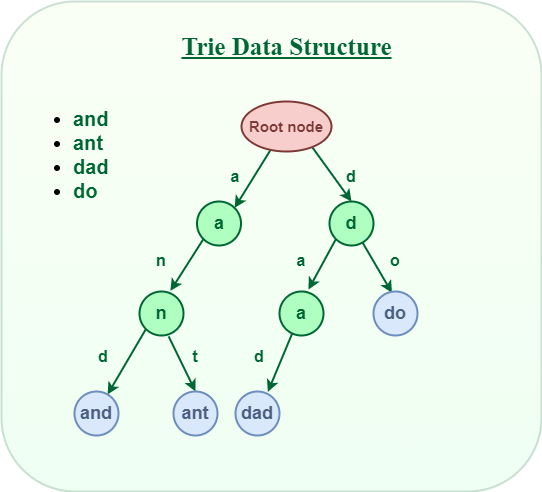
  1. Trie comes from word reTrieval.
  2. Trie is a k-way tree DS.
  3. It is optimised for retrieval where string have common prefix which are store on common nodes.

Time Complexity

  1. It has time complexity of O(N) where N is the maximum length of string.

Programmatic representation

  1. A Node is represented as class having 2 things –
    1. children representing one of 26 characters for a node.
    2. isLastNode – representing last node of string.

class TrieNode{
//representing one of 26 characters of alphabet for a node
TrieNode children;
//representing last node of string.
boolean isLastNode;
TrieNode(){
children=new TrieNode[26];
isLastNode=false;
}
}

Trie Operation and applications:

Insertion :

class TrieNode{

TrieNode children;
boolean isLastNode;

TrieNode(){
children=new TrieNode[26];
isLastNode=false;
}

}

Class Trie{
TrieNode root;
Trie(){
root=new TrieNode();
}


public static void main(){
Trie trie=new Trie;
trie.insert("parag");
trie.insert("parameter");
trie.insert("parashoot");
trie.autocomplete("para");
}
private void insert(String word){
TrieNode current=root;
}
private void autoComplete(String prefix){
TrieNode current=root;
}
}

Kafka Consumption Optimisation

  • Kafka parameters & Performance Optimization

Following are the parameters of Kafka that can be balanced one over other for performance-

  1. Partition : a partition is a logical unit of storage for messages. Each topic in Kafka can be divided into one or more partitions. Messages are stored inorder within each partition, and each message is assigned a unique identifier called an offset.
  2. Number of brokers :
  3. Number of consumer instances or no. of pods on which these instances are running
  4. Concurrency :
  5. Consumer group :
    • Use a consumer group to scale out consumption. This will allow you to distribute the load of consuming messages across multiple consumers, which can improve throughput.
  6. fetch size of batch data :

Optimal Partition Configuration-

Increase the number of partitions. This will allow more consumers to read messages in parallel, which will improve throughput. so it the partition and consumer should have 1:1 ration for better performance?

Note: Kafka related Bottlenecks will not occur while pushing the data because as in this case it depends on external source of data how fast it generates. Bottlenecks occurs when huge data on topic and limited consumer capacity (instances, capacity, consumption configuration etc).

Use cases:

Case 1: If Kafka consumer is struggling to keep up with the incoming data (suppose 170million events data lag). To decrease the lag and improve the performance of your Kafka setup, you can consider the following steps:

  1. Consumer Configuration:
    • Increase the number of consumer instances to match the partition count or even exceed it. Since you have 40 partitions, consider having at least 40 consumer instances. This ensures that each partition is consumed by a separate consumer, maximizing parallelism and throughput.
    • Tune the consumer configuration parameters to optimize performance. Specifically, consider adjusting the fetch.min.bytes, fetch.max.wait.ms, max.poll.records, and max.partition.fetch.bytes settings to balance the trade-off between latency and throughput. Experiment with different values to find the optimal configuration for your use case.
  2. Partition Configuration:
    • Assess the data distribution pattern to ensure an even distribution across partitions. If the data is skewed towards certain partitions, consider implementing a custom partitioner or using a key-based partitioning strategy to distribute the load more evenly.
    • If you anticipate further data growth or increased load, you might consider increasing the number of partitions. However, adding partitions to an existing Kafka topic requires careful planning, as it can have implications for ordering guarantees and consumer offsets.
  3. Cluster Capacity:
    • Evaluate the overall capacity and performance of your Kafka cluster. Ensure that your brokers have sufficient CPU, memory, and disk I/O resources to handle the volume of data and consumer concurrency.
    • Monitor the broker metrics to identify any potential bottlenecks. Consider scaling up your cluster by adding more brokers if necessary.
  4. Monitoring and Alerting:
    • Implement robust monitoring and alerting systems to track lag, throughput, and other relevant Kafka metrics. This enables you to proactively identify issues and take appropriate actions.
  5. Consumer Application Optimization:
    • Review your consumer application code for any potential performance bottlenecks. Ensure that your code is optimized, handles messages efficiently, and avoids any unnecessary delays or blocking operations.

Spring Kafka

Index

  1. Resources
    • v3.1 features
  2. Producer
  3. Consumer
    • consumer variations -8
    • consumer factory
  4. Todo
  5. Findings/Answers

API Docs:

  1. https://docs.spring.io/spring-kafka/docs/current/api/

For new features added in specific version of spring-kafka refer :

  1. https://docs.spring.io/spring-kafka/docs/ [refer the version from below link if not knoe–>select version > refernces>htmls]
  2. https://spring.io/projects/spring-kafka#learn

Notes to implement for performance:

https://spring.io/projects/spring-kafka#learn

linkedln :

13 ways to learn Kafka:

  1. 1. Tutorial: Official Apache Kafka Quickstart – https://lnkd.in/eVrMwgCw
  2. 2. Documentation: Official Apache Kafka Documentation – https://lnkd.in/eEU2sZvq
  3. 3. Tutorial: Kafka Learning with RedHat – https://lnkd.in/em-wsvDt
  4. 4. Read: Kafka – The Definitive Guide: Real-Time Data and Stream Processing at Scale – https://lnkd.in/ez3aCVsH
  5. 5. Course: Apache Kafka Essential Training: Getting Started – https://lnkd.in/ettejx2w
  6. 6. Read: Kafka in Action – https://lnkd.in/ed7ViYQZ
  7. 7. Course: Apache Kafka Deep Dive – https://lnkd.in/ekaB9mv6
  8. 8. Read: Apache Kafka Quick Start Guide – https://lnkd.in/e-3pSXnu
  9. 9. Course: Learn Apache Kafka for Beginners – https://lnkd.in/ewh6uUyT
  10. 10. Course: Apache Kafka Crash Course for Java and Python Developers – https://lnkd.in/e72AHUY4
  11. 11. Read: Mastering Kafka Streams and ksqlDB: Building real-time data systems by example – https://lnkd.in/eqr_DaY2
  12. 12. Course: Deploying and Running Apache Kafka on Kubernetes – https://lnkd.in/ezQ58usN
  13. 13. Course: Stream Processing Design Patterns with Kafka Streams – https://lnkd.in/egrks3rn

Kafka 3.1 features –

  1. Micrometer observations –
  2. Same broker for multiple test cases
  3. Retryable topic changes are permanent.
  4. KafkaTemplate supporting CompletableFuture(?) instead of LIstenableFuture(?).
  5. Testing Changes
    • Since 3.0.1 the application sets the default broker to application broker spring.kafka.bootstrap-servers – default embedded one.
    • .

References: https://docs.spring.io/spring-kafka/docs/current/reference/html/

Points :

  1. Starting with version 2.5 , Broker can be changed at runtime – Section “Connecting to Kafka”
    • Suport For ABSwitchCluster -one cluster active at a time