Author: sevanand yadav
software engineer working as web developer having specialization in spring MVC with mysql,hibernate
Epithet
- An epithet is a nickname or descriptive term that’s added to someone’s name that becomes part of common usage. For example, in the name Alexander the Great, “the Great” is an epithet.
- an adjective or phrase expressing a quality or attribute regarded as characteristic of the person or thing mentioned.
- a descriptive word or phrase that replaces a person, place, or object—not all adjectives are epithets.
3 Types of Epithets With Examples of Each
Familiarize yourself with the different types of epithets and epithet examples so you can use them—or in some cases, avoid using them—more purposefully and effectively:
- Fixed epithet. The repeated use of a word or phrase for the same person, place, or object. Also called the Homeric epithet, fixed epithets are commonly used in epic poetry. In Homer’s Odyssey, Odysseus is repeatedly referred to as “many-minded,” Penelope as “prudent,” and Telemachus as “sound-minded.”
- Argumentative epithet. Epithets that hint at a warning. Argumentative epithets are commonly used by orators to suggest a possible outcome. During a speech, a lawmaker might reference the negative outcomes of a past war or skirmish, strongly hinting that something similarly bad could happen if circumstances don’t change.
- Kenning. A specific epithet that’s a two-word phrase that metaphorically describes an object. Kennings are commonly found in Old English and Old Norse poetry. “Sky-candle” is a kenning for the sun and “bookworm” is a more modern kenning in the English language for a voracious reader.
| Epithet | meaning | Usage |
|---|---|---|
| Blue-Eyed | ||
| Good-for-nothing | -(of a person) lazy and feckless. | – “his good-for-nothing son” – The boy was a real terror ,they called him a little good for nothing |
| gut-feeling | an instinctive feeling, as opposed to an opinion based on facts. | – she had the Gut Feeling about the new boyfriend of her sister -My gut feeling was that this woman was a good woman. |
| weary-road | -I Have walked this weary road for so long | |
| While-Hand | ||
Linux
Record audio –
Recording audio through arecord (It will record an audio of 5 secs of U8 format and mp3 type named sample.mp3):
- arecord -d 5 -f U8 sample.mp3
- arecord -d 1800 -f U8 sample.mp3
Software Security
Aptitude
Index
- Numbers
Numbers
| S.No | Reciprocal | Fraction | % | Square | Cube | Factorial | Sq. Root | Cube Root |
|---|---|---|---|---|---|---|---|---|
| 1 | 1 | 1 | 100% | |||||
| 2 | 1/2 | 0.5 | 50% | |||||
| 3 | 1/3 | 0.33 | 33.33% | |||||
| 4 | 1/4 | 0.25 | 25% | |||||
| 5 | 1/5 | 0.20 | 20% | |||||
| 6 | 1/6 | 0.166 | 16.66% | |||||
| 7 | 1/7 | |||||||
| 8 | 1/8 | |||||||
| 9 | 1/9 | |||||||
| 10 | 1/10 | |||||||
| 11 | 1/11 | |||||||
| 12 | 1/12 | |||||||
| 13 | 1/13 | |||||||
| 14 | 1/14 | |||||||
| 15 | 1/15 | |||||||
| 16 | 1/16 | |||||||
| 17 | 1/17 | |||||||
| 18 | 1/18 | |||||||
| 19 | 1/19 | |||||||
| 20 | 1/20 | |||||||
| 21 | 1/21 | |||||||
| 22 | 1/22 | |||||||
| 23 | 1/23 | |||||||
| 24 | 1/24 | |||||||
| 25 | 1/25 | |||||||
| 26 | 1/26 | |||||||
| 27 | 1/27 | |||||||
| 28 | 1/28 | |||||||
| 29 | 1/29 | |||||||
| 30 | 1/30 | |||||||
| 31 | 1/31 | |||||||
| 31 | ||||||||
| 32 | ||||||||
Map
Tree
It’s a recursive(/Iterative) DS
Index
- Tree Theory
- Introduction
- Binary Tree
- Search- (tc -O(n) same reason as BST)
- Binary Search Tree
- Inserting node (tc -O(n) -if emenents are skewed one sided (left/right)-need to traversed the all nodes i.e height of tree to insert)
- Searching for a node (tc -O(n))
- Questions
- Tree Implementation
- Node representation
- Inserting node in BST
- Tree-traversal
- DFS
- Recursively (hard to explain in case of backtracking)
- Iteratively (using stack)
- Questions
- BFS
- Iteratively (using queue)
- Questions
- DFS
- Expression tree & Binary Tree
Topics Covered-
- Definition & Components of tree
- Where to use?
- Denoting Tree in Java
- Types of Tree
- Traversal and searching
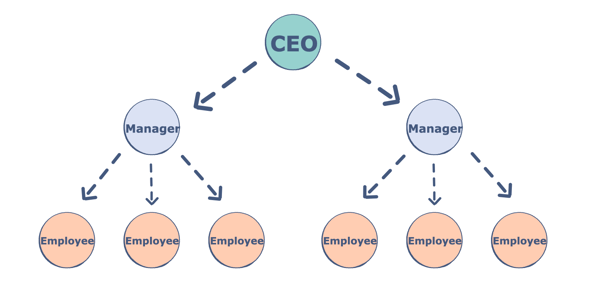
Trees are non-linear data structures. They are often used to represent hierarchical data. For a real-world example, a hierarchical company structure uses a tree to organize.
Tree have 1:N parent-child relation, if N is 2 then we call it Binary Tree
Components of a Tree
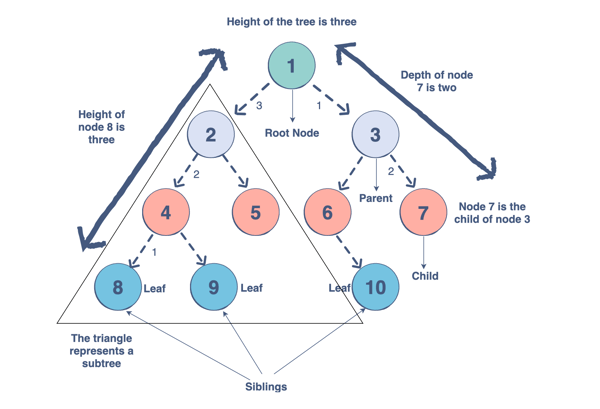
Trees are a collection of nodes (vertices), and they are linked with edges (pointers), representing the hierarchical connections between the nodes. A node contains data of any type, but all the nodes must be of the same data type. Trees are similar to graphs, but a cycle cannot exist in a tree. What are the different components of a tree?
- Root: The root of a tree is a node that has no incoming link (i.e. no parent node). Think of this as a starting point of your tree.
- Children: The child of a tree is a node with one incoming link from a node above it (i.e. a parent node). If two children nodes share the same parent, they are called siblings.
- Parent: The parent node has an outgoing link connecting it to one or more child nodes
- Leaf: A leaf has a parent node but has no outgoing link to a child node. Think of this as an endpoint of your tree.
- Subtree: A subtree is a smaller tree held within a larger tree. The root of that tree can be any node from the bigger tree.
- Depth: The depth of a node is the number of edges between that node and the root. Think of this as how many steps there are between your node and the tree’s starting point.
- Height: The height of a node is the number of edges in the longest path from a node to a leaf node. Think of this as how many steps there are between your node and the tree’s endpoint. The height of a tree is the height of its root node.
- Degree: The degree of a node refers to the number of sub-trees.
Why do we use trees?
The hierarchical structure gives a tree unique properties for storing, manipulating, and accessing data.We can use a tree for the following:
- Storage as hierarchy. Storing information that naturally occurs in a hierarchy. File systems on a computer and PDF use tree structures.
- Searching. Storing information that we want to search quickly. Trees are easier to search than a Linked List. Some types of trees (like AVL and Red-Black trees) are designed for fast searching.
- Inheritance. Trees are used for inheritance, XML parser, machine learning, and DNS, amongst many other things.
- Indexing. Advanced types of trees, like B-Trees and B+ Trees, can be used for indexing a database.
- Networking. Trees are ideal for things like social networking and computer chess games.
- Shortest path. A Spanning Tree can be used to find the shortest paths in routers for networking.
How to make a tree/?
To build a tree in Java we start with the root node.
Node<String> root = new Node<>("root");
Once we have our root, we can add our first child node using addChild, which adds a child node and assigns it to a parent node. We refer to this process as insertion (adding nodes) and deletion (removing nodes)
Node<String> node1 = root.addChild(new Node<String>("node 1"));
Types of Trees
There are many types of trees that we can use to organize data differently within a hierarchical structure.The tree we use depends on the problem we are trying to solve. Let’s take a look at the trees we can use in Java. We will be covering:
- N-ary trees
- Balanced trees
- Binary trees
- Binary Search Trees
- AVL Trees
- Red-Black Trees
- 2-3 Trees
- 2-3-4 Trees
There are 3 main types of Binary tree based on thier structureL
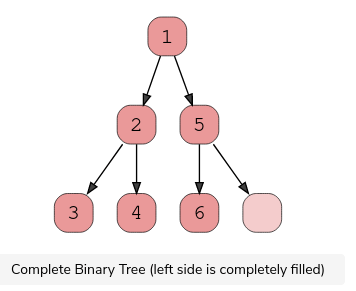
1.Complete Binary Tree
A complete binary tree exists when every level, excluding the last, is filled and all nodes at the last level are as far left as they can be. Here is a visual representation of a complete binary tree.
2.Full Binary Tree
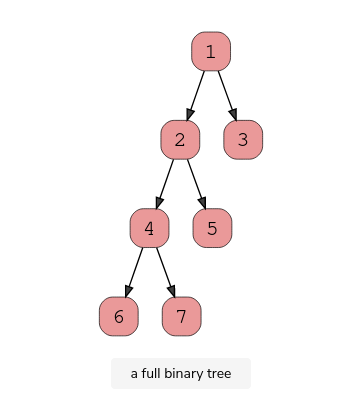
A full binary tree (sometimes called proper binary tree) exits when every node, excluding the leaves, has two children. Every level must be filled, and the nodes are as far left as possible. Look at this diagram to understand how a full binary tree looks.
3.Perfect Binary Tree
A perfect binary tree should be both full and complete. All interior nodes should have two children, and all leaves must have the same depth. Look at this diagram to understand how a perfect binary tree looks.
A perfect binary tree should be both full and complete. All interior nodes should have two children, and all leaves must have the same depth. Look at this diagram to understand how a perfect binary tree looks.
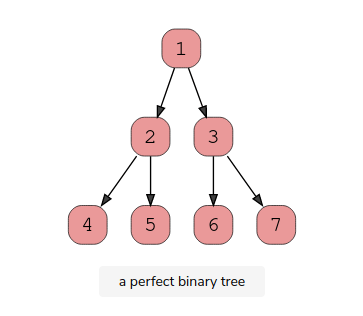
Binary Search Trees
A Binary Search Tree is a binary tree in which every node has a key and an associated value. This allows for quick lookup and edits (additions or removals), hence the name “search”.
It’s important to note that every Binary Search Tree is a binary tree, but not every binary tree is a Binary Search Tree.
What makes them different? In a Binary Search Tree, the left subtree of a subtree must contain nodes with fewer(smaller) keys than a node’s key, while the right subtree will contain nodes with keys greater than that node’s key. Take a look at this visual to understand this condition.
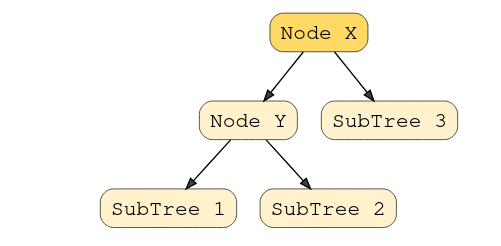
In this example, the node Y is a parent node with two child nodes. All nodes in subtree 1 must have a value less than node Y, and subtree 2 must have a greater value than node Y.
Red Black Tree (Used in HashMap Java-8)
Intro to Tree Traversal and Searching
To use trees, we can traverse them by visiting/checking every node of a tree. If a tree is “traversed”, this means every node has been visited. There are four ways to traverse a tree. These four processes fall into one of two categories: breadth-first traversal or depth-first traversal.
Note : the traversal technique – in-order, pre-order and post-order only applies to binary tree where as DFS (iteratively using stack)can also be used for general graph for traversal.
- DFS 3 OPTIONS (Position of root node)-
- In-order ,
- post-order (for deleting nodes),
- preorder (preorder expression)
- BFS – one- option
- Level order
- In-order Traversal –
- as the name suggests gives the sorted number [in ascending order]
- Think of this as moving up the tree, then back down. You traverse the left child and its sub-tree until you reach the root. Then, traverse down the right child and its subtree. This is a depth-first traversal.
- Manual traversal hind- take the traversal order (LrR)–>1st one to print is L sub-tree(take the L sub tree as a tree and apply LrR)
- Pre-order Traversal –
- Helps in creating the copy of the tree.Preorder traversal is also used to get prefix expression on of an expression tree.
- This of this as starting at the top, moving down, and then over. You start at the root, traverse the left sub-tree, and then move over to the right sub-tree. This is a depth-first traversal.
- Manual traversal hind- take the traversal order (rLR)–>1st one to print is L sub-tree(take the L sub tree as a tree and apply rLR)
- Post-order Traversal –
- Aids in deletion of nodes as it traverses the child nodes first and then the root node..so helps avoid orphan node while deleting nodes .Postorder traversal is also useful to get the postfix expression of an expression tree.
- Begin with the left-sub tree and move over to the right sub-tree. Then, move up to visit the root node. This is a depth-first traversal
- Levelorder: Think of this as a sort of zig-zag pattern. This will traverse the nodes by their levels instead of subtrees. First, we visit the root and visit all children of that root, left to right. We then move down to the next level until we reach a node that has no children. This is the left node. This is a breadth-first traversal.
Depth First Search/Traversal
Overview: We follow a path from the starting node to the ending node and then start another path until all nodes are visited. This is commonly implemented using stacks, and it requires less memory than BFS. It is best for topographical sorting, such as graph backtracking or cycle detection.
The steps for the DFS algorithm are as follows:
- Pick a node. Push all adjacent nodes into a stack.
- Pop a node from that stack and push adjacent nodes into another stack.
- Repeat until the stack is empty or you have reached your goal. As you visit nodes, you must mark them as
visitedbefore proceeding, or you will be stuck in an infinite loop.
BFS traversal -Level Order Traversal
Overview: We proceed level-by-level to visit all nodes at one level before going to the next. The BFS algorithm is commonly implemented using queues, and it requires more memory than the DFS algorithm. It is best for finding the shortest path between two nodes.
The steps for the BFS algorithm are as follows:
- Pick a node. Enqueue all adjacent nodes into a queue. Dequeue a node, and mark it as visited. Enqueue all adjacent nodes into another queue.
- Repeat until the queue is empty of you have met your goal.
- As you visit nodes, you must mark them as
visitedbefore proceeding, or you will be stuck in an infinite loop.
Application/Uses of Tree traversal – BFS traversal Application
- Copying Garbage Collection,Cheney’s Algorithm
- Finding shortest path between two nodes
- Minimum spanning tree
Linked-list
Index-
- Single Linked List
- Define the Structure and add element
- traversal
- Find loop
- Reverse link-list
- Mid element
- Delete duplicate
- Doubly Linked-list
- DLL introduction and representation
- Advantages and Disadvantages
- Adding the Nodes
- at end
- at begging
- after a given node
- before a given node
1.Define the Structure and add element
//Structure and insertion
//Step-1 - Declare a Node class (preferably in same package same class as private member)

//Step-2 : linkledlist implementation class and corresponding methods in it

public class MyLinkedListImpl<E> {
private class Node<E> {
	E key;
	Node<E> next;

	Node(E key) { //constructor with parameter of value only and next always null
		this.key = key;
		this.next = null;
	}
}

//must have the head of linklist as a node
	static Node<Integer> head;
	static MyLinkedListImpl linkedL = new MyLinkedListImpl();

	public static void main(String[] args) {
/*hard-coding the node values*/
// linkedL.head=new Node<Integer>(1);
//linkedL.head.next=new Node<Integer>(2);
/*by standard process*/
		append(5);
		append(4);
/*for traversig the nodes -call method wtih head send as parameter*/
linkedL.printNode(head);
/*finding the loop*/
 boolean hasLoop = linkedL.findaLoop();
/*way to introduce a loop*/
// linkedL.head.next.next.next.next = linkedL.head;
	head = reverseLinkedList(head);
// System.out.println("lop: " + hasLoop);

}
//Insert node at end of linked-list
private static void append(int i) {
//Step1- create a new object of node to store new node data
		Node<Integer> n1 = new Node<Integer>(i);
//if the linklist is empty then insert at top
		if (linkedL.head == null) {
			linkedL.head = n1;
		} else {
//traverse till next of node is null and link the node (simple assignment)
			Node<Integer> n = linkedL.head;
			while (n.next != null) {
				n = n.next;
			}
			n.next = n1;
		}

	}
- In above code block, methods to insert a new node in linked list are discussed. A node can be added in three ways
- 1) At the front of the linked list
- 2) After a given node.
- 3) At the end of the linked list. (above method)
//insert afrer a node
	private static boolean insertAfter(Node<Integer> afterNode, int j) {
		boolean result = false;
		if (linkedL.head == null)
			return result;
		else if (afterNode.next == null) {
			Node<Integer> newNode = new Node<Integer>(j);
			afterNode.next = newNode;
			result = true;
		} else {
			Node<Integer> newNode = new Node<Integer>(j);
			newNode.next = afterNode.next;
			afterNode.next = newNode;

			result = true;

		}
		return result;
	}
//Insert at beginning
	/**
	 * @param value Check Condition for if root element id null simple 4 step
	 */
	private static void push(int value) {
		Node<Integer> n1 = new Node<Integer>(value);
		n1.next = linkedL.head;
		linkedL.head = n1;

		// return linkedL;
	}
2.Traverse
//Traverse
	private void printNode(Node<Integer> head) {
		Node<Integer> node = head;
		while (node != null) {
			System.out.print(node.key + "--> ");
			node = node.next;
		}
		System.out.println("");

	}
3.Find Loop/Cycle
//Loop
	/**
	 * @return Fischer cycle way
	 */
	private boolean findaLoop() {
		boolean result = false;
		Node<Integer> p1 = linkedL.head;
		Node<Integer> p2 = linkedL.head;

		while (p1 != null && p2 != null && p2.next != null) {
			p1 = p1.next;
			p2 = p2.next.next;
			if (p1 == p2) {// note key are not compared the node itself is compared
				result = true;
				break;
			}
		}
		return result;
	}
4.Reverse the Linked-list
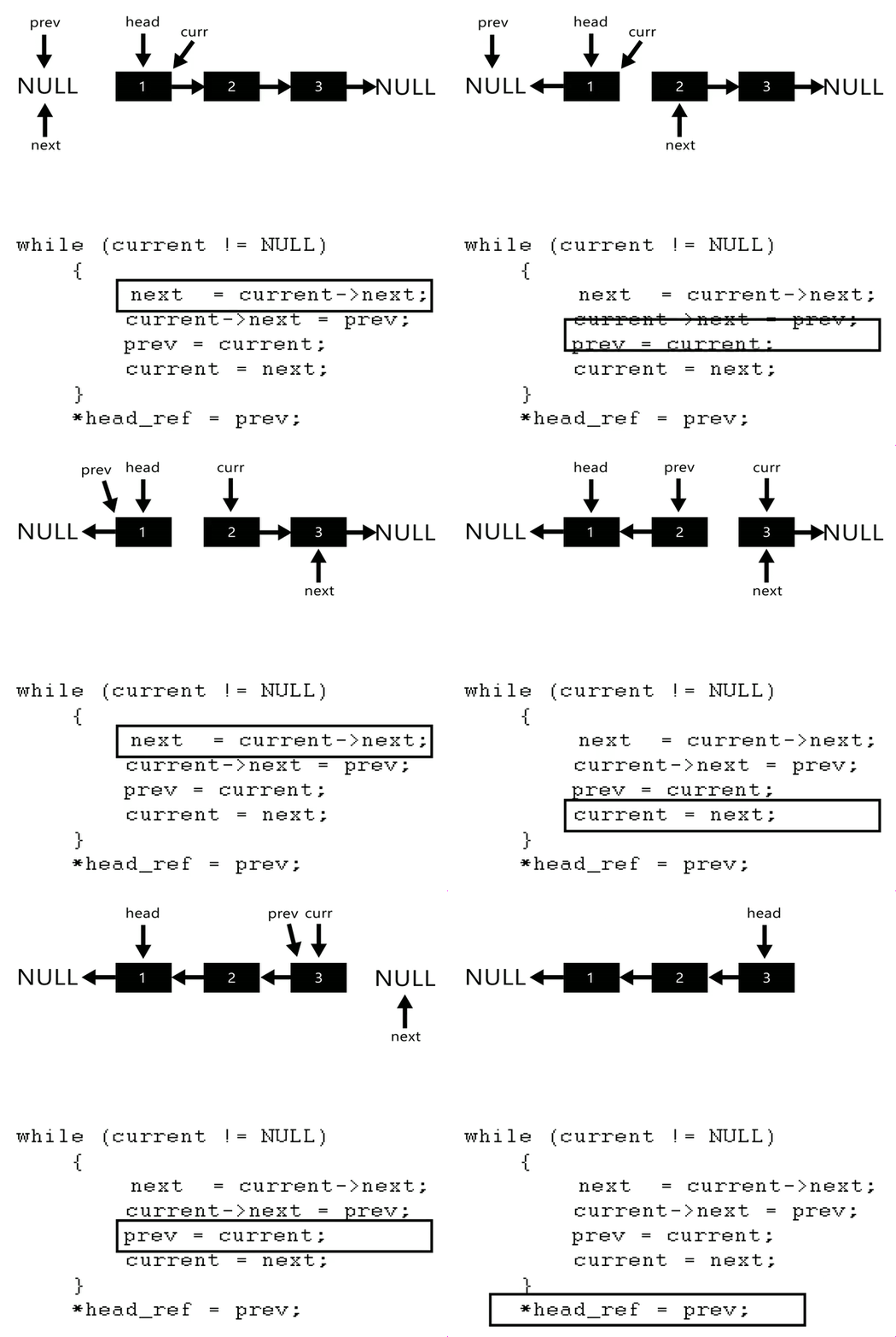
- Algorithm
- Initialize three pointers prev as NULL, curr as head and next as NULL.
- Iterate through the linked list. In loop, do following.
- / Before changing next of current,
- // store next node
- next = curr->next
- // Now change next of current
- // This is where actual reversing happens
- curr->next = prev
- // Move prev and curr one step forward
- prev = curr
- curr = next
//Reverse
	private static Node reverseLinkedList(Node head) {// problen us no link in btw
		Node current = head;
		Node next = null;
		Node prev = null;
		while (current != null) {// not next current checked so as to assign all link
			// change the linking
			next = current.next;
			current.next = prev;
			// move a step ahead
			prev = current;
			current = next;
		}
/*prev is return ed as it pointed head after reversal*/
		return prev;
	}
5.Palindrom
//PAlindrom
REcursice way
passs two SB one dring passing and one build while unwinding if bith equal then palindrome
https://www.techiedelight.com/recursively-check-linked-list-characters-palindrome-or-not
6.Center Element
//Loop
Remove Duplicate
public ListNode deleteDuplicates(ListNode head) {
HashSet hs=new HashSet<>();
ListNode h=head,prev=null;
while(h!=null){
                if(hs.add(h.val)){
                       prev=h;

                }else{
                    prev.next=h.next;
                }
                        h=h.next;

            }
    return head;
}
String
Index
- Definition
- Character at any index of string method
- Concatenation and Time complexity to concatenate
- Delete char at an index
- Reverse a string
- Sub-strings of a string
- Definition sub-string
- Sub-sequence
- Definition – sub-sequence
- LCS
- Definition – sub-sequence
Definition – Array of character is String.
Accessing characters of char-Array i.e String:
stringVariable.charAt(index);
Imagine you were concatenating a list of strings, as shown below. What would the running time of this code be? For simplicity, assume that the strings are all the same length (call this x) and that there are n strings.
String joinWords(String[) words ) {
String sentence =
for(String w : words) {
sentence = sentence + w;
}
return sentence;
}
On each concatenation, a new copy of the string is created, and the two strings are copied over, character by character. The first iteration requires us to copy x characters, The second iteration requires copying 2x characters. The third iteration requires 3x, and so on. The total time therefore i s O ( x + 2x + . . . + n x ) .
This reduces to O( xn2 ) ,
Why is it O( x n2 ) ? Because 1 + 2 + . . . + n equals n( n + l ) / 2 , or O( n2 )
StringBuffer / StringBuilder
StringBuilder/StringBuffer can help you avoid above problem. StringBuilder simply creates a resizable array of all the strings, copying them back to a string only when necessary.
String joinWords(String[] words) {
StringBuilder sentence = new StringBuilder();
for (String w : words ) {
sentence.append(w);
}
return sentence.toString() ;
}
method to delete a character from StringBuffer
void deleteChar(String word) {
word=""Hello;
StringBuilder sb = new StringBuilder(word);
int i=0;
sb.deleteCharAt(i);
System.out.println(sb);
System.out.println(sb.length());

}

//Output-
//ello
//4
Reverse the String
Solution – O(N) O(1)extra space –
//Code -to list all substrings

//Practise link - https://leetcode.com/problems/reverse-words-in-a-string-iii/discuss/1769521/Java-solution-using-two-pointers-approach
Sub-Strings of a String
Definition – a sub-string refers to a contiguous sequence of characters within a larger string. More formally, a sub-string is any portion of a string that can be specified by indicating its starting and ending points.
Algorithm
- Brute-force -TC- O(N2) – Using – 2 iteration
- iterate twice over string length – generating the sub-strings
Code
//Code -Brute-force -TC- O(N2)
void generateSubstrings(String s){
int len=s.length;

for(int i=0;i<len;i++){
  for(int j=i+1;j<len;j++){
      s.substring(i,j);
     }
   }
}
Numerology Note:
- Total no of sub-string – n(n+1)/2
- Here’s a breakdown of how the formula is derived:
- Substrings of length 1: There are nnn substrings (each character is a substring).
- Substrings of length 2: There are n−1n – 1n−1 substrings.
- Substrings of length 3: There are n−2n – 2n−2 substrings.
- And so on…
- The total number of substrings is the sum of the first n natural numbers, which is given by the formula above i.e (n)+(n-1)+(n-2) +…+1=n(n+1)/2
- Here’s a breakdown of how the formula is derived:
Sub-sequence
Definition – a subsequence refers to a sequence derived from another sequence by deleting some or none of the elements without changing the order of the remaining elements.
Algorithm 1 – using brute force(bit masking/unmasking) – TC-2^n
//using brute force(bit masking/unmasking) - TC-2^n
Numerology Note:
- Total no of sub-sequence – N2 ,where N is length of string
- Total Combinations: Since each element can be included or excluded independently of the others, the total number of possible combinations (subsequences) is the product of the choices for all elements.
- 2×2×2×…×2 (n times)=2n
Array
- Theory
- Problem solving
Introduction
An array is a collection of items stored at contiguous memory locations. The idea is to store multiple items of the same type together.
Array’s size –Fixed
In C language array has a fixed size meaning once the size is given to it, it cannot be changed i.e. you can’t shrink it neither can you expand it. The reason was that for expanding if we change the size we can’t be sure ( it’s not possible every time) that we get the next memory location to us as free. The shrinking will not work because the array, when declared, gets memory statically, and thus compiler is the only one to destroy it.
Arrays in Java
Memory allocation: In Java all arrays are dynamically allocated. (but having fixed size,the size can’t be changed once allotted whether statically or dynamically i.e more discussed below)
Array can contain primitives (int, char, etc.) as well as object (or non-primitive) references of a class depending on the definition of the array. In case of primitive data types, the actual values are stored in contiguous memory locations. In case of objects of a class, the actual objects are stored in heap segment.
1-D Array in java
//The general form of a one-dimensional array declaration is
type var-name[];
OR
type[] var-name;
Example:
// both are valid declarations
int intArray[];
or int[] intArray;
Although the first declaration above establishes the fact that intArray is an array variable, no actual array exists. It merely tells the compiler that this variable (intArray) will hold an array of the integer type. To link intArray with an actual, physical array of integers, you must allocate one using new and assign it to intArray.
Instantiating an Array in Java When an array is declared, only a reference of array is created. To actually create or give memory to array, you create an array like this:
var-name = new type [size];
To use new to allocate an array, you must specify the type and number of elements to allocate.
Note About Array
- The elements in the array allocated by new will automatically be initialized to zero (for numeric types), false (for boolean), or null (for reference types).Refer Default array values in Java
- Obtaining an array is a two-step process. First, you must declare a variable of the desired array type. Second, you must allocate the memory that will hold the array, using new, and assign it to the array variable. Thus, in Java all arrays are dynamically allocated. (But once allocated it’s of fixed size can’t be changed at runtime as in case of linked-list)
Array Literal
In a situation, where the size of the array and variables of array are already known, array literals can be used.
int[] intArray = new int[]{ 1,2,3,4,5,6,7,8,9,10 };
 // Declaring array literal
Multidimensional Arrays
Multidimensional arrays are arrays of arrays with each element of the array holding the reference of other array. These are also known as Jagged Arrays.
int[][] intArray = new int[10][20]; //a 2D array or matrix
int[][][] intArray = new int[10][20][10]; //a 3D array
Accessing Jagged array
class multiDimensional
{
	public static void main(String args[])
	{
		// declaring and initializing 2D array
		int arr[][] = { {2,7,9},{3,6,1},{7,4,2} };

		// printing 2D array
		for (int i=0; i< 3 ; i++)
		{
			for (int j=0; j < 3 ; j++)
				System.out.print(arr[i][j] + " ");

			System.out.println();
		}
	}
}
//2D Arrays Operation
	int arr[][] = { {2,7,9},{3,6,1},{7,4,2} };

//number of rows
arr.length;

//number of columns in each-row
arr[i].length;
Array Members
- The public final field length, which contains the number of components of the array. length may be positive or zero.
- All the members inherited from class Object; the only method of Object that is not inherited is its clone method.
- The public method clone(), which overrides clone method in class Object and throws no checked exceptions. (as opposed to Object’s clone method throws CloneNotSupportedException )
Array can be copied to another array using the following ways in java:
- Using variable assignment. This method has side effects as changes to the element of an array reflects on both the places. To prevent this side effect following are the better ways to copy the array elements.
- Create a new array of the same length and copy each element.
- Use the clone method of the array. Clone methods create a new array of the same size.
- Use System.arraycopy() method. arraycopy can be used to copy a subset of an array.
- Use Arrays.copyOf() to copy first few elements of array or full copy.
- Use Arrays.copyOfRange() to copy specified range of a specific array to new array.
Cloning of arrays
When you clone a single dimensional array, such as Object[], a “deep copy” (i.e 2 separate copies are maintained not referenced to same memory location) is performed with the new array containing copies of the original array’s elements as opposed to references.
public static void main(String args[])
    {
        int intArray[] = {1,2,3};

        int cloneArray[] = intArray.clone();

        // will print false as deep copy is created
        // for one-dimensional array
        System.out.println(intArray == cloneArray);

        for (int i = 0; i < cloneArray.length; i++) {
            System.out.print(cloneArray[i]+" ");
        }
    }
Output:

false
1 2 3
A clone of a multi-dimensional array (like Object[][]) is a “shallow copy” however, which is to say that it creates only a single new array with each element array a reference to an original element array, but subarrays are shared.
public static void main(String args[])
    {
        int intArray[][] = {{1,2,3},{4,5}};

        int cloneArray[][] = intArray.clone();

        // will print false
        System.out.println(intArray == cloneArray);

        // will print true as shallow copy is created
        // i.e. sub-arrays are shared
        System.out.println(intArray[0] == cloneArray[0]);
        System.out.println(intArray[1] == cloneArray[1]);

    }
Using System.arraycopy()
We can also use System.arraycopy() Method. The system is present in java.lang package. Its signature is as :
public static void arraycopy(Object src, int srcPos, Object dest,int destPos, int length)
Where:
- src denotes the source array.
- srcPos is the index from which copying starts.
- dest denotes the destination array
- destPos is the index from which the copied elements are placed in the destination array.
- length is the length of the subarray to be copied.
      int arr1[] = { 0, 1, 2, 3, 4, 5 };
      int arr2[] = { 5, 10, 20, 30, 40, 50 };
      // copies an array from the specified source array
      System.arraycopy(arr1, 0, arr2, 0, 1);
Using Arrays.copyOf( )
If you want to copy the first few elements of an array or full copy of the array, you can use this method. Its syntax is as:
public static int[] copyOf(int[] original, int newLength)
        import java.util.Arrays;
        //Example
        int a[] = { 1, 8, 3 };
        // Create an array b[] of same size as a[]
        // Copy elements of a[] to b[]
        int b[] = Arrays.copyOf(a, 3);
Using Arrays.copyOfRange()
This method copies the specified range of the specified array into a new array.
public static int[] copyOfRange(int[] original, int from, int to)
Where,
- original − This is the array from which a range is to be copied,
- from − This is the initial index of the range to be copied,
- to − This is the final index of the range to be copied, exclusive.
         import java.util.Arrays;
         int a[] = { 1, 8, 3, 5, 9, 10 };

        // Create an array b[]
        // Copy elements of a[] to b[]
        int b[] = Arrays.copyOfRange(a, 2, 6);
Overview of the above methods:
- Simply assigning reference is wrong
- The array can be copied by iterating over an array, and one by one assigning elements.
- We can avoid iteration over elements using clone() or System.arraycopy()
- clone() creates a new array of the same size, but System.arraycopy() can be used to copy from a source range to a destination range.
- System.arraycopy() is faster than clone() as it uses Java Native Interface [Todo:what is it (Different from JNI)? how enhance performance](Source : StackOverflow)
- If you want to copy the first few elements of an array or a full copy of an array, you can use Arrays.copyOf() method.
- Arrays.copyOfRange() is used to copy a specified range of an array. If the starting index is not 0, you can use this method to copy a partial array.
Advantages of using arrays:
- Arrays allow random access to elements. This makes accessing elements by position faster.
- Arrays have better cache locality that can make a pretty big difference in performance.
- Arrays represent multiple data items of the same type using a single name.
Disadvantages of using arrays:
- You can’t change the size i.e. once you have declared the array you can’t change its size because of static memory allocated to it.
- Insertion and deletion are difficult as the elements are stored in consecutive memory locations and the shifting operation is costly too
Applications on Array
- Array stores data elements of the same data type.
- Arrays can be used for CPU scheduling.
- Used to Implement other data structures like Stacks, Queues, Heaps, Hash tables, etc.
 Techglot