13. DynamoDB – NoSQL Serverless Database
Index
- Introduction
- Primary Keys
- Partition(Hash)
- Partition+Range
- WCU
- RCU
- Eventual and strong consistency
- DynamoDB -Reading Data
- DynamoDB -Reading Data (Query)
- DynamoDB -Reading Data (Scan)
- DynamoDB -Writing Data
- DynamoDB as Session state Cache
- Dynamo dB Transactions
- Dynamo dB WritesTypes
Introduction
- Traditional applications leverage RDBMS databases
- Vertical scaling (getting a more powerful CPU / RAM / IO)
- Horizontal scaling (increasing reading capability by adding EC2 / RDS Read Replicas)

NoSQL databases
- NoSQL databases scale horizontally
- There’s no “right or wrong” for NoSQL vs SQL, they just require to model the data differently and think about user queries differently
Amazon DynamoDB
- Integrated with IAM for security, authorization and administration
- Enables event driven programming with DynamoDB Streams
DynamoDB – Basics
- DynamoDB is made of Tables
- Each table has a Primary Key (must be decided at creation time)
- Each table can have an infinite number of items (= rows)
- Each item has attributes (can be added over time – can be null)
- Maximum size of an item(row) is 400KB
- Data types supported are:
- Scalar Types – String, Number, Binary, Boolean, Null
- Document Types – List, Map
- Set Types – String Set, Number Set, Binary Set
DynamoDB – Primary Keys
- Option 1: Partition Key (HASH)
- Partition key must be unique for each item
- Partition key must be “diverse” so that the data is distributed
- Option 2: Partition Key + Sort Key (HASH + RANGE
- The combination must be unique for each item
- Data is grouped by partition key
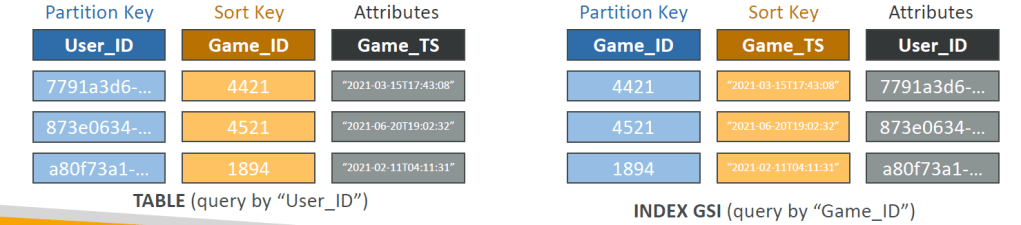
- Example: users-games table, “User_ID” for Partition Key and “Game_ID” for Sort Key
DynamoDB – Partition Keys (Exercise)
- What is the best Partition Key to maximize data distribution?
- One with the highest cardinality so it’s a good candidate
DynamoDB – Read/Write Capacity Modes
Control how you manage your table’s capacity (read/write throughput)
- Provisioned Mode (default)
- You specify the number of reads/writes per second
- You need to plan capacity beforehand
- Pay for provisioned read & write capacity units
- On-Demand Mode
- Read/writes automatically scale up/down with your workloads
- No capacity planning needed
- Pay for what you use, more expensive ($$$)
- Note- You can switch between different modes once every 24 hours
R/W Capacity Modes – Provisioned
- Table must have provisioned read and write capacity units
- Read Capacity Units (RCU) – throughput for reads
- Write Capacity Units (WCU) – throughput for writes
- Option to setup auto-scaling of throughput to meet demand
- Throughput can be exceeded temporarily using “Burst Capacity”
- If Burst Capacity has been consumed, you’ll get a “ProvisionedThroughputExceededException”
- It’s then advised to do an exponential backoff retry
DynamoDB – Write Capacity Units (WCU)
- One Write Capacity Unit (WCU) represents one write per second for an item up to 1 KB in size i.e 1WCU = 1KB/SEC
- If the items are larger than 1 KB, more WCUs are consumed
Examples
Example 1: we write 10 items per second, with item size 2 KB
• We need 10 ∗ (2) = 20 𝑊𝐶𝑈𝑠
Example 2: we write 6 items per second, with item size 4.5 KB
• We need 6 ∗ (5) = 30 𝑊𝐶𝑈𝑠 (4.5 gets rounded to the upper KB)
Example 3: we write 120 items per minute, with item size 2 KB
• We need   (120/60)*2 = 4 𝑊𝐶𝑈𝑠
Strongly Consistent ‘Read’ vs. Eventually Consistent ‘Read‘
- Eventually Consistent Read (default) If we read just after a write, it’s possible we’ll get some stale data because of replication
- Strongly Consistent Read If we read just after a write, we will get the correct data
- Set “ConsistentRead” parameter to True in API calls (GetItem, BatchGetItem, Query, Scan)
- Consumes twice the RCU
DynamoDB – Read Capacity Units (RCU)
- One Read Capacity Unit (RCU) represents one Strongly Consistent Read per second, or two Eventually Consistent Reads per second, for an item up to 4KB in size
- If the items are larger than 4 KB, more RCUs are consumed
Example 1: 10 Strongly Consistent Reads per second, with item size 4 KB
• We need 10 ∗ (4kb/4KB)= 10 𝑅𝐶𝑈𝑠
 Example 2: 16 Eventually Consistent Reads per second, with item size 12 KB
 We need (16/2)= 24 𝑅𝐶𝑈𝑠   (eventual consistency consumes 1/2 than the strong consistent )
• Example 3: 10 Strongly Consistent Reads per second, with item size 6 KB
 We need 10 ∗ ( 8/4)= 20 𝑅𝐶𝑈𝑠 (we must round up 6 KB to 8 KB)
DynamoDB – Partitions Internal
- Data is stored in partitions
- Partition Keys go through a hashing algorithm to know to which partition they go to.
- WCUs and RCUs are spread evenly across partitions
To compute the number of partitions:
• # 𝑜𝑓 𝑝𝑎𝑟𝑡𝑖𝑡𝑖𝑜𝑛𝑠(by capacity)= (RCU/3000+WRU/1000)
• # 𝑜𝑓 𝑝𝑎𝑟𝑡𝑖𝑡𝑖𝑜𝑛𝑠(by size) = (total size/10GB)
• # 𝑜𝑓 𝑝𝑎𝑟𝑡𝑖𝑡𝑖𝑜𝑛𝑠 = ceil(max # 𝑜𝑓 𝑝𝑎𝑟𝑡𝑖𝑡𝑖𝑜𝑛𝑠(BY size), # 𝑜𝑓 𝑝𝑎𝑟𝑡𝑖𝑡𝑖𝑜𝑛𝑠(by size) )
DynamoDB – Throttling
- If we exceed provisioned RCUs or WCUs, we get “ProvisionedThroughputExceededException”
- Reasons:
- Hot Keys – one partition key is being read too many times (e.g., popular item)
- Hot Partitions
- Very large items, remember RCU and WCU depends on size of items
- Solutions:
- Exponential backoff when exception is encountered (already in SDK)
- Distribute partition keys as much as possible
- If RCU issue, we can use DynamoDB Accelerator (DAX)
R/W Capacity Modes – On-Demand
- Read/writes automatically scale up/down with your workloads
- Unlimited WCU & RCU, no throttle, more expensive
- You’re charged for reads/writes that you use in terms of RRU and WRU
- Read Request Units (RRU) – throughput for reads (same as RCU)
- Write Request Units (WRU) – throughput for writes (same as WCU)
- 2.5x more expensive than provisioned capacity (use with care)
- Use cases: unknown workloads, unpredictable application traffic, …
DynamoDB – Writing Data
- PutItem
- Creates a new item or fully replace an old item (same Primary Key)
- Consumes WCUs
- UpdateItem
- Edits an existing item’s attributes or adds a new item if it doesn’t exist
- Can be used to implement Atomic Counters – a numeric attribute that’s unconditionally incremented
- Conditional Writes
- Accept a write/update/delete only if conditions are met, otherwise returns an error
- Helps with concurrent access to items
- No performance impact
DynamoDB – Reading Data
- GetItem
- Read based on Primary key
- Primary Key can be HASH or HASH+RANGE
- Eventually Consistent Read (default)
- Option to use Strongly Consistent Reads (more RCU – might take longer)
- ProjectionExpression can be specified to retrieve only certain attributes
DynamoDB – Reading Data (Query)
- Query returns items based on
- KeyConditionExpression
- Partition Key value (must be = operator) – required
- Sort Key value (=, <, <=, >, >=, Between, Begins with) – optional
- FilterExpression
- Additional filtering after the Query operation (before data returned to you)
- Use only with non-key attributes (does not allow HASH or RANGE attributes)
- KeyConditionExpression
- Returns
- The number of items specified in Limit
- Or up to 1 MB of data
- Ability to do pagination on the results
- Can query table, a Local Secondary Index, or a Global Secondary Index
DynamoDB – Reading Data (Scan)
- Scan the entire table and then filter out data (inefficient)
- Returns up to 1 MB of data – use pagination to keep on reading
- Consumes a lot of RCU
- Limit impact using Limit or reduce the size of the result and pause
- For faster performance, use Parallel Scan
- Multiple workers scan multiple data segments at the same time
- Increases the throughput and RCU consumed
- Limit the impact of parallel scans just like you would for Scans
- Can use ProjectionExpression & FilterExpression (no changes to RCU)
DynamoDB – Deleting Data
- DeleteItem
- Delete an individual item
- Ability to perform a conditional delete
- DeleteTable
- Delete a whole table and all its items
- Much quicker deletion than calling DeleteItem on all items
DynamoDB – Batch Operations
- Allows you to save in latency by reducing the number of API calls
- Operations are done in parallel for better efficiency
- Part of a batch can fail; in which case we need to try again for the failed items
- BatchWriteItem
- Up to 25 PutItem and/or DeleteItem in one call
- Up to 16 MB of data written, up to 400 KB of data per item
- Can’t update items (use UpdateItem)
- BatchGetItem
- Return items from one or more tables
- Up to 100 items, up to 16 MB of data
- Items are retrieved in parallel to minimize latency
DynamoDB – Local Secondary Index (LSI)
- Alternative Sort Key for your table (same Partition Key as that of base table)
- The Sort Key consists of one scalar attribute (String, Number, or Binary)
- Up to 5 Local Secondary Indexes per table
- Must be defined at table creation time
- Attribute Projections – can contain some or all the attributes of the base table (KEYS_ONLY, INCLUDE, ALL)

DynamoDB – Global Secondary Index (GSI)
- Alternative Primary Key (HASH or HASH+RANGE) from the base table
- Speed up queries on non-key attributes
- The Index Key consists of scalar attributes (String, Number, or Binary)
- Attribute Projections – some or all the attributes of the base table (KEYS_ONLY, INCLUDE, ALL)
- Must provision RCUs & WCUs for the index
- Can be added/modified after table creation
DynamoDB – Indexes and Throttling
- Global Secondary Index (GSI):
- If the writes are throttled on the GSI, then the main table will be throttled!
- Even if the WCU on the main tables are fine
- Choose your GSI partition key carefully!
- Assign your WCU capacity carefully!
- Local Secondary Index (LSI):
- Uses the WCUs and RCUs of the main table
- No special throttling considerations
DynamoDB – Optimistic Locking
- DynamoDB has a feature called “Conditional Writes
- A strategy to ensure an item hasn’t changed before you update/delete it
- Each item has an attribute that acts as a version number
DynamoDB Accelerator (DAX)
- Fully-managed, highly available, seamless in-memory cache for DynamoDB
- Microseconds latency for cached reads & queries
- Doesn’t require application logic modification (compatible with existing DynamoDB APIs)
- Solves the “Hot Key” problem (too many reads)
- 5 minutes TTL for cache (default)
- Up to 10 nodes in the cluster
- Multi-AZ (3 nodes minimum recommended for production)
- Secure (Encryption at rest with KMS, VPC, IAM CloudTrail)
DynamoDB Accelerator (DAX) vs. ElastiCache

DynamoDB Streams
- Ordered stream of item-level modifications (create/update/delete) in a table
- Stream records can be:
- Sent to Kinesis Data Streams
- Read by AWS Lambda
- Read by Kinesis Client Library applications
- Data Retention for up to 24 hours
- Use cases:
- react to changes in real-time (welcome email to users)
- Analytics
- Insert into derivative tables
- Ordered stream of item-level modifications (create/update/delete) in a table
- Stream records can be:
- Sent to Kinesis Data Streams
- Read by AWS Lambda
- Read by Kinesis Client Library applications
- Data Retention for up to 24 hours
- Use cases:
- react to changes in real-time (welcome email to users)
- Analytics
- Insert into derivative tables
- Insert into ElasticSearch
- Implement cross-region replication

- Ability to choose the information that will be written to the stream:
- KEYS_ONLY – only the key attributes of the modified item
- NEW_IMAGE – the entire item, as it appears after it was modified
- OLD_IMAGE – the entire item, as it appeared before it was modified
- NEW_AND_OLD_IMAGES – both the new and the old images of the item
- DynamoDB Streams are made of shards, just like Kinesis Data Streams
- You don’t provision shards, this is automated by AWS
- Records are not retroactively populated in a stream after enabling it.
DynamoDB Streams & AWS Lambda
- You need to define an Event Source Mapping to read from a DynamoDB Streams
- You need to ensure the Lambda function has the appropriate permissions
- Your Lambda function is invoked synchronously

DynamoDB – Time To Live (TTL)
- Automatically delete items after an expiry timestamp
- Doesn’t consume any WCUs (i.e., no extra cost)
- The TTL attribute must be a “Number” data type with “Unix Epoch timestamp” value
- Expired items deleted within 48 hours of expiration
- Expired items, that haven’t been deleted, appears in reads/queries/scans (if you don’t want them, filter them out)
- Expired items are deleted from both LSIs and GSIs
- A delete operation for each expired item enters the DynamoDB Streams (can help recover expired items)
- Use cases: reduce stored data by keeping only current items, adhere to regulatory obligations,
DynamoDB CLI – Good to Know
- –projection-expression: one or more attributes to retrieve
- –filter-expression: filter items before returned to you
- General AWS CLI Pagination options (e.g., DynamoDB, S3, …)
- –page-size: specify that AWS CLI retrieves the full list of items but with a larger number of API calls instead of one API call (default: 1000 items)
- —max-items: max. number of items to show in the CLI (returns NextToken)
- –-starting-token: specify the last NextToken to retrieve the next set of items
DynamoDB Transactions
- Coordinated, all-or-nothing operations (add/update/delete) to multiple items across one or more tables
- Provides Atomicity, Consistency, Isolation, and Durability (ACID)
- Read Modes – Eventual Consistency, Strong Consistency, Transactional
- Write Modes – Standard, Transactional
- Consumes 2x WCUs & RCUs
- DynamoDB performs 2 operations for every item (prepare & commit)
- Two operations: (up to 25 unique items or up to 4 MB of data)
- TransactGetItems – one or more GetItem operations
- TransactWriteItems – one or more PutItem, UpdateItem, and DeleteItem operations
- Use cases: financial transactions, managing orders, multiplayer games, …
DynamoDB Transactions – Capacity Computations (Important for the exam!)
Example1: 3 Transactional writes per second, with item size 5 KB
• We need 3 ∗ (5KB/1kb) ∗ 2 𝑡𝑟𝑎𝑛𝑠𝑎𝑐𝑡𝑖𝑜𝑛𝑎𝑙 𝑐𝑜𝑠𝑡 = 30 𝑊𝐶𝑈𝑠
Example 2: 5 Transaction reads per second , with item size 5 KB
• We need 5 ∗ (8/4) ∗ 2 𝑡𝑟𝑎𝑛𝑠𝑎𝑐𝑡𝑖𝑜𝑛𝑎𝑙 𝑐𝑜𝑠𝑡 = 20 𝑅𝐶𝑈𝑠
(5 gets rounded to the upper 4 KB)
DynamoDB as Session State Cache
- It’s common to use DynamoDB to store session states
- vs. ElastiCache
- ElastiCache is in-memory, but DynamoDB is serverless
- Both are key/value stores
- vs. EFS
- EFS must be attached to EC2 instances as a network drive
- vs. EBS & Instance Store
- EBS & Instance Store can only be used for local caching, not shared caching
- vs. S3
- S3 is higher latency, and not meant for small objects
DynamoDB Write Sharding
- Imagine we have a voting application with two candidates, candidate A and candidate B.
- If Partition Key is “Candidate_ID”, this results into two partitions, which will generate issues (e.g., Hot Partition)
- A strategy that allows better distribution of items evenly across partitions
- Add a suffix to Partition Key value
- Two methods
- Sharding Using Random Suffix
- Sharding Using Calculated Suffix

DynamoDB – Write Types

DynamoDB Operations
- Table Cleanup
- Option 1: Scan + DeleteItem
- Very slow, consumes RCU & WCU, expensive
- Option 2: Drop Table + Recreate table
- Fast, efficient, cheap
- Option 1: Scan + DeleteItem
- Copying a DynamoDB Table
- Option 1: Using AWS Data Pipeline
- Option 2: Backup and restore into a new table
- Takes some time
- Option 3: Scan + PutItem or BatchWriteItem
- Write your own code
DynamoDB – Security & Other Features
- Security
- VPC Endpoints available to access DynamoDB without using the Internet
- Access fully controlled by IAM
- Encryption at rest using AWS KMS and in-transit using SSL/TLS
- Backup and Restore feature available
- Point-in-time Recovery (PITR) like RDS
- No performance impact
- Global Tables
- Multi-region, multi-active, fully replicated, high performance
- DynamoDB Local
- Develop and test apps locally without accessing the DynamoDB web service (without Internet)
- AWS Database Migration Service (AWS DMS) can be used to migrate to DynamoDB (from MongoDB, Oracle, MySQL, S3, …)
DynamoDB – Fine-Grained Access Control
- Using Web Identity Federation or Cognito Identity Pools, each user gets AWS credentials
- You can assign an IAM Role to these users with a Condition to limit their API access to DynamoDB
- LeadingKeys – limit row-level access for users on the Primary Key
- Attributes – limit specific attributes the user can see


 Techglot