14.API Gateway
Build, Deploy and Manage APIs
Index
- Introduction
- Integration with other services
- API Gateway- endpoints Types
- Deployment stages
- API Gateway Integration Types
- Caching API Responses
- API Gateway- Usage plans and API Keys
- API Gateway throlleling
- API Gateway – errors
- API Gateway – CORS
- API Gateway – SECURITY
- API Gateway – HTTP API vs Rest API
- API Gateway – web Socket
- connecting Api
- API Gateway Architecture
- Introduction
- AWS Lambda + API Gateway: No infrastructure to manage
- Handle different environments (dev, test, prod…)
- Handle security (Authentication and Authorization)
- Create API keys, handle request throttling
- Integration with other services
- Lambda Function
- Easy way to expose REST API backed by AWS Lambda
- HTTP
- Expose HTTP endpoints in the backend
- Why? Add rate limiting, caching, user authentications, API keys, etc…
- AWS Service
- Expose any AWS API through the API Gateway?
- Example: start an AWS Step Function workflow, post a message to SQS
- Why? Add authentication, deploy publicly, rate control…
- API Gateway endpoints Types
- Edge-Optimized (default): For global clients
- Requests are routed through the CloudFront Edge locations (improves latency
- The API Gateway still lives in only one region
- Regional:
- For clients within the same region
- Could manually combine with CloudFront (more control over the caching strategies and the distribution)
- Private:
- Can only be accessed from your VPC using an interface VPC endpoint (ENI)
- Use a resource policy to define access
- Deployment stages
- Making changes in the API Gateway does not mean they’re effective
- You need to make a “deployment” for them to be in effect
- It’s a common source of confusion
- Changes are deployed to “Stages” (as many as you want)
- Use the naming you like for stages (dev, test, prod)
- Each stage has its own configuration parameters
- Stages can be rolled back as a history of deployments is kept
API Gateway – Stage Variables
- Stage variables are like environment variables for API Gateway
- They can be used in:
- Lambda function ARN
- HTTP Endpoint
- Parameter mapping templates
- Use cases:
- Configure HTTP endpoints your stages talk to (dev, test, prod…)
- Pass configuration parameters to AWS Lambda through mapping templates
- Stage variables are passed to the ”context” object in AWS Lambda
API Gateway – Canary Deployment
- Possibility to enable canary deployments for any stage (usually prod)
- Choose the % of traffic the canary channel receives(say 5%)
- Possibility to override stage variables for canary
- This is blue / green deployment with AWS Lambda & API Gateway
- API Gateway Integration Types
- Integration Type MOCK
- API Gateway returns a response without sending the request to the backend
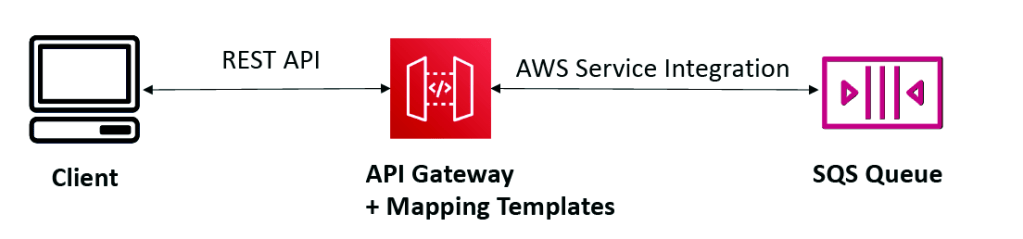
- Integration Type HTTP / AWS (Lambda & AWS Services)
- you must configure both the integration request and integration response
- Setup data mapping using mapping templates for the request & response
- Integration Type AWS_PROXY (Lambda Proxy):
- incoming request from the client is the input to Lambda
- The function is responsible for the logic of request / response
- No mapping template, headers, query string parameters… are passed as arguments
- Integration Type HTTP_PROXY
- No mapping template
- The HTTP request is passed to the backend
- The HTTP response from the backend is forwarded by API Gateway

Mapping Templates (AWS & HTTP Integration)
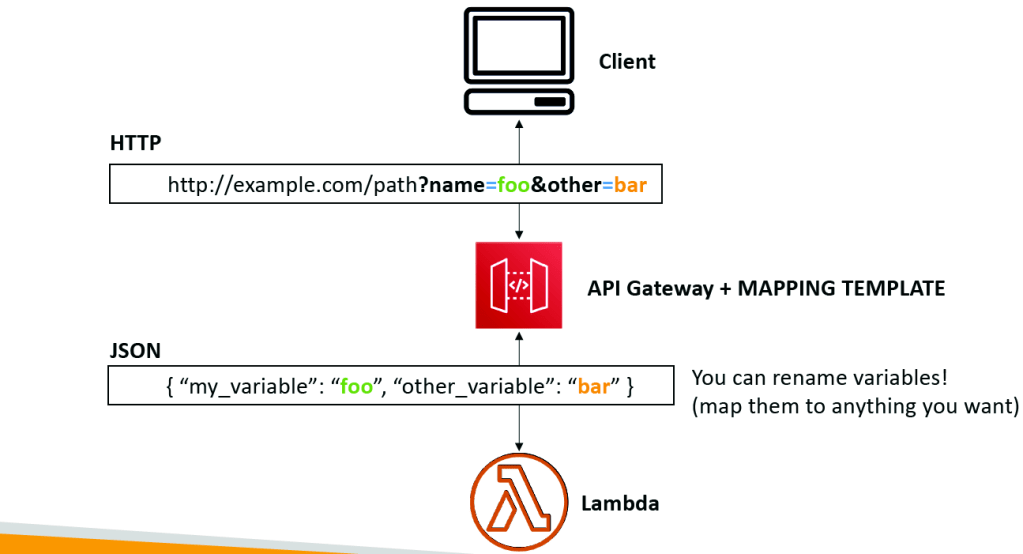
- Mapping templates can be used to modify request / responses
- Rename / Modify query string parameters
- Modify body content
- Add headers
- Uses Velocity Template Language (VTL): for loop, if etc…
- Filter output results (remove unnecessary data)
- Mapping Example: JSON to XML with SOAP
- Mapping Example: Query String parameters

- Caching API Responses
- Caching reduces the number of calls made to the backend
- Default TTL (time to live) is 300 seconds (min: 0s, max: 3600s)
- Caches are defined per stage
- Possible to override cache settings per method
- Cache capacity between 0.5GB to 237GB
- Cache is expensive, makes sense in production, may not make sense in dev / test
- Cache Invalidation
- Clients can invalidate the cache with header: Cache- Control: max-age=0 (with proper IAM authorization)
- If you don’t impose an InvalidateCache policy (or choose the Require authorization check box in the console), any client can invalidate the API cache
- API Gateway- Usage plans and API Keys
If you want to make an API available as an offering ($) to your customers
- Usage Plan
- who can access one or more deployed API stages and methods
- how much and how fast they can access them
- uses API keys to identify API clients and meter access
- configure throttling limits and quota limits that are enforced on individual client
- API Keys:
- alphanumeric string values to distribute to your customers
- Usage Plan
- who can access one or more deployed API stages and methods
- how much and how fast they can access them
- uses API keys to identify API clients and meter access
- configure throttling limits and quota limits that are enforced on individual client
- API Keys:
- alphanumeric string values to distribute to your customers
- Ex: WBjHxNtoAb4WPKBC7cGm64CBibIb24b4jt8jJHo9
- Can use with usage plans to control access
- Throttling limits are applied to the API keys
- Quotas limits is the overall number of maximum requests
- Callers of the API must supply an assigned API key in the x-api-key header in requests to the API.
- API Gateway throttling
- API Gateway throttles requests at 10,000 rps across all API
- Soft limit that can be increased upon request
- In case of throttling => 429 Too Many Requests (retriable error)
- Can set Stage limit & Method limits to improve performance
- Or you can define Usage Plans to throttle per customer
- Just like Lambda Concurrency, one API that is overloaded, if not limited, can cause the other APIs to be throttled.
- API Gateway – errors
- 4xx means Client errors
- 400: Bad Request
- 403: Access Denied, WAF filtered
- 429: Quota exceeded, Throttle
- 5xx means Server errors
- 502: Bad Gateway Exception, usually for an incompatible output returned from a Lambda proxy integration backend and occasionally for out-of-order invocations due to heavy loads.
- 503: Service Unavailable Exception
- 504: Integration Failure – ex Endpoint Request Timed-out Exception,API Gateway requests time out after 29 second maximum
- API Gateway – CORS
- CORS must be enabled when you receive API calls from another domain.
- The OPTIONS pre-flight request must contain the following headers:
- Access-Control-Allow-Methods
- Access-Control-Allow-Headers
- Access-Control-Allow-Origin
- API Gateway – SECURITY
- IAM Permissions
- Create an IAM policy authorization and attach to User / Role
- Authentication = IAM | Authorization = IAM Policy
- Good to provide access within AWS (EC2, Lambda, IAM users…)
- Leverages “Sig v4” capability where IAM credential are in headers
- API Gateway – Resource Policies
- Resource policies (similar to Lambda Resource Policy)
- Allow for Cross Account Access (combined with IAM Security)
- Allow for a specific source IP address
- Allow for a VPC Endpoint
- Cognito User Pools
- Cognito fully manages user lifecycle, token expires automatically
- API gateway verifies identity automatically from AWS Cognito
- Authentication = Cognito User Pools | Authorization = API Gateway Methods
- Lambda Authorizer (formerly Custom Authorizers)
- Token-based authorizer (bearer token) – ex JWT (JSON Web Token) or Oauth
- A request parameter-based Lambda authorizer (headers, query string, stage var)
- Lambda must return an IAM policy for the user, result policy is cached
- Authentication = External | Authorization = Lambda function
- Pay per Lambda invocation, results are cached
- API Gateway – HTTP API vs Rest API
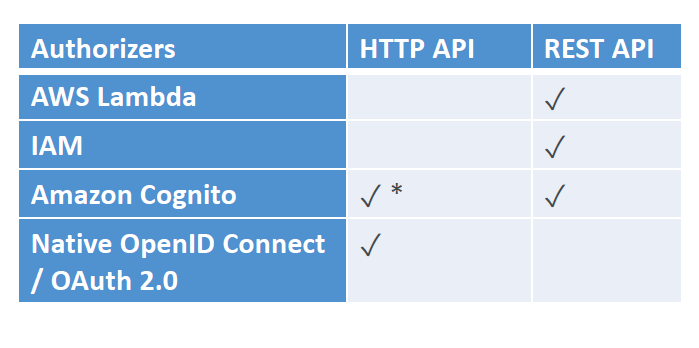
- HTTP APIs
- low-latency, cost-effective AWS Lambda proxy, HTTP proxy APIs and private integration (no data mapping
- support OIDC and OAuth 2.0 authorization, and built-in support for CORS
- No usage plans and API keys
- REST APIs
- All features (except Native OpenID Connect / OAuth 2.0)
- API Gateway – web Socket
- What’s WebSocket?
- Two-way interactive communication between a user’s browser and a server
- Server can push information to the client
- This enables stateful application use cases
- WebSocket APIs are often used in realtime applications such as chat applications, collaboration platforms, multiplayer games, and financial trading platforms.
- Works with AWS Services (Lambda DynamoDB) or HTTP endpoints
- Connecting API
- WebSocket URL
- wss://[some-uniqueid].execute-api.[region].amazonaws.com/[stage-name]
- Client to Server Messaging
- ConnectionID is re-used

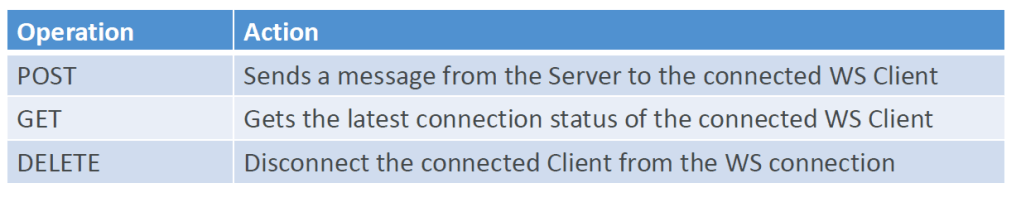
- Server to Client messaging
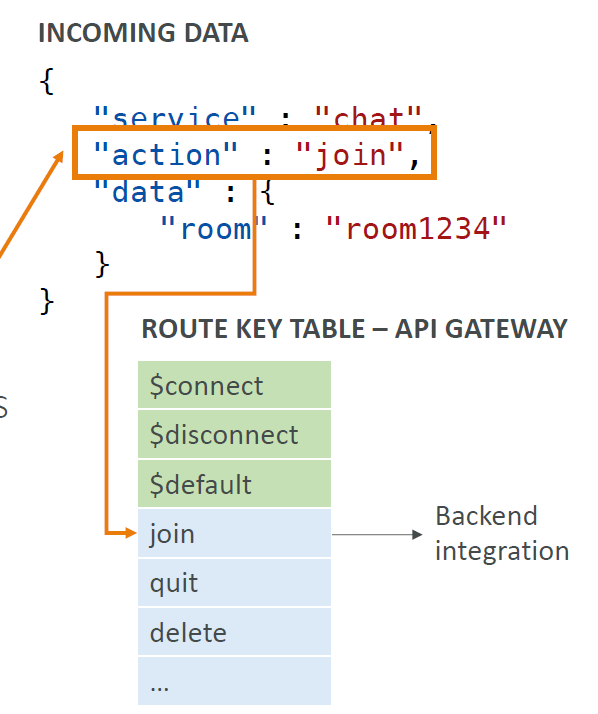
API Gateway – WebSocket API – Routing
- Incoming JSON messages are routed to different backend
- If no routes => sent to $default
- You request a route selection expression to select the field on JSON to route from
- Sample expression: $request.body.action
- The result is evaluated against the route keys available in your API Gateway
- The route is then connected to the backend you’ve setup through API Gateway
- API Gateway Architecture
- Create a single interface for all the microservices in your company
- Use API endpoints with various resources
- Apply a simple domain name and SSL certificates

 Techglot