17.Monitoring,Logging, Auditing
Index
- Monitoring Overview in AWS
- CloudWatch
- CloudWatch Metrics
- CloudWatch Custom Metrics
- CloudWatch Logs
- CloudWatch Logs Hands On
- CloudWatch Agent & CloudWatch Logs Agent
- CloudWatch Logs Metric Filters
- CloudWatch Alarms
- CloudWatch Alarms Hands On
- CloudWatch Events
- EventBridge Overview
- EventBridge Hands On
- X-Ray Overview
- X-Ray Hands On
- X-Ray: Instrumentation and Concepts
- X-Ray: Sampling Rules
- X-Ray APIs
- X-Ray with Beanstalk
- X-Ray & ECS
- CloudTrail
- CloudTrail Hands On
- CloudTrail vs CloudWatch vs X-Ray
Monitoring Overview in AWS
- AWS CloudWatch:
- Metrics: Collect and track key metrics
- Logs: Collect, monitor, analyze and store log files
- Events: Send notifications when certain events happen in your AWS
- Alarms: React in real-time to metrics / events
- AWS X-Ray:
- Troubleshooting application performance and errors
- Distributed tracing of microservices
- AWS CloudTrail:
- Internal monitoring of API calls being made
- Audit changes to AWS Resources by your users
AWS CloudWatch Metrics
- CloudWatch provides metrics for every services in AWS
- Metric is a variable to monitor (CPUUtilization, NetworkIn…)
- Metrics belong to namespaces
- Dimension is an attribute of a metric (instance id, environment, etc…).
- Up to 10 dimensions per metric
- Metrics have timestamps
- Can create CloudWatch dashboards of metrics
EC2 Detailed monitoring
- EC2 instance metrics have metrics “every 5 minutes
- With detailed monitoring (for a cost), you get data “every 1 minute”
- Use detailed monitoring if you want to scale faster for your ASG!
- The AWS Free Tier allows us to have 10 detailed monitoring metrics
- Note: EC2 Memory usage is by default not pushed (must be pushed from inside the instance as a custom metric)
CloudWatch Custom Metrics
- Possibility to define and send your own custom metrics to CloudWatch
- Example: memory (RAM) usage, disk space, number of logged in users …
- Use API call PutMetricData
- Ability to use dimensions (attributes) to segment metrics
- Instance.id
- Environment.name
- Metric resolution (StorageResolution API parameter – two possible value):
- Standard: 1 minute (60 seconds)
- High Resolution: 1/5/10/30 second(s) – Higher cost
- Important: Accepts metric data points two weeks in the past and two hours in the future (make sure to configure your EC2 instance time correctly)
CloudWatch Logs
- Log groups: arbitrary name, usually representing an application
- Log stream: instances within application / log files / containers
- Can define log expiration policies (never expire, 30 days, etc..)
- CloudWatch Logs can send logs to
- Amazon S3 (exports)
- • Kinesis Data Streams
- • Kinesis Data Firehose
- • AWS Lambda
- • ElasticSearch
CloudWatch Logs – Sources
- SDK, CloudWatch Logs Agent, CloudWatch Unified Agent
- • Elastic Beanstalk: collection of logs from application
- • ECS: collection from containers
- • AWS Lambda: collection from function logs
- • VPC Flow Logs: VPC specific logs
- • API Gateway
- • CloudTrail based on filter
- • Route53: Log DNS queries
CloudWatch Logs Metric Filter & Insights
- CloudWatch Logs can use filter expressions
- For example, find a specific IP inside of a log
- Or count occurrences of “ERROR” in your logs
- Metric filters can be used to trigger CloudWatch alarms
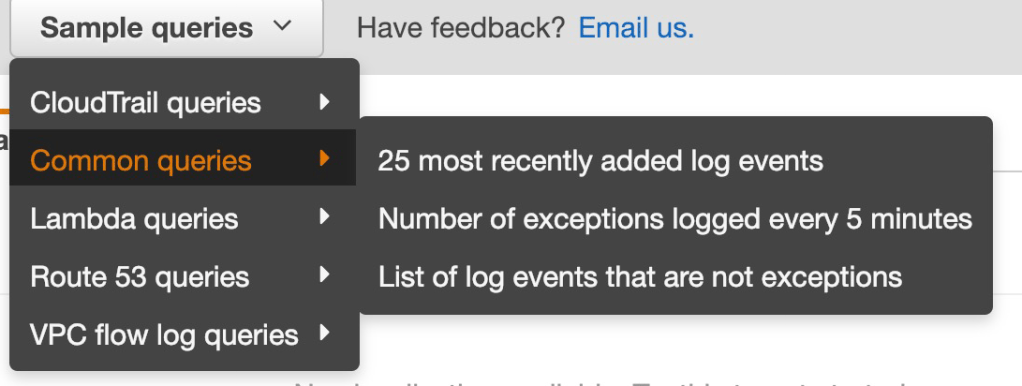
- CloudWatch Logs Insights can be used to query logs and add queries to CloudWatch Dashboards
CloudWatch Logs – S3 Export
- Log data can take up to 12 hours to become available for export
- The API call is CreateExportTask
- Not near-real time or real-time… use Logs Subscriptions instead
CloudWatch Logs for EC2
- By default, no logs from your EC2 machine will go to CloudWatch
- You need to run a CloudWatch agent on EC2 to push the log files
- Make sure IAM permissions are coorect
- The CloudWatch log agent can be setup on-premises too
CloudWatch Logs Agent & Unified Agent
- For virtual servers (EC2 instances, on-premise servers…)
- CloudWatch Logs Agent
- Old version of the agent
- Can only send to CloudWatch Logs
- CloudWatch Unified Agent
- Collect additional system-level metrics such as RAM, processes, etc…
- Collect logs to send to CloudWatch Logs
- Centralized configuration using SSM Parameter Store
CloudWatch Unified Agent – Metrics
- Collected directly on your Linux server / EC2 instance
- CPU (active, guest, idle, system, user, steal)
- • Disk metrics (free, used, total), Disk IO (writes, reads, bytes, iops)
- • RAM (free, inactive, used, total, cached)
- • Netstat (number of TCP and UDP connections, net packets, bytes)
- • Processes (total, dead, bloqued, idle, running, sleep)
- • Swap Space (free, used, used %)
- Reminder: out-of-the box metrics for EC2 – disk, CPU, network (high level)
CloudWatch Logs Metric Filter
- CloudWatch Logs can use filter expressions
- • For example, find a specific IP inside of a log
- • Or count occurrences of “ERROR” in your logs
- • Metric filters can be used to trigger alarms
- • Filters do not retroactively filter data. Filters only publish the metric datapoints for events that happen after the filter was created.
CloudWatch Alarms
- • Alarms are used to trigger notifications for any metric
- • Various options (sampling, %, max, min, etc…)
- • Alarm States:
- • OK
- • INSUFFICIENT_DATA
- • ALARM
- • Period:
- • Length of time in seconds to evaluate the metric
- • High resolution custom metrics: 10 sec, 30 sec or multiples of 60 sec
CloudWatch Alarm Targets
- • Stop, Terminate, Reboot, or Recover an EC2 Instance
- • Trigger Auto Scaling Action
- • Send notification to SNS (from which you can do pretty much anything)
EC2 Instance Recovery
- Status Check:
- Instance status = check the EC2 VM
- System status = check the underlying hardware
- Recovery: Same Private, Public, Elastic IP, metadata, placement group
CloudWatch Alarm: good to know
- Alarms can be created based on CloudWatch Logs Metrics Filters
- To test alarms and notifications, set the alarm state to Alarm using CLI
aws cloudwatch set-alarm-state –alarm-name “myalarm” –state-value
ALARM –state-reason “testing purposes
CloudWatch Events
- Event Pattern: Intercept events from AWS services (Sources
- Example sources: EC2 Instance Start, CodeBuild Failure, S3, Trusted Advisor
- Can intercept any API call with CloudTrail integration
- Schedule or Cron (example: create an event every 4 hours
- A JSON payload is created from the event and passed to a target
- Compute: Lambda, Batch, ECS task
- • Integration: SQS, SNS, Kinesis Data Streams, Kinesis Data Firehose
- • Orchestration: Step Functions, CodePipeline, CodeBuild
- • Maintenance: SSM, EC2 Actions
EventBridge Overview
- EventBridge is the next evolution of CloudWatch Events
- • Default event bus: generated by AWS services (CloudWatch Events)
- • Partner event bus: receive events from SaaS service or applications
- (Zendesk, DataDog, Segment, Auth0…)
- • Custom Event buses: for your own applications
- • Event buses can be accessed by other AWS accounts
- • Rules: how to process the events (similar to CloudWatch Events)
Amazon EventBridge Schema Registry
- EventBridge can analyze the events in your bus and infer the schema
- The Schema Registry allows you to generate code for your application, that will know in advance how data is structured in the event bus
- Schema can be versioned
Amazon EventBridge vs CloudWatch Events
- • Amazon EventBridge builds upon and extends CloudWatch Events.
- • It uses the same service API and endpoint, and the same underlying service infrastructure.
- • EventBridge allows extension to add event buses for your custom applications and your third-party SaaS apps.
- • Event Bridge has the Schema Registry capability
- • EventBridge has a different name to mark the new capabilities
- • Over time, the CloudWatch Events name will be replaced with EventBridge
AWS X-Ray Overview
- Debugging in Production, the good old way:
- • Test locally
- • Add log statements everywhere
- • Re-deploy in production
- • Log formats differ across applications using CloudWatch and analytics is hard.
- • Debugging: monolith “easy”, distributed services “hard”
- • No common views of your entire architecture!
- • Enter… AWS X-Ray!
AWS X-Ray advantages
- Troubleshooting performance (bottlenecks)
- • Understand dependencies in a microservice architecture
- • Pinpoint service issues
- • Review request behavior
- • Find errors and exceptions
- • Are we meeting time SLA?
- • Where I am throttled?
- • Identify users that are impacted
X-Ray: In
AWS X-Ray Leverages Tracing
- • Tracing is an end to end way to following a “request”
- • Each component dealing with the request adds its own “trace”
- • Tracing is made of segments (+ sub segments)
- • Annotations can be added to traces to provide extra-information
- • Ability to trace:
- • Every request
- • Sample request (as a % for example or a rate per minute)
- • X-Ray Security:
- • IAM for authorization
- • KMS for encryption at rest
AWS X-Ray How to enable it?
- Your code (Java, Python, Go, Node.js, .NET) must import the AWS X-Ray SDK
- • Very little code modification needed
- • The application SDK will then capture:
- • Calls to AWS services
- • HTTP / HTTPS requests
- • Database Calls (MySQL, PostgreSQL, DynamoDB)
- • Queue calls (SQS)
- Install the X-Ray daemon or enable X-Ray AWS Integration
- X-Ray daemon works as a low level UDP packet interceptor (Linux / Windows / Mac…)
- AWS Lambda / other AWS services already run the X-Ray daemon for you
- Each application must have the IAM rights to write data to X-Ray
X-Ray Instrumentation in your code
- Instrumentation means the measure of product’s performance, diagnose errors, and to write trace information.
- • To instrument your application code, you use the X-Ray SDK
- • Many SDK require only configuration changes
- • You can modify your application code to customize and annotation the data that the SDK sends to XRay, using interceptors, filters, handlers, middleware
X-Ray Concepts
- • Segments: each application / service will send them
- • Subsegments: if you need more details in your segment
- • Trace: segments collected together to form an end-to-end trace
- • Sampling: decrease the amount of requests sent to X-Ray, reduce cost
- • Annotations: Key Value pairs used to index traces and use with filters
- • Metadata: Key Value pairs, not indexed, not used for searching
The X-Ray daemon / agent has a config to send traces cross account:
• make sure the IAM permissions are correct – the agent will assume the role
• This allows to have a central account for all your application tracing
X-Ray: Sampling Rules
- With sampling rules, you control the amount of data that you record
- You can modify sampling rules without changing your code
- By default, the X-Ray SDK records the first request each second, and five percent of any additional requests.
- One request per second is the reservoir, which ensures that at least one trace is recorded each second as long the service is serving requests
- Five percent is the rate at which additional requests beyond the reservoir size are sampled
X-Ray Write APIs (used by the X-Ray daemon)
- PutTraceSegments: Uploads segment documents to AWS X-Ray
- PutTelemetryRecords: Used by the AWS X-Ray daemon to upload telemetry.
- SegmentsReceivedCount,
- SegmentsRejectedCounts,
- BackendConnectionErrors
- GetSamplingRules: Retrieve all sampling rules (to know what/when to send)
- GetSamplingTargets & GetSamplingStatisticSummaries: advanced
- The X-Ray daemon needs to have an IAM policy authorizing the correct API calls
X-Ray Read APIs –
- GetServiceGraph: main graph
- BatchGetTraces: Retrieves a list of traces specified by ID. Each trace is a collection of segment documents that originates from a single request.
- GetTraceSummaries: Retrieves IDs and annotations for traces available for a specified time frame using an optional filter. To get the full traces, pass the trace IDs to BatchGetTraces
- GetTraceGraph: Retrieves a service graph for one or more specific traceIDs
X-Ray with Beanstalk
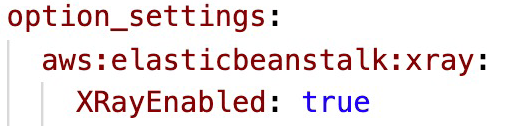
- You can run the daemon by setting an option in the Elastic Beanstalk console or with a configuration file (in .ebextensions/xray-daemon.config)
- Note: The X-Ray daemon is not provided for Multicontainer Docker
X-Ray & ECS
AWS CloudTrail
- Provides governance, compliance and audit for your AWS Account
- • CloudTrail is enabled by default!
- • Get an history of events / API calls made within your AWS Account by:
- • Console
- • SDK
- • CLI
- • AWS Services
- • Can put logs from CloudTrail into CloudWatch Logs or S3
- • A trail can be applied to All Regions (default) or a single Region.
- • If a resource is deleted in AWS, investigate CloudTrail first!
CloudTrail Events
- • Management Events:
- • Operations that are performed on resources in your AWS account
- • Examples:
- • Configuring security (IAM AttachRolePolicy)
- • Configuring rules for routing data (Amazon EC2 CreateSubnet)
- • Setting up logging (AWS CloudTrail CreateTrail)
- • By default, trails are configured to log management events.
- • Can separate Read Events (that don’t modify resources) from Write Events (that may modify resources)
- • Data Events:
- • By default, data events are not logged (because high volume operations)
- • Amazon S3 object-level activity (ex: GetObject, DeleteObject, PutObject): can separate Read and Write Events
- • AWS Lambda function execution activity (the Invoke API)
- • CloudTrail Insights Events:
- Enable CloudTrail Insights to detect unusual activity in your account:
- • inaccurate resource provisioning
- • hitting service limits
- • Bursts of AWS IAM actions
- • Gaps in periodic maintenance activity
- • CloudTrail Insights analyzes normal management events to create a baseline
- • And then continuously analyzes write events to detect unusual patterns
- • Anomalies appear in the CloudTrail console
- • Event is sent to Amazon S3
- • An EventBridge event is generated (for automation needs)
- Enable CloudTrail Insights to detect unusual activity in your account:
CloudTrail Events Retention
- Events are stored for 90 days in CloudTrail
- To keep events beyond this period, log them to S3 and use Athena
CloudTrail vs CloudWatch vs X-Ray
- CloudTrail:
- • Audit API calls made by users / services / AWS console
- • Useful to detect unauthorized calls or root cause of changes
- • CloudWatch:
- • CloudWatch Metrics over time for monitoring
- • CloudWatch Logs for storing application log
- • CloudWatch Alarms to send notifications in case of unexpected metrics
- • X-Ray:
- • Automated Trace Analysis & Central Service Map Visualization
- • Latency, Errors and Fault analysis
- • Request tracking across distributed systems

 Techglot