- EBT- Bean Stack
- Developers upload applications and Elastic Beanstalk handles the deployment details of capacity provisioning, load balancing, auto-scaling, and application health monitoring
- Elastic Beanstalk automatically scales your application up and down.
- You maintain full control of the underlying resources
- The Managed Platform Updates feature automatically applies updates for your operating system, Java, PHP, Node.js etc
- AWS CloudFormation is used by Elastic Beanstalk to deploy the resources
There are several layers:
- Applications:
- Contain environments, environment configurations, and application versions.
- You can have multiple application versions held within an application
AWS Elastic Beanstalk Deployment Policies
- All at once – Deploys the new version to all instances simultaneously
- If the update fails, you need to roll back the changes by re-deploying the original version to all of your instances
- No additional cost
- Rolling – Update a batch of instances, and then move onto the next batch once the first batch healthy
- Each batch of instances is taken out of service while the deployment takes place.
- Not ideal for performance-sensitive systems.
- No additional cost
- Rolling with additional batch: Like Rolling but launches new instances in a batch ensuring that there is full availability
- Application is running both versions simultaneously
- Small additional cost.
- Additional batch is removed at the end of the deployment
- Good for production environments
- Immutable: Launches new instances in a new ASG and deploys the version update to these instances before swapping traffic to these instances once healthy
- New code is deployed to new instances using an ASG
- High cost as double the number of instances running during updates
- Great for production environments
- Blue/green – Create a new “stage” environment and deploy updates there
- This is not a feature within Elastic Beanstalk
- You create a new “staging” environment and deploy updates there
- The new environment (green) can be validated independently and you can roll back if there are issues.
- Route 53 can be setup using weighted policies to redirect a a percentage of traffic to the staging environment.
- Using Elastic Beanstalk, you can “swap URLs” when done with the environment test
AWS Elastic Beanstalk – .ebextensions
- Configuration files are YAML- or JSON-formatted documents with a .config file extension that you place in a folder named .ebextensions and deploy in your application source bundle.
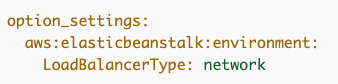
- The option_settings section of a configuration file defines values for configuration options.
- The other sections of a configuration file (packages, sources, files, users groups, commands, container_commands, and services) let you configure the EC2 instances that are launched in your environment.
AWS Elastic Beanstalk – HTTPS
- Can assign a server certificate to your environment’s load balancer :
- Can be configured through the console.
- This secures the connection between the client (app user) and the load balancer
- The backend connections between the load balancer and EC2 are not secured.
- You can use AWS Certificate Manager (ACM) certificates
- Can also configure through .ebextensions:
option_settings:
aws:elbv2:listener:443:
ListenerEnabled: 'true'
Protocol: HTTPS
SSLCertificateArns: arnXXX
- For end-to-end or single instance environments, configure instances to terminate HTTPS:
- Must be configured through .ebextensions configuration files.
AWS Elastic Beanstalk – HTTP to HTTPS Redirection
To configure HTTP to HTTPS redirection, do one of the following:
- If your environment is load balanced – Configure your load balancer to [terminate HTTPS.]
- If you’re running a single instance environment – Configure your application to terminate HTTPS connections at the instance
- Configure your Amazon Elastic Compute Cloud (Amazon EC2) instances to redirect HTTP traffic to HTTPS (platform dependent).
AWS Elastic Beanstalk and Amazon Relational Database Service (RDS)
- You can deploy Amazon RDS within an Elastic Beanstalk environment
- However, if you terminate your Elastic Beanstalk environment you also lose the database.
- For production it is preferable to create the Amazon RDS database outside of Elastic Beanstalk

 Techglot