- IaaC– Cloud formation
AWS CloudFormation – Key Benefits
- Infrastructure is provisioned consistently, with fewer mistakes (human error).
- You can use version control and peer review for your CloudFormation templates.
AWS CloudFormation – Key Concepts
- Templates – The JSON or YAML text file that contains the instructions for building out the AWS environment
- Stacks – The entire environment described by the template and created, updated and deleted as a single unit
1.AWS CloudFormation – Templates
- Logical IDs are used to reference resources within the template
- Physical IDs identify resources outside of AWS CloudFormation templates, but only after the resources have been created
AWS CloudFormation – Intrinsic Functions
- AWS CloudFormation provides several built-in functions that help you manage your stack
- Use intrinsic functions in your templates to assign values to properties that are not available until runtime.
AWS CloudFormation – Intrinsic Functions – Ref
- The intrinsic function Ref returns the value of the specified parameter or resource.
- When you specify a resource’s logical name, it returns a value that you can typically use to refer to that resource, such as a physical ID.
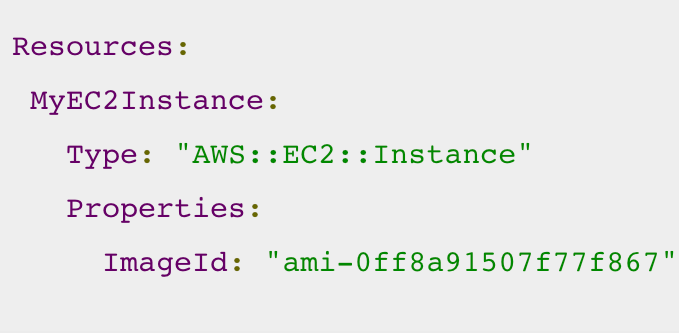
- The following resource declaration for an Elastic IP address needs the instance ID of an EC2 instance and uses the Ref function to specify the instance ID of the MyEC2Instance resource:

Intrinsic Functions – Fn::GetAtt
- The Fn::GetAtt intrinsic function returns the value of an attribute from a resource in the template.
- Full syntax (YAML): Fn::GetAtt: [ logicalNameOfResource, attributeName ]
- Short form (YAML): !GetAtt logicalNameOfResource.attributeName
Intrinsic Functions – Fn::FindInMap
- The intrinsic function Fn::FindInMap returns the value corresponding to keys in a two-level map that is declared in the Mappings section
- Full syntax (YAML): Fn::FindInMap: [ MapName, TopLevelKey, SecondLevelKey ]
- Short form (YAML): !FindInMap [ MapName, TopLevelKey, SecondLevelKey ]
Reference doc for inbuilt functions
https://docs.aws.amazon.com/AWSCloudFormation/latest/UserGuide/intrinsic-function-reference.html
AWS CloudFormation – Resources
- Resources – the required Resources section declares the AWS resources that you want to include in the stack, such as an Amazon EC2 instance or an Amazon S3 bucket.
- Mandatory , Resources are declared and can reference each other.
AWS CloudFormation – Parameters
- Parameters – use the optional Parameters section to customize your templates.
- Parameters enable you to input custom values to your template each time you create or update a stack.
- Useful for template reuse
AWS CloudFormation – Mappings
- Mappings – the optional Mappings section matches a key to a corresponding set of named values.
- Exam tip: with mappings you can, for example, set values based on a region You can create a mapping that uses the region name as a key and contains the values you want to specify for each specific region.
AWS CloudFormation – Outputs
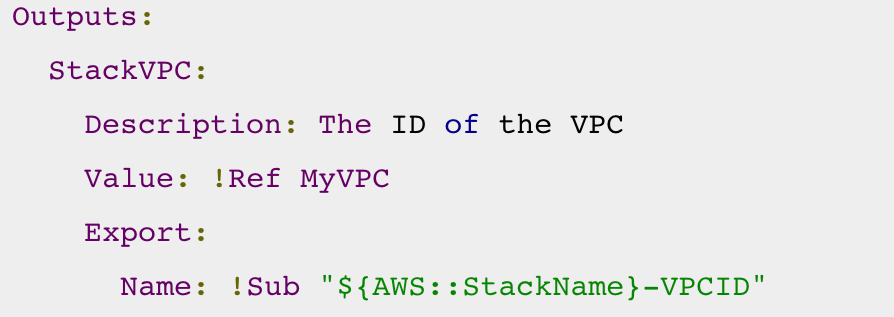
- Outputs – the optional Outputs section declares output values that you can import into other stacks (to create cross-stack references), return in response (to describe stack calls), or view on the AWS CloudFormation console
- In the following example YAML code, the output named StackVPC returns the ID of a VPC, and then exports the value for cross-stack referencing with the name VPCID appended to the stack’s name.
AWS CloudFormation – Conditions
- Conditions – the optional Conditions section contains statements that define the circumstances under which entities are created or configured
- In the sample YAML code below, resources are created only if the EnvType parameter is equal to prod:

AWS CloudFormation – Transform
- Transform – the optional Transform section specifies one or more macros that AWS CloudFormation uses to process your template
- The transform section can be used to reference additional code stored in S3, such as Lambda code or reusable snippets of CloudFormation code.
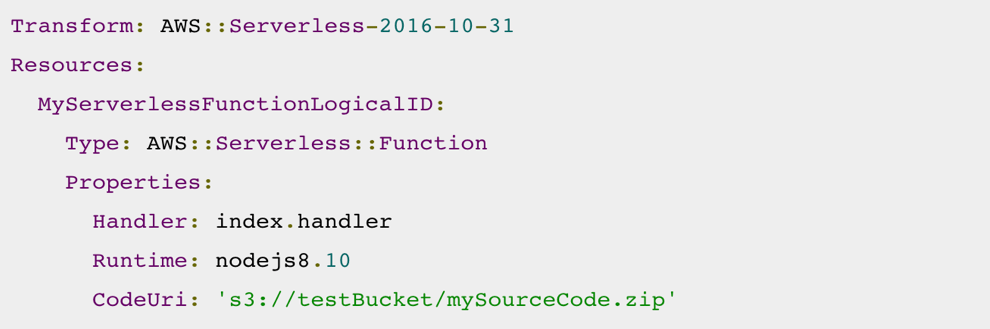
- The AWS::Serverless transform specifies the version of the AWS Serverless Application Model (AWS SAM) to use. This model defines the AWS SAM syntax that you can use and how AWS CloudFormation processes it.
- The AWS::Include transform works with template snippets that are stored separately from the main AWS CloudFormation template
- In the following example, the template uses AWS SAM syntax to simplify the declaration of a Lambda function and its execution role
AWS CloudFormation – Nested Stacks
- Nested stacks allow re-use of CloudFormation code for common use cases.
- For example standard configuration for a load balancer, web server, application server etc.
- Instead of copying out the code each time, create a standard template for each common use case and reference from within your CloudFormation template.
AWS CloudFormation – Change Sets
- AWS CloudFormation provides two methods for updating stacks: direct update or creating and executing change sets.
- Use direct updates when you want to quickly deploy your updates
- With change sets, you can preview the changes AWS CloudFormation will make to your stack, and then decide whether to apply those changes.

 Techglot