16.Application Integration(SQS, SNS, Kinesis)
- Introduction
- Amazon SQS
- Standard Queue
- Producing Messages
- Consuming Messages
- Multiple EC2 Instances Consumers
- Amazon SQS – Security
- SQS – Message Visibility Timeout
- Amazon SQS – Dead Letter Queue
- Amazon SQS – Delay Queue
- Amazon SQS – Long Polling
- SQS Extended Client
- SQS – Must know API
- Amazon SQS – FIFO Queue
- SQS FIFO – Deduplication
- SQS FIFO – Message Grouping
- Amazon SNS
- Amazon SNS – How to publish
- Amazon SNS – Security
- SNS + SQS: Fan Out
- Amazon SNS – FIFO Topic
- SNS FIFO + SQS FIFO: Fan Out
- SNS – Message Filtering
- Kinesis
- Overview
- Kinesis Data Streams
- Kinesis Data Streams Security
- Kinesis Producers
- Kinesis – ProvisionedThroughputExceeded
- Kinesis Data Streams Consumers
- Kinesis Consumers Types
- Kinesis Client Library (KCL)
- Kinesis Operation – Shard Splitting
- Kinesis Operation – Merging Shards
- Kinesis Data Firehose
- Kinesis Data Streams vs Firehose
- Kinesis Data Analytics (SQL application)
- Ordering data into Kinesis
- Ordering data into SQS
- Kinesis vs SQS ordering
- SQS vs SNS vs Kinesis
Introduction
- There are two patterns of application communication
- Synchronous communications(application to application)
- Asynchronous / Event based(application to queue to application)
- Synchronous between applications can be problematic if there are sudden spikes of traffic
- In that case, it’s better to decouple your applications
- using SQS: queue model
- using SNS: pub/sub model
- using Kinesis: real-time streaming model
- These services can scale independently from our application!
Amazon SQS – Standard Queue
- Oldest offering (over 10 years old)
- Fully managed service, used to decouple applications
- Attributes:
- Unlimited throughput, unlimited number of messages in queue
- Default retention of messages: 4 days, maximum of 14 days
- Low latency (<10 ms on publish and receive)
- Limitation of 256KB per message sent
- Can have duplicate messages (at least once delivery, occasionally)
- Can have out of order messages (best effort ordering)
SQS – Producing Messages
- Produced to SQS using the SDK (SendMessage API)
- The message is persisted in SQS until a consumer deletes it
- Message retention: default 4 days, up to 14 days
- SQS standard: unlimited throughput
SQS- Consuming Messages
- Consumers (running on EC2 instances, servers, or AWS Lambda)…
- Poll SQS for messages (receive up to 10 messages at a time)
- Process the messages (example: insert the message into an RDS database)
- Delete the messages using the DeleteMessage API
SQS- Multiple EC2 Instances Consumers
- Consumers receive and process messages in parallel
- At least once delivery
- Best-effort message ordering
- We can scale consumers horizontally to improve throughput of processing
Amazon SQS – Security
- Encryption:
- In-flight encryption using HTTPS API
- At-rest encryption using KMS keys
- Client-side encryption if the client wants to perform encryption/decryption itself
- Access Controls
- IAM policies to regulate access to the SQS API
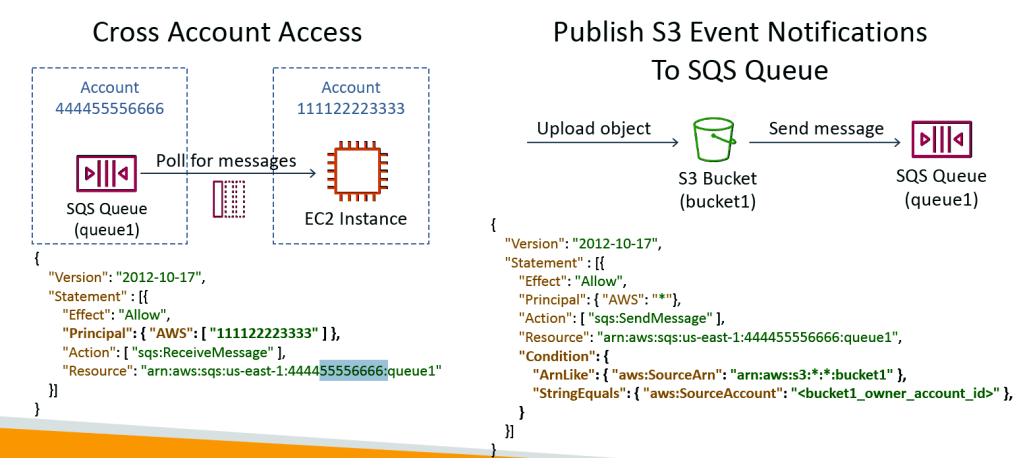
- SQS Access Policies(similar to S3 bucket policies)
- Useful for cross-account access to SQS queues
- Useful for allowing other services (SNS, S3…) to write to an SQS queue
SQS – Message Visibility Timeout
- After a message is polled by a consumer, it becomes invisible to other consumers
- By default, the “message visibility timeout” is 30 seconds
- That means the message has 30 seconds to be processed
- After the message visibility timeout is over, the message is “visible” in SQS
- If a message is not processed within the visibility timeout, it will be processed twice
- A consumer could call the ChangeMessageVisibility API to get more time
- If visibility timeout is high (hours), and consumer crashes, re-processing will take time
- If visibility timeout is too low (seconds), we may get duplicates
Amazon SQS – Dead Letter Queue
- If a consumer fails to process a message within the Visibility Timeout…
- the message goes back to the queue!
- We can set a threshold of how many times a message can go back to the queue
- After the MaximumReceives threshold is exceeded, the message goes into a dead letter queue (DLQ)
- Useful for debugging!
- Make sure to process the messages in the DLQ before they expire:
- Good to set a retention of 14 days in the DLQ
Amazon SQS – Delay Queue
- Delay a message (consumers don’t see it immediately) up to 15 minutes
- Default is 0 seconds (message is available right away)
- Can set a default at queue level
- Can override the default on send using the DelaySeconds parameter
Amazon SQS – Long Polling
- When a consumer requests messages from the queue, it can optionally “wait” for messages to arrive if there are none in the queue
- This is called Long Polling
- LongPolling decreases the number of API calls made to SQS while increasing the efficiency and latency of your application
- The wait time can be between 1 sec to 20 sec (20 sec preferable)
- Long Polling is preferable to Short Polling
- Long polling can be enabled at the queue level or at the API level using WaitTimeSeconds
SQS Extended Client
- Message size limit is 256KB, how to send large messages, e.g. 1GB?
- Using the SQS Extended Client (Java Library)
SQS – Must know API
- CreateQueue (MessageRetentionPeriod), DeleteQueue
- PurgeQueue: delete all the messages in queue
- SendMessage (DelaySeconds), ReceiveMessage, DeleteMessage
- MaxNumberOfMessages: default 1, max 10 (for ReceiveMessage API)
- ReceiveMessageWaitTimeSeconds: Long Polling
- ChangeMessageVisibility: change the message timeout
- Batch APIs for SendMessage, DeleteMessage, ChangeMessageVisibility helps decrease your costs
Amazon SQS – FIFO Queue
- FIFO = First In First Out (ordering of messages in the queue)
- Limited throughput: 300 msg/s without batching, 3000 msg/s with
- Exactly-once send capability (by removing duplicates)
- Messages are processed in order by the consumer
SQS FIFO – Deduplication
- De-duplication interval is 5 minutes
- Two de-duplication methods:
- Content-based deduplication: will do a SHA-256 hash of the message body
- Explicitly provide a Message Deduplication ID
SQS FIFO – Message Grouping
- If you specify the same value of MessageGroupID in an SQS FIFO queue,you can only have one consumer, and all the messages are in order
- To get ordering at the level of a subset of messages, specify different values for MessageGroupID
- Messages that share a common Message Group ID will be in order within the group
- Each Group ID can have a different consumer (parallel processing!)
- Ordering across groups is not guaranteed
Amazon SNS
- What if you want to send one message to many receivers?
- The “event producer” only sends message to one SNS topic
- As many “event receivers” (subscriptions) as we want to listen to the SNS topic notifications
- Each subscriber to the topic will get all the messages (note: new feature to filter messages)
- Up to 10,000,000 (10M)subscriptions per topic
- 100,000 (0.1M)topics limit
- Subscribers can be:
- SQS
- HTTP / HTTPS (with delivery retries – how many times)
- Lambda
- Emails
- SMS messages
- Mobile Notifications
Amazon SNS – How to publish
- Topic Publish (using the SDK)
- Create a topic
- Create a subscription (or many)
- Publish to the topic
- Direct Publish (for mobile apps SDK)
- Create a platform application
- Create a platform endpoint
- Publish to the platform endpoint
- Works with Google GCM, Apple APNS, Amazon ADM…
Amazon SNS – Security
- Encryption:
- In-flight encryption using HTTPS API
- At-rest encryption using KMS keys
- Client-side encryption if the client wants to perform encryption/decryption itself
- Access Controls:
- IAM policies to regulate access to the SNS API
- SNS Access Policies (similar to S3 bucket policies)
- Useful for cross-account access to SNS topics
- Useful for allowing other services ( S3…) to write to an SNS topic
SNS + SQS: Fan Out
Fan-out- the number of inputs that can be connected to a specified output.
- Push once in SNS, receive in all SQS queues that are subscribers
- Fully decoupled, no data loss
- SQS allows for: data persistence, delayed processing and retries of work
- Ability to add more SQS subscribers over time
- Make sure your SQS queue access policy allows for SNS to write
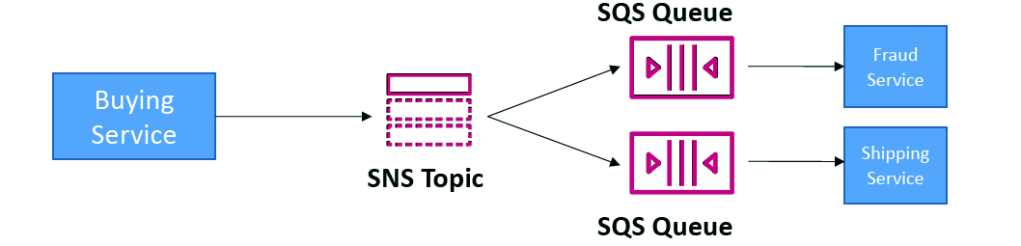
Application: S3 Events to multiple queues
- For the same combination of: event type (e.g. object create) and prefix (e.g. images/) you can only have one S3 Event rule
- If you want to send the same S3 event to many SQS queues, use fan-out
Amazon SNS – FIFO Topic
- FIFO = First In First Out (ordering of messages in the topic)
- Similar features as SQS FIFO:
- Ordering by Message Group ID (all messages in the same group are ordered)
- Deduplication using a Deduplication ID or Content Based Deduplication
- Can only have SQS FIFO queues as subscribers
- Limited throughput (same throughput as SQS FIFO)
SNS FIFO + SQS FIFO: Fan Out
- In case you need fan out + ordering + deduplication
SNS – Message Filtering
- JSON policy used to filter messages sent to SNS topic’s subscriptions
- If a subscription doesn’t have a filter policy, it receives every message
Kines Overview
- Makes it easy to collect, process, and analyze streaming data in real-time
- Ingest real-time data such as: Application logs, Metrics, Website clickstreams
- Kinesis Data Streams: capture, process, and store data streams
- Kinesis Data Firehose: load data streams into AWS data stores
- Kinesis Data Analytics: analyze data streams with SQL or Apache Flink
- Kinesis Video Streams: capture, process, and store video streams
Kinesis Data Streams
- Billing is per shard provisioned, can have as many shards as you want
- Retention between 1 day (default) to 365 days
- Ability to reprocess (replay) data
- Once data is inserted in Kinesis, it can’t be deleted (immutability)
- Data that shares the same partition goes to the same shard (ordering
- Producers: AWS SDK, Kinesis Producer Library (KPL), Kinesis Agent
- Consumers:
- Write your own: Kinesis Client Library (KCL), AWS SDK
- Managed: AWS Lambda, Kinesis Data Firehose, Kinesis Data Analytics
Kinesis Data Streams Security
- Control access / authorization using IAM policies
- Encryption in flight using HTTPS endpoints
- Encryption at rest using KMS
- You can implement encryption/decryption of data on client side (harder
- VPC Endpoints available for Kinesis to access within VPC
- Monitor API calls using CloudTrail
Kinesis Producers
- Puts data records into data streams
- Data record consists of:
- Sequence number (unique per partition-key within shard)
- Partition key (must specify while put records into stream)
- Data blob (up to 1 MB)
- Producers
- AWS SDK: simple producer
- Kinesis Producer Library (KPL): C++, Java, batch, compression, retries
- Kinesis Agent: monitor log files
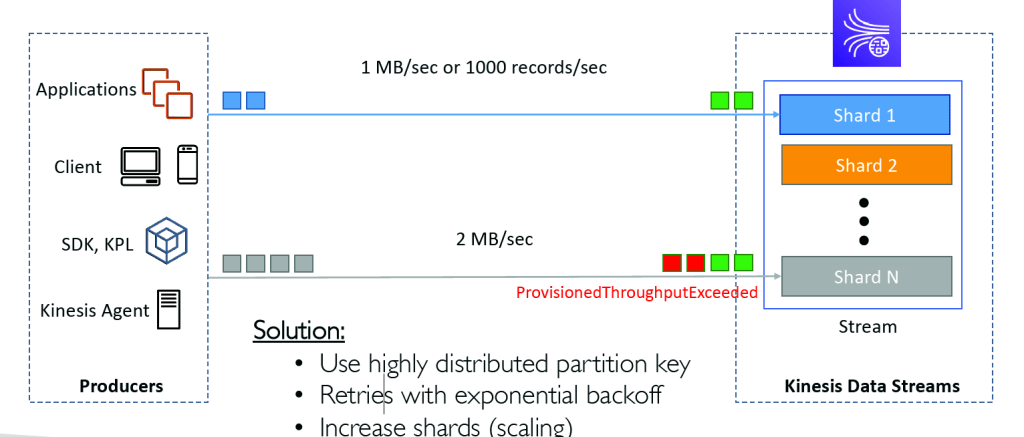
- Write throughput: 1 MB/sec or 1000 records/sec per shard
- PutRecord API
- Use batching with PutRecords API to reduce costs & increase throughput
Kinesis – ProvisionedThroughputExceeded
Kinesis Data Streams Consumers
- Get data records from data streams and process them
- AWS Lambda
- Kinesis Data Analytics
- Kinesis Data Firehose
- Custom Consumer (AWS SDK) – Classic or Enhanced Fan-Out
- Kinesis Client Library (KCL): library to simplify reading from data stream
Kinesis Consumers Types
Kinesis Client Library (KCL)
2 Types –
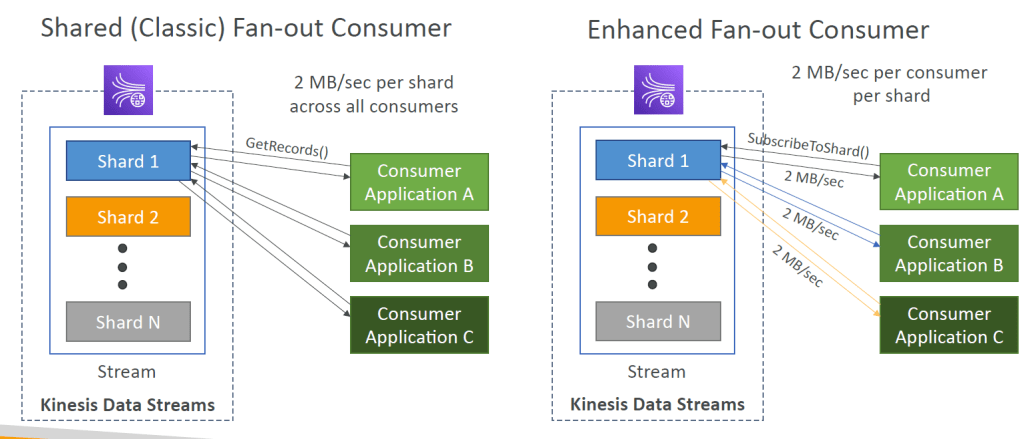
- Shared (Classic) Fan-out Consumer – pull
- Low number of consuming applications
- Read throughput: 2 MB/sec per shard across all consumers
- Max. 5 GetRecords API calls/sec
- Latency ~200 ms
- Minimize cost ($)
- Consumers poll data from Kinesis using GetRecords API call
- Returns up to 10 MB (then throttle for 5 seconds) or up to 10000 records
- Enhanced Fan-out Consumer – push
- Multiple consuming applications for the same stream
- 2 MB/sec per consumer per shard
- Latency ~70 ms
- Higher costs ($$$)
- Kinesis pushes data to consumers over HTTP/2 (SubscribeToShard API)
- Soft limit of 5 consumer applications (KCL) per data stream (default)
Kinesis Consumers – AWS Lambda
- Supports Classic & Enhanced fan-out consumers
- Read records in batches
- Can configure batch size and batch window
- If error occurs, Lambda retries until succeeds or data expired
- Can process up to 10 batches per shard simultaneously
Kinesis Client Library (KCL)
- A Java library that helps read record from a Kinesis Data Stream with distributed applications sharing the read workload
- Each shard is to be read by only one KCL instance(Many to One i.e from Shard to KCL)
- 4 shards = max. 4 KCL instances
- 6 shards = max. 6 KCL instances
- Progress is checkpointed into DynamoDB (needs IAM access)
- Track other workers and share the work amongst shards using DynamoDB
- KCL can run on EC2, Elastic Beanstalk, and on-premises
- Records are read in order at the shard level
- Versions:
- KCL 1.x (supports shared consumer)
- KCL 2.x (supports shared & enhanced fan-out consumer)
Kinesis Operation – Shard Splitting
- Used to increase the Stream capacity (1 MB/s data in per shard)
- Used to divide a “hot shard”.
- The old shard is closed and will be deleted once the data is expired
- No automatic scaling (manually increase/decrease capacity)
- Can’t split into more than two shards in a single operation
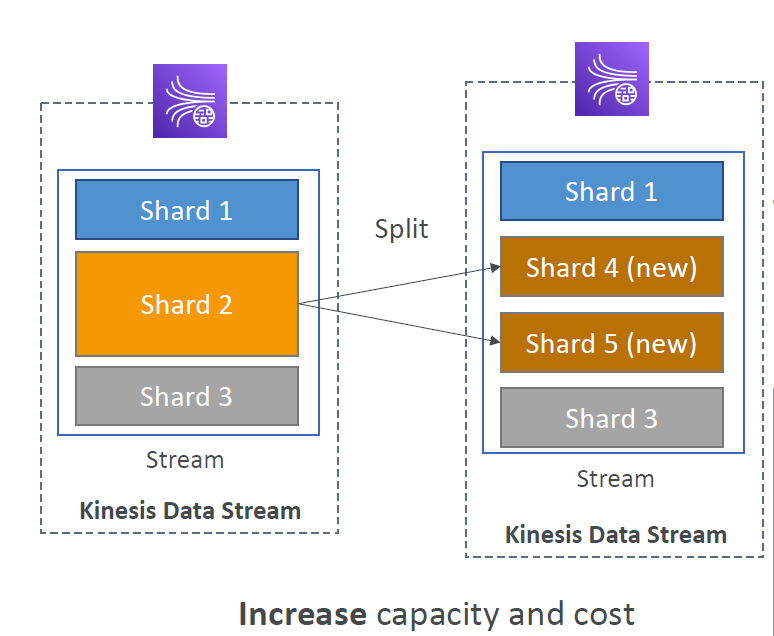
Kinesis Operation – Merging Shards
- Decrease the Stream capacity and save costs
- Can be used to group two shards with low traffic (cold shards)
- Old shards are closed and will be deleted once the data is expired
- Can’t merge more than two shards in a single operation
Kinesis Data Firehose
- Fully Managed Service, no administration, automatic scaling, serverless
- AWS: Redshift / Amazon S3 / ElasticSearch
- 3rd party partner: Splunk / MongoDB / DataDog / NewRelic / …
- Custom: send to any HTTP endpoint
- Pay for data going through Firehose
- Near Real Time
- 60 seconds latency minimum for non full batches
- Or minimum 32 MB of data at a time
- Supports many data formats, conversions, transformations, compression
- Supports custom data transformations using AWS Lambda
- Can send failed or all data to a backup S3 bucket
Kinesis Data Streams vs Firehose
| Kinesis Data Streams | Kinesis Data Firehose | |
|---|---|---|
| Streaming service for ingest at scale | Load streaming data into S3 / Redshift / ES / 3rd party / custom HTTP | |
| Write custom code (producer / consumer) | Fully managed | |
| Real-time (~200 ms) | Near real-time (buffer time min. 60 sec) | |
| Manage scaling (shard splitting / merging) | Automatic scaling | |
| Data storage for 1 to 365 days | No data storage | |
| Supports replay capability | ||
Kinesis Data Analytics (SQL application)
- Perform real-time analytics on Kinesis Streams using SQL
- Fully managed, no servers to provision
- Automatic scaling
- Real-time analytics
- Pay for actual consumption rate
- Can create streams out of the real-time queries
- Use cases:
- Time-series analytics
- Real-time dashboards
- Real-time metrics
Ordering data into Kinesis
- Imagine you have 100 trucks (truck_1, truck_2, … truck_100) on the road sending their GPS positions regularly into AWS
- You want to consume the data in order for each truck, so that you can track their movement accurately
- How should you send that data into Kinesis?
- Answer: send using a “Partition Key” value of the “truck_id”
- The same key will always go to the same shard
Ordering data into SQS
- For SQS standard, there is no ordering
- For SQS FIFO, if you don’t use a Group ID, messages are consumed in the order they are sent, with only one consumer
- You want to scale the number of consumers, but you want messages to be “grouped when they are related to each other
- Then you use a Group ID (similar to Partition Key in Kinesis)
Kinesis vs SQS ordering
Let’s assume 100 trucks, 5 kinesis shards, 1 SQS FIFO
| Kinesis Data Streams | SQS ordering | |
|---|---|---|
| On average you’ll have 20 trucks per shard | You only have one SQS FIFO queue | |
| Trucks will have their data ordered within each shard | You will have 100 Group ID | |
| The maximum amount of consumers in parallel we can have is 5 | You can have up to 100 Consumers (due to the 100 Group ID) | |
| Can receive up to 5 MB/s of data | You have up to 300 messages per second (or 3000 if using batching |
SQS vs SNS vs Kinesis
| SQS | SNS | Kinesis |
|---|---|---|
| Consumer “pull data” | Push data to many subscribers | Standard: pull data • 2 MB per shard |
| Data is deleted after being consumed. | Data is not persisted (lost if not delivered). | – Possibility to replay data – Data expires after X days |
| Can have as many workers (consumers) as we want | – Up to 12,500,000 (12.5 m)subscribers – Pub/Sub – Up to 100,000 topics | Enhanced-fan out: push data • 2 MB per shard per consumer |
| No need to provision throughput | No need to provision throughput | Must provision throughput |
| Ordering guarantees only on FIFO queues | Integrates with SQS for fanout architecture pattern | Ordering at the shard level |
| Individual message delay capability | FIFO capability for SQS FIFO | Meant for real-time big data, analytics and ETL |

 Techglot