- Amazon Elastic Compute Cloud (EC2)
Index
- Intro
- Pricing Model
- AMI
- EC2 IP Adress
- Monitoring
- NAT Instance and NAT Gateway
- Amazon Elastic Compute Cloud (Amazon EC2) is a web service that provides resizable compute capacity in the cloud
- With EC2 you have full control at the operating system layer
- Key pairs are used to securely connect to EC2 instances:
- A key pair consists of a public key that AWS stores, and a private key file that you store.
- For Windows AMIs, the private key file is required to obtain the password used to log into your instance.
- For Linux AMIs, the private key file allows you to securely SSH (secure shell) into your instance
- User data is data that is supplied by the user at instance launch in the form of a script.
- Instance metadata is data about your instance that you can use to configure or manage the running instance. Instance
- Instance metadata is available at http://169.254.169.254/latest/meta-data/ (the trailing “/” is required).
- Instance user data is available at: http://169.254.169.254/latest/user-data.
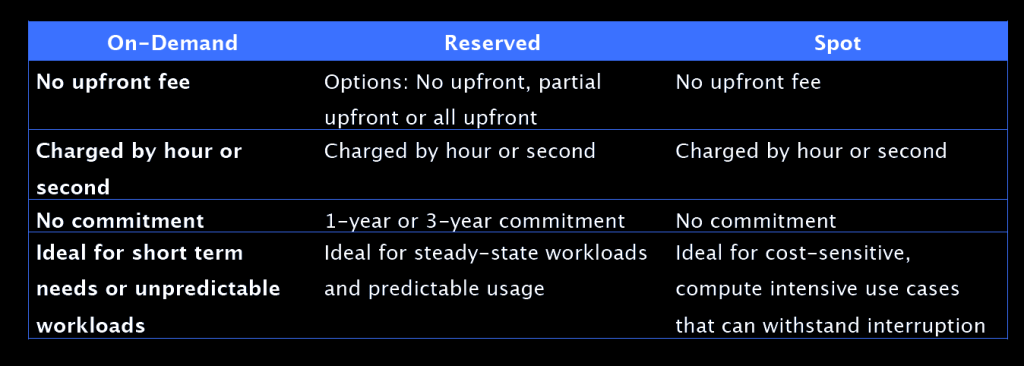
Amazon EC2 Pricing Models
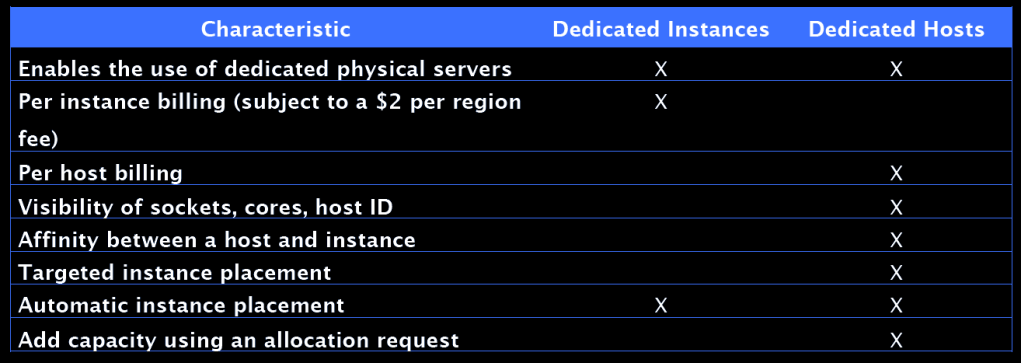
Amazon EC2 Dedicated Hosts and Instances
Amazon EC2 AMIs
- An Amazon Machine Image (AMI) provides the information required to launch an instance.
- An AMI includes the following:
- A template for the root volume for the instance (for example, an operating system, an application server, and applications).
- Launch permissions that control which AWS accounts can use the AMI to launch instances.
- A block device mapping that specifies the volumes to attach to the instance when it’s launched.
- Volumes attached to the instance are either EBS or Instance store
- Amazon Elastic Block Store (EBS) provides persistent storage. EBS snapshots, which reside on Amazon S3, are used to create the volume.
- Instance store volumes are ephemeral (non-persistent). That means data is lost if the instance is shut down. A template stored on Amazon S3 is used to create the volume.
- AMIs are regional. You can only launch an AMI from the region in which it is stored. However, you can copy AMI’s to other regions using the console, command line, or the API.
Amazon EC2 IP Addresses
| Name | Description |
|---|---|
| Public IP address | – Lost when the instance is stopped. – Used in Public Subnets. – No charge – Associated with a private IP address on the instance. – Cannot be moved between instances |
| Private IP address | -Retained when the instance is stopped -Used in Public and Private Subnets |
| Elastic IP address | -Static Public IP address -You are charged if not used -Associated with a private IP address on the instance -Can be moved between instances and Elastic Network Adapters |
IAM Roles:
- IAM roles are more secure than storing access keys and secret access keys on EC2 instances.
- IAM roles are easier to manage.
- You can attach an IAM role to an instance at launch time or at any time after by using the AWS CLI, SDK, or the EC2 console.
- IAM roles can be attached, modified, or replaced at any time
- Only one IAM role can be attached to an EC2 instance at a time
- IAM roles are universal and can be used in any region
Monitoring
- EC2 status checks are performed every minute and each returns a pass or a fail status.
- If all checks pass, the overall status of the instance is OK. If one or more checks fail, the overall status is impaired.
- System status checks detect (StatusCheckFailed_System) problems WITH your instance that require AWS involvement to repair
- Instance status checks (StatusCheckFailed_Instance) detect problems that require your involvement to repair
- You can create Amazon CloudWatch alarms that monitor Amazon EC2 instances and automatically perform an action if the status check fails.
NAT Instance vs NAT Gateway
| NAT Instance | NAT Gateway |
|---|---|
| Managed by you (e.g. software updates) | Managed by AWS |
| Scale up (instance type) manually and use enhanced networking | Elastic scalability up to 45 Gbps |
| No high availability – scripted/auto-scaled HA possible using multiple NATs in multiple subnets | Provides automatic high availability within an AZ and can be placed in multiple AZs |
| Need to assign Security Group | No Security Groups |
| Can use as a bastion host | Cannot access through SSH |
| Use an Elastic IP address or a public IP address with a NAT instance | Choose the Elastic IP address to associate with a NAT gateway at creation |
| Can implement port forwarding through manual customisation | Does not support port forwarding |

 Techglot