19.Security Services – KMS, Encryption SDK, SSM Parameter Store
Index
- AWS Security – Section Introduction
- Encryption 101
- KMS
- KMS Overview
- KMS Hands On w/ CLI
- KMS Encryption Patterns and Envelope Encryption
- Encryption SDK CLI Hands On
- KMS Limits
- KMS and AWS Lambda Practice
- S3
- S3 Security Advanced
- S3 Bucket Key
- SSM
- SSM Parameter Store Overview
- SSM Parameter Store Hands On (CLI)
- SSM Parameter Store Hands On (AWS Lambda)
- Secrets Manager –
- Secrets Manager Overview
- Secrets Manager – Hands On
- SSM Parameter Store vs Secrets Manager
- CloudWatch Logs Encryption
- CodeBuild Security
AWS Security – Section Introduction
Why encryption?
Encryption in flight (SSL)
- Data is encrypted before sending and decrypted after receiving
- SSL certificates help with encryption (HTTPS)
- Encryption in flight ensures no MITM (man in the middle attack) can happen
Server side encryption at rest
- Data is encrypted after being received by the server
- Data is decrypted before being sent
- It is stored in an encrypted form thanks to a key (usually a data key)
- The encryption / decryption keys must be managed somewhere and the server must have access to it
Client side encryption
- Data is encrypted by the client and never decrypted by the server
- Data will be decrypted by a receiving client
- The server should not be able to decrypt the data
- Could leverage Envelope Encryption
KMS (Key Management Service)
KMS Overview
- Anytime you hear “encryption” for an AWS service, it’s most likely KMS
- Easy way to control access to your data, AWS manages keys for us
- Fully integrated with IAM for authorization
- Seamlessly integrated into:
- Amazon EBS: encrypt volumes
- • Amazon S3: Server side encryption of objects
- • Amazon Redshift: encryption of data
- • Amazon RDS: encryption of data
- • Amazon SSM: Parameter store
- • Etc…
- But you can also use the CLI / SDK
- Able to fully manage the keys & policies
- Create
- • Rotation policies
- • Disable
- • Enable
- Able to audit key usage (using CloudTrail)
- Three types of Customer Master Keys (CMK):
- AWS Managed Service Default CMK: free
- User Keys created in KMS: $1 / month
- User Keys imported (must be 256-bit symmetric key): $1 / month
- pay for API call to KMS ($0.03 / 10000 calls)
AWS KMS 101
- Anytime you need to share sensitive information… use KMS
- Database passwords
- • Credentials to external service
- • Private Key of SSL certificates
- The value in KMS is that the CMK used to encrypt data can never be retrieved by the user, and the CMK can be rotated for extra security
- Never ever store your secrets in plaintext, especially in your code!
- Encrypted secrets can be stored in the code / environment variables
- KMS can only help in encrypting up to 4KB of data per call
- If data > 4 KB, use envelope encryption
- To give access to KMS to someone
- Make sure the Key Policy allows the user
- Make sure the IAM Policy allows the API calls
KMS Key Policies
- Control access to KMS keys, “similar” to S3 bucket policies
- Difference: you cannot control access without them
- Default KMS Key Policy:
- Created if you don’t provide a specific KMS Key Policy
- Complete access to the key to the root user = entire AWS account
- Gives access to the IAM policies to the KMS key
- Custom KMS Key Policy:
- Define users, roles that can access the KMS key
- Define who can administer the key
- Useful for cross-account access of your KMS key
Copying Snapshots across accounts
- Create a Snapshot, encrypted with your own CMK
- Attach a KMS Key Policy to authorize cross-account access
- Share the encrypted snapshot
- (in target) Create a copy of the Snapshot, encrypt it with a KMS Key in your account
- Create a volume from the snapshot
KMS – Customer Master Key (CMK) Types
- Symmetric (AES-256 keys)
- First offering of KMS, single encryption key that is used to Encrypt and Decrypt
- AWS services that are integrated with KMS use Symmetric CMKs
- Necessary for envelope encryption
- You never get access to the Key unencrypted (must call KMS API to use)
- Asymmetric (RSA & ECC key pairs)
- Public (Encrypt) and Private Key (Decrypt) pair
- Used for Encrypt/Decrypt, or Sign/Verify operations
- The public key is downloadable, but you can’t access the Private Key unencrypted
- Use case: encryption outside of AWS by users who can’t call the KMS API
Envelope Encryption
- KMS Encrypt API call has a limit of 4 KB
- If you want to encrypt >4 KB, we need to use Envelope Encryption
- The main API that will help us is the GenerateDataKey API
- For the exam: anything over 4 KB of data that needs to be encrypted must use the Envelope Encryption == GenerateDataKey API
Encryption SDK
- The AWS Encryption SDK implemented Envelope Encryption for us
- The Encryption SDK also exists as a CLI tool we can install
- Implementations for Java, Python, C, JavaScript
- Feature – Data Key Caching
- re-use data keys instead of creating new ones for each encryption
- Helps with reducing the number of calls to KMS with a security trade-off
- Use LocalCryptoMaterialsCache (max age, max bytes, max number of messages)
KMS Symmetric – API Summary
- Encrypt: encrypt up to 4 KB of data through KMS
- • GenerateDataKey: generates a unique symmetric data key (DEK)
- • returns a plaintext copy of the data key
- • AND a copy that is encrypted under the CMK that you specify
- • GenerateDataKeyWithoutPlaintext:
- • Generate a DEK to use at some point (not immediately)
- • DEK that is encrypted under the CMK that you specify (must use Decrypt later)
- • Decrypt: decrypt up to 4 KB of data (including Data Encryption Keys)
- • GenerateRandom: Returns a random byte string
KMS Request Quotas
- When you exceed a request quota, you get a ThrottlingException
- To respond, use exponential backoff (backoff and retry)
- For cryptographic operations, they share a quota
- This includes requests made by AWS on your behalf (ex: SSE-KMS)
- For GenerateDataKey, consider using DEK caching from the Encryption SDK
- You can request a Request Quotas increase through API or AWS support
S3 Encryption for Objects
- There are 4 methods of encrypting objects in S3
- SSE-S3: encrypts S3 objects using keys handled & managed by AWS
- SSE-KMS: leverage AWS Key Management Service to manage encryption keys
- SSE-C: when you want to manage your own encryption keys
- Client Side Encryption
- It’s important to understand which ones are adapted to which situation for the exam
SSE-KMS
- SSE-KMS: encryption using keys handled & managed by KMS
- KMS Advantages: user control + audit trail
- Object is encrypted server side
- Must set header: “x-amz-server-side-encryption”: ”aws:kms”
- SSE-KMS leverages the GenerateDataKey & Decrypt KMS API calls
- To perform SSE-KMS, you need:
- A KMS Key Policy that authorizes the user / role
- An IAM policy that authorizes access to KMS
- Otherwise you will get an access denied error
- S3 calls to KMS for SSE-KMS count against your KMS limits
- If throttling, try exponential backoff
- If throttling, you can request an increase in KMS limits
- The service throttling is KMS, not Amazon S3
S3 Bucket Policies – Force SSL
- To force SSL, create an S3 bucket policy with a DENY on the condition aws:SecureTransport = false
- Note: Using an allow on aws:SecureTransport = true would allow anonymous GetObject if using SSLGetObject if using SSL
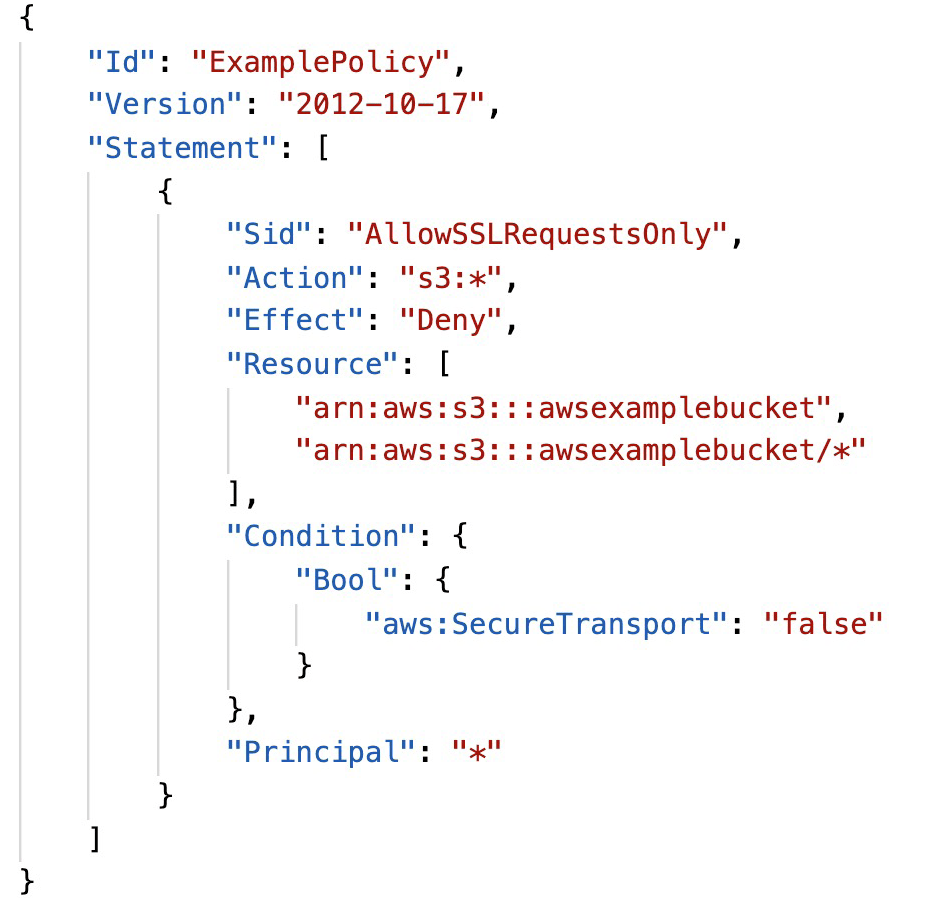
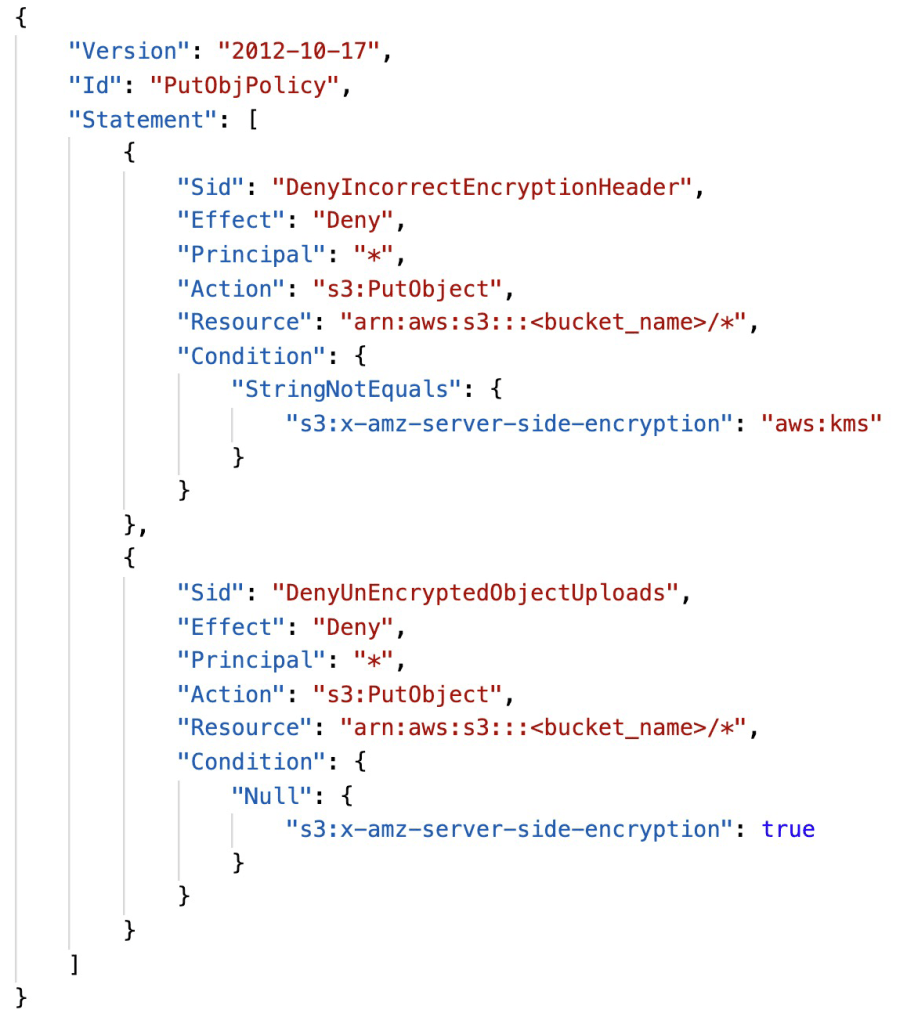
S3 Bucket Policy – Force Encryption of SSE-KMS
- Deny incorrect encryption header: make sure it includes aws:kms (== SSE-KMS)
- Deny no encryption header to ensure objects are not uploaded un-encrypted
- Note: could swap 2) for S3 default encryption of SSE-KMS
S3 Bucket Key for SSE-KMS encryption
- New setting to decrease…
- Number of API calls made to KMS from S3 by 99%
- Costs of overall KMS encryption with Amazon S3 by 99%
- This leverages data keys
- A “S3 bucket key” is generated
- That key is used to encrypt KMS objects with new data keys
- You will see less KMS CloudTrail events in CloudTrail
SSM Parameter Store
- Secure storage for configuration and secrets
- Optional Seamless Encryption using KMS
- Serverless, scalable, durable, easy SDK
- Version tracking of configurations / secrets
- Configuration management using path & IAM
- Notifications with CloudWatch Events
- Integration with CloudFormation
SSM Parameter Store Hierarchy
- • /my-department/
- • my-app/
- • dev/
- • db-url
- • db-password
- • prod/
- • db-url
- • db-password
- • dev/
- • other-app/
- • my-app/
- • /other-department/
- • /aws/reference/secretsmanager/secret_ID_in_Secrets_Manager
- • /aws/service/ami-amazon-linux-latest/amzn2-ami-hvm-x86_64-gp2
Standard and advanced parameter tiers
| Standard | Advanced | |
|---|---|---|
| Total number of parameters allowed (per AWS account and Region) | 10,000 | 100,000 |
| Maximum size of a parameter value | 4 KB | 8 KB |
| Parameter policies available | No | Yes |
| Cost | No additional charge | Charges apply |
| Storage Pricing | Free | $0.05 per advanced parameter per month |
| API Interaction Pricing (higher throughput = up to 1000 Transactions per second) | Standard Throughput: free Higher Throughput: $0.05 per 10,000 API interactions | Standard Throughput: $0.05 per 10,000 API interactions Higher Throughput: $0.05 per 10,000 API interactions |
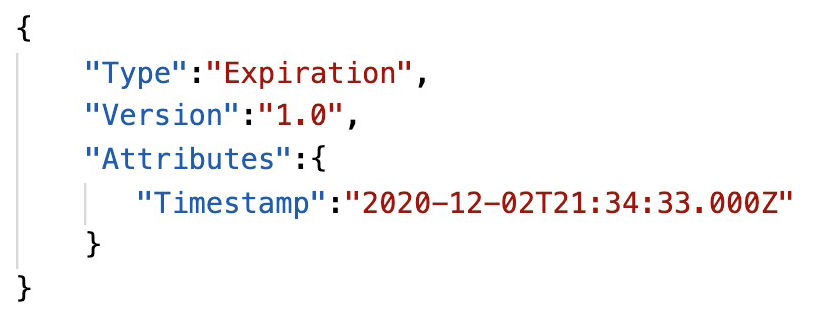
Parameters Policies (for advanced parameters)
- Allow to assign a TTL to a parameter (expiration date) to force updating or deleting sensitive data such as passwords
- Can assign multiple policies at a time
AWS Secrets Manager Overview
- Newer service, meant for storing secrets
- Capability to force rotation of secrets every X days
- Automate generation of secrets on rotation (uses Lambda)
- Integration with Amazon RDS (MySQL, PostgreSQL, Aurora)
- Secrets are encrypted using KMS
- Mostly meant for RDS integration
SSM Parameter Store vs Secrets Manager
- Secrets Manager ($$$):
- Automatic rotation of secrets with AWS Lambda
- Lambda function is provided for RDS, Redshift, DocumentDB
- KMS encryption is mandatory
- Can integration with CloudFormation
- SSM Parameter Store ($):
- Simple API
- No secret rotation (can enable rotation using Lambda triggered by CW Events
- KMS encryption is optional
- Can integration with CloudFormation
- Can pull a Secrets Manager secret using the SSM Parameter Store API
CloudWatch Logs Encryption
- You can encrypt CloudWatch logs with KMS keys
- Encryption is enabled at the log group level, by associating a CMK with a log group, either when you create the log group or after it exists.
- You cannot associate a CMK with a log group using the CloudWatch console.
- You must use the CloudWatch Logs API:
- associate-kms-key : if the log group already exists
- create-log-group: if the log group doesn’t exist yet
CodeBuild Security
- To access resources in your VPC, make sure you specify a VPC configuration for your CodeBuild
- Secrets in CodeBuild
- Don’t store them as plaintext in environment variables
- Instead…
- Environment variables can reference parameter store parameters
- Environment variables can reference secrets manager secrets

 Techglot