- Lambda
Index
- Introduction
- Lambda Pricing
- Lambda Event source mapping
- Lambda event notification
- Lambda handler
- Lambda synchronous and async
- Lambda version
- Lambda concurrency
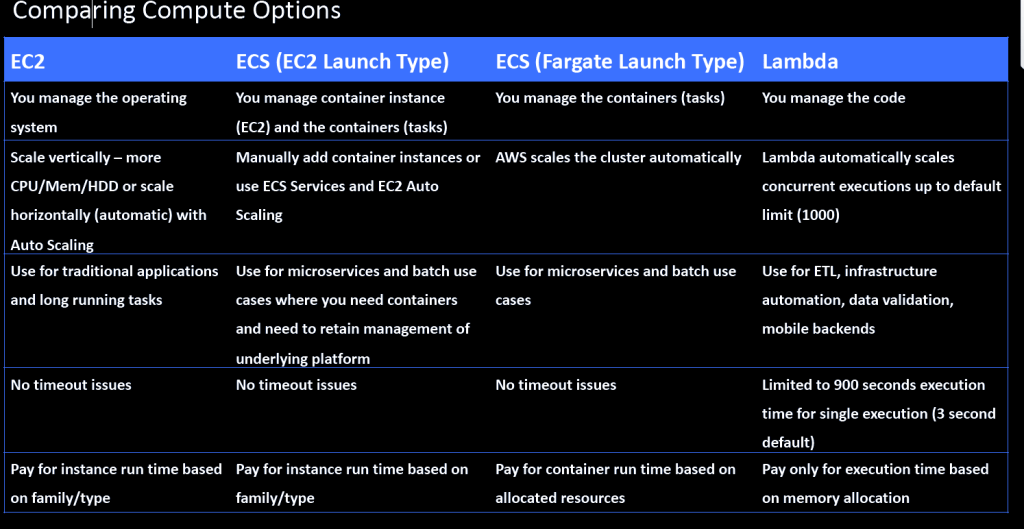
- AWS Lambda can automatically run code in response to multiple events, such as HTTP requests via Amazon API Gateway, modifications to objects in Amazon S3 buckets, table updates in Amazon DynamoDB, and state transitions in AWS Step Functions.
Charges-
- You are charged based on the number of requests for your functions and the duration, the time it takes for your code to execute
- The AWS Lambda free usage tier includes 1M free requests per month and 400,000 GB seconds of compute time per month
AWS Lambda – Invoking Functions
- When you invoke a function, you can choose to invoke it synchronously or asynchronously
- To invoke a function synchronously with the AWS CLI, use the invoke command

- The name of the file where the AWS CLI writes the response from the function is response.json.
- The payload is a string that contains an event in JSON format (base64 encoded).
- To get logs for an invocation from the command line, use the –log-type option. The response includes a LogResult field that contains up to 4 KB of base64-encoded logs from the invocation

AWS Lambda – Asynchronous Invocation
- For asynchronous invocation, Lambda places the event in a queue and returns a success response without additional information.
- To invoke a function asynchronously, set the invocation type parameter to Event.

AWS Lambda – Event Source Mappings
- To process items from a stream or queue, you can create an event source mapping
- An event source mapping is an AWS Lambda resource that reads from an event source and invokes a Lambda function
- You can use event source mappings to process items from a stream or queue in services that don’t invoke Lambda functions directly.
- An event source mapping uses permissions in the function’s execution role to read and manage items in the event source.
- Permissions, event structure, settings, and polling behavior vary by event source
- The configuration of the event source mapping for stream and queue-based services (DynamoDB, Kinesis), and Amazon SQS, is made on the Lambda side.
- Note: for other services such as Amazon S3 and SNS, the function is invoked asynchronously and the configuration is made on the source (S3/SNS) rather than Lambda.
AWS Lambda – Event Notifications
- You can use Lambda to process event notifications from Amazon S3
- Amazon S3 can send an event to a Lambda function when an object is created or DELETD.
- You configure notification settings on a bucket, and grant Amazon S3 permission to invoke a function on the function’s resource-based permissions policy.
- Amazon S3 invokes your function asynchronously with an event that contains details about the object
AWS Lambda – Versions
- Versioning means you can have multiple versions of your function.
- You can use versions to manage the deployment of your AWS Lambda functions. For example, you can publish a new version of a function for beta testing without affecting users of the stable production version
- The function version includes the following information:
- The function code and all associated dependencies.
- The Lambda runtime that executes the function
- All of the function settings, including the environment variables.
- A unique Amazon Resource Name (ARN) to identify this version of the function
- You work on $LATEST which is the latest version of the code – this is mutable
- When you’re ready to publish a Lambda function you create a version (these are numbered

- Numbered versions are assigned a number starting with 1 and subsequent versions are incremented by 1.
- Versions are immutable (code cannot be edited).
- Because different versions have unique ARNs this allows you to effectively manage them for different environments like Production, Staging or Development
- qualified ARN has a version suffix ,An unqualified ARN does not have a version suffix.


- You cannot create an alias from an unqualified ARN
AWS Lambda – Aliases
- Lambda aliases are pointers to a specific Lambda version
- Using an alias you can invoke a function without having to know which version of the function being referenced.
- Aliases are mutable.
- Aliases also have static ARNs but can point to any version of the same function
- Aliases enable stable configuration of event triggers / destinations
- Aliases enable blue / green deployment by assigning weights to Lambda version (doesn’t work for $LATEST, you need to create an alias for $LATEST).
AWS Lambda – Lambda Handler
- A handler is a function which Lambda will invoke to execute your code – it is an entry point
- You define a Lambda function handler as an instance or static method in a class
AWS Lambda – Function Dependencies
- If your Lambda function depends on external libraries such as AWS X-Ray SDK , database clients etc. you need to install the packages with the code and zip it all up.
- For Node.js use npm & “node modules” directory
- For Python use pip — target options.
- For Java include the relevant .jar files.
- Upload the zip file straight to Lambda if it’s less than 50MB, otherwise upload to S3
AWS Lambda – Concurrency
- The first time you invoke your function, AWS Lambda creates an instance of the function and runs its handler method to process the event
- When the function returns a response, it stays active and waits to process additional events.
- If you invoke the function again while the first event is being processed, Lambda initializes another instance, and the function processes the two events concurrently
- Burst Concurrency Limits:
- 500 – Other Regions
- 1000 – Asia Pacific (Tokyo), Europe (Frankfurt).
- 3000 – US West (Oregon), US East (N. Virginia), Europe (Ireland)
- After the initial burst, your functions’ concurrency can scale by an additional 500 instances each minute.
- This continues until the account limit (default 1000 exec/sec is reached).
AWS Lambda – Throttling
Throttle – a device controlling the flow of fuel or power to an engine.
- Each invocation over the concurrency limit will trigger a throttle.
- TooManyRequestsExeception may be experienced if the concurrent execution limit is exceeded.
- You may receive a HTTP status code: 429 and the message is “Request throughput limit exceeded”.
- Throttle behavior:
- For synchronous invocations returns throttle error 429.
- For asynchronous invocations retries automatically (twice) then goes to a Dead Letter Queue (DLQ).
- A DLQ can be an SNS topic or SQS queue
- The original event payload is sent to the DLQ
AWS Lambda – Reserved Concurrency
- You can set a reserved concurrency at the function level to guarantee a set number of concurrent executions will be available for a critical function
- You can reserve up to the Unreserved account concurrency value that is shown in the console minus 100 for functions that don’t have reserved concurrency
- To throttle a function, set the reserved concurrency to zero. This stops any events from being processed until you remove the limit.
AWS Lambda –Provisioned Concurrency
- When provisioned concurrency is allocated, the function scales with the same burst behavior as standard concurrency
- After it’s allocated, provisioned concurrency serves incoming requests with very low latency.
- When all provisioned concurrency is in use, the function scales up normally to handle any additional requests.
- Provisioned concurrency runs continually and is billed in addition to standard invocation costs
AWS Lambda – Success and Failure Destinations
- Lambda asynchronous invocations can put an event or message on SNS,SQS and EventBridge for further processing
AWS Lambda – Dead Letter Queue
- A dead-letter queue saves discarded events for further processing. A dead-letter queue acts the same as an on-failure destination in that it is used when an event fails all processing attempts or expires without being processed.
- However, a dead-letter queue is part of a function’s version-specific configuration, so it is locked in when you publish a version
- You can setup a DLQ by configuring the ‘DeadLetterConfig’ property when creating or updating your Lambda function
AWS Lambda – Monitoring and Logging
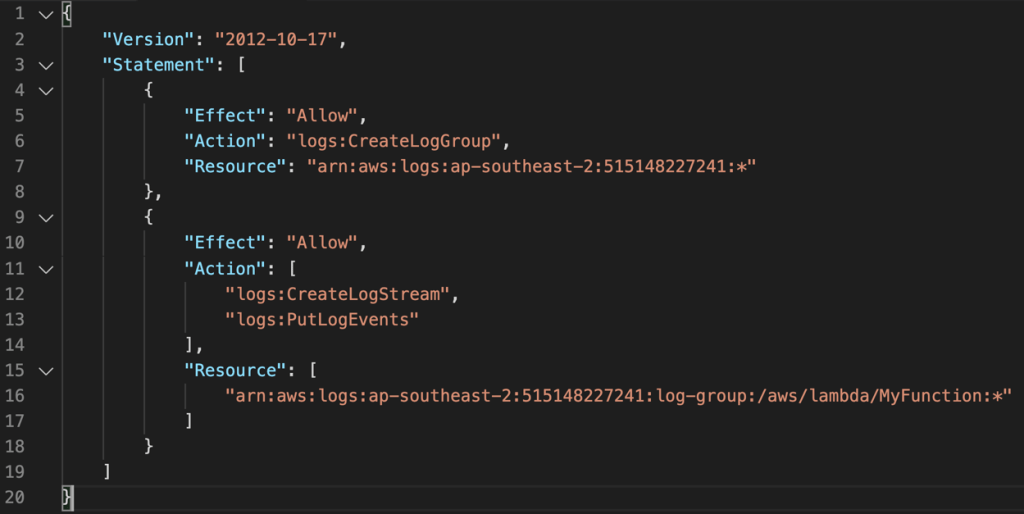
- Must ensure a Lambda function execution role has permissions (IAM) that allows writes to CloudWatch Logs
AWS Lambda – Tracing with X-Ray
- The AWS X-Ray Daemon is a software application that gathers raw segment data and relays it to the AWS X-Ray service.
- Must have permissions to write to X-Ray in the execution role.
AWS Lambda – Deploy Lambda through AWS CloudFormation
- The function code zip file must be stored in Amazon S3
- The S3 bucket must be in the same region where you’re running CloudFormation
AWS Lambda in a Virtual Private Cloud (VPC)
- You can configure a function to connect to private subnets in a virtual private cloud.
- To enable this, you need to allow the function to connect to the private subnet
- Lambda needs the following VPC configuration information so that it can connect to the VPC:
- Private subnet ID
- Security Group ID (with required access).
- Lambda uses this information to setup an Elastic Network Interface (ENI) using an available IP address from your private subnet
- Lambda uses your function’s permissions to create and manage network interfaces. To connect to a VPC, your function’s execution role must have the following permissions:
- ec2:CreateNetworkInterface
- c2:DescribeNetworkInterfaces
- ec2:DeleteNetworkInterfac
- These permissions are included in the AWSLambdaVPCAccessExecutionRole managed policy.
AWS Lambda – Functions as Targets for Application Load Balancers (ALB)
- Application Load Balancers (ALBs) support AWS Lambda functions as targets
- You can register your Lambda functions as targets and configure a listener rule to forward requests to the target group for your Lambda function (CLI, API or Management Console).
- When the load balancer forwards the request to a target group with a Lambda function as a target, it invokes your Lambda function and passes the content of the request to the Lambda function, in JSON format.
- Limits:
- The Lambda function and target group must be in the same account and in the same Region.
- The maximum size of the request body that you can send to a Lambda function is 1 MB
- The maximum size of the response JSON that the Lambda function can send is 1 MB
- WebSockets are not supported. Upgrade requests are rejected with an HTTP 400 code
AWS Lambda – Limits
- Memory allocation 128MB – 3008MB in 64MB increments
- Maximum execution time is 15 minutes (900 seconds
- Size of environment variables maximum 4KB
- Disk capacity in the “function container” (/tmp) is 512 MB
- Concurrency limits: 1000 concurrent executions
- Function burst concurrency 500 -3000 (region dependent).
- Invocation payload
- Synchronous 6 MB.
- Asynchronous 256 KB
- Lambda function deployment size is 50 MB (zipped), 250 MB unzipped
AWS Lambda – Layers
- You can configure your Lambda function to pull in additional code and content in the form of layers.
- A layer is a ZIP archive that contains libraries, a custom runtime, or other dependencies.
- With layers, you can use libraries in your function without needing to include them in your deployment package
- A function can use up to 5 layers at a time
- Layers are extracted to the /opt directory in the function execution environment.
- Each runtime looks for libraries in a different location under /opt, depending on the language.
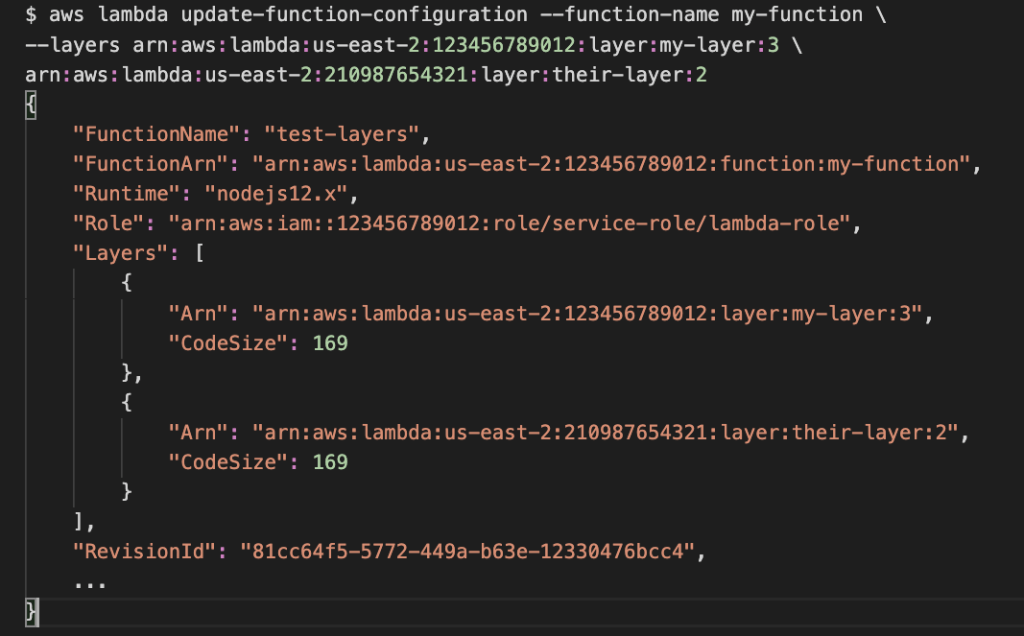
- To add layers to your function, use the update-function-configuration command.
- The following example adds two layers: one from the same account as the function, and one from a different account

 Techglot